Do you want to delete Instagram followers ? Go to your profile, open your subscriber list, click on the account in question, then click the three dots, and select Remove the subscriber.
The person does not receive no notification. You can also take it a step further by blocking a subscriber to block their access to your content.
Why would you unfollow people on Instagram?
Sort through your subscriber list helps improve your commitment rate. An account with 500 active subscribers generates more interactions than an account with 5,000 subscribers ghosts. It's a matter of quality, not quantity.
Here are the profiles to delete first:
- The fake Instagram accounts and bots.
- The inactive accounts who don't like or comment on anything.
- The non-target individuals who have no interest in your content.
- Accounts that have made a unfollow and no longer follow you.
Removing these subscribers also improves the the quality of your community and gives you a truly reliable number of followers.
How do I delete Instagram followers, step by step?
Delete a subscriber It takes just a few seconds to do this from your profile without blocking them. Here are the steps to follow.
1. Delete a subscriber
- Go to your Instagram profile.

- Press Subscribers, at the top of the page, next to "Followed.".
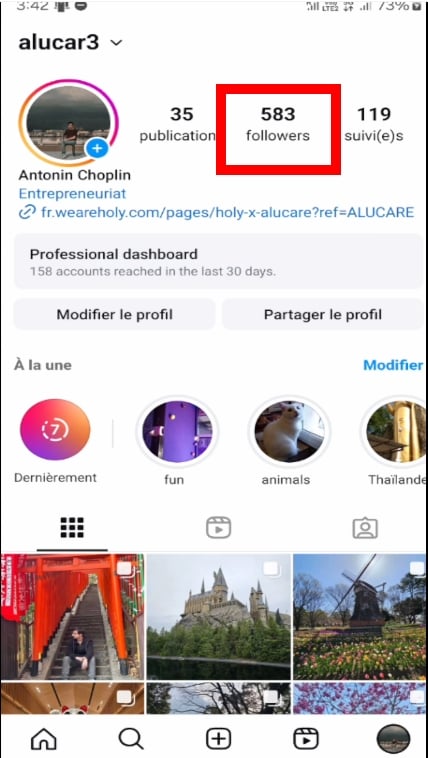
- Search for the person to delete by name or by profile photo, then tap on their account.

- Click on the three small dots in the upper right corner, then select Remove follower.
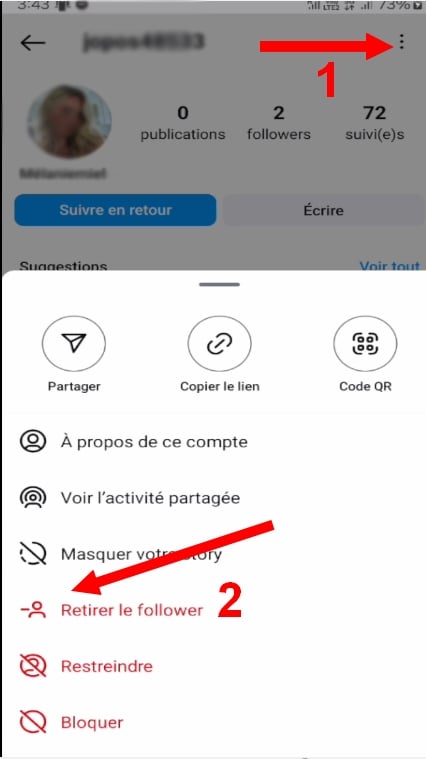
- Confirm Delete by pressing To delete.

The deleted person does not receive no alerts. She'll only realize this if she checks your profile and notices that she's no longer one of your followers.
2. Block a subscriber
If you want completely cut off access If someone is blocking your content, blocking them back is the most drastic solution. Once blocked on Instagram, that person will no longer be able to find your profile or see your publications or your stories.
Open the’Instagram application, then follow these steps:
- Go to your Instagram profile.
- Press Subscribers.
- Find the person you want to delete.
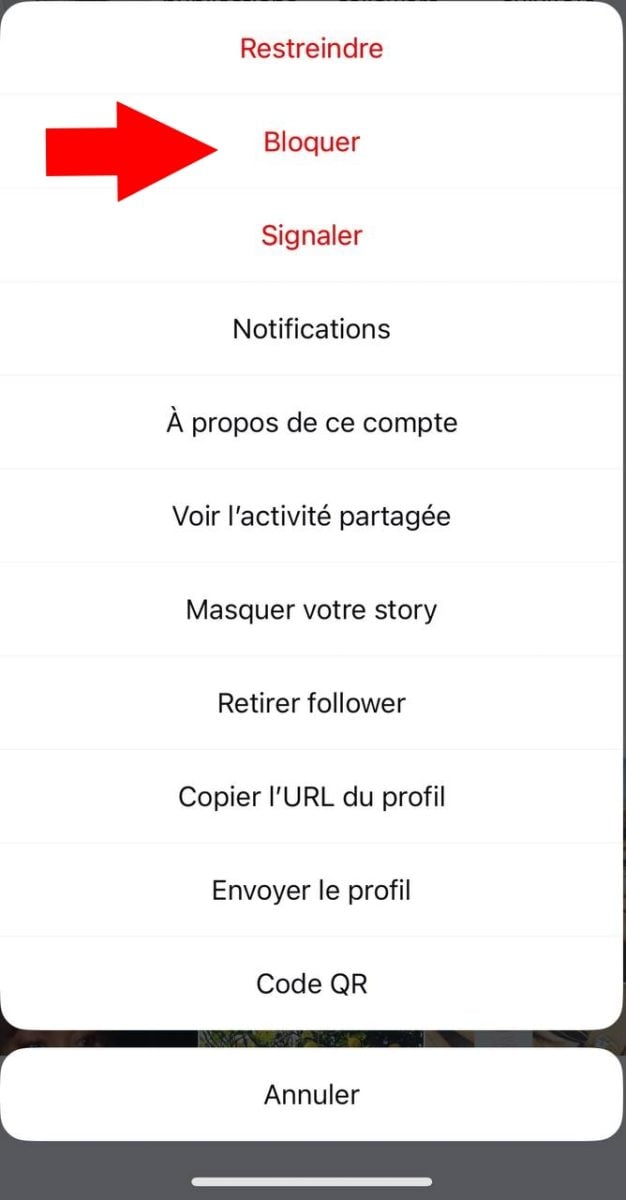
- From their profile, tap the three small points at top right.
- Select the option To block.
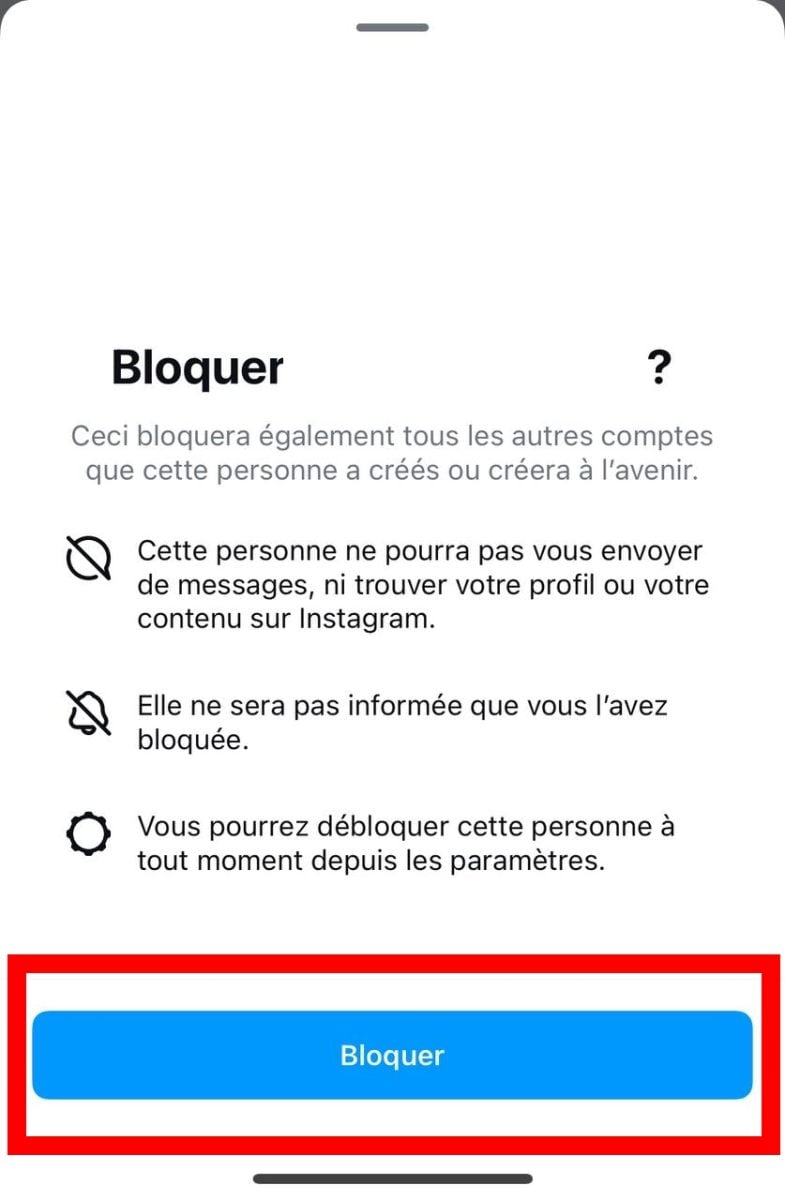
- To confirm the action by pressing To block.
If the account isn't part of your subscriber list, you can still block him. Search for him in the search bar, go to his profile, and then click on the three points in the upper right corner and select To block.
How do I unfollow a large number of people on Instagram?
instagram allows you to withdraw up to 200 accounts per hour. If you exceed this limit, your instagram account may be suspended. It's best to take it step by step if you have a lot of people to sort through.
To delete Instagram followers If you're doing this in bulk, you have two options:
- Use a third-party app which automates the deletion.
- Remove subscribers one by one, by hand.
The apps third parties such as Cleaner for IG Where Followers & Unfollowers seem practical. They display your list of followers and let you select multiple people to delete at once. But they pose a real problem: most violate the terms of use ofinstagram and can lead to the ban from your account.
To Delete Followers on Instagram risk-free, the best solution All that's left is to remove them one by one. It's slower, but you retain complete control over your number of subscribers and you avoid accidentally removing the right people. Incorrect filtering can also hurt your commitment and limit your future interactions.
What is the daily limit on the number of posts you can delete on Instagram?
instagram sets a limit of 200 cuts per hour. Over the course of a day, it is recommended not to exceed 500 subscribers removed to prevent the algorithm from flagging your account as suspicious. If you want to do a major cleanup, spread it out over several days.
Frequently Asked Questions About Deleting Instagram Followers
Does the person who was removed receive a notification?
No. When you delete a subscriber on instagram, the person does not receive no email or any notification. She'll only find out by checking your profile and seeing that she's no longer one of your followers.
Can she come back to you?
Yes. Unlike blocking, unfollowing doesn't prevent the person from following you again at any time. If you no longer want them to see your content, blocking is the only permanent solution.
What's the difference between deleting a subscriber and blocking them?
- Delete a subscriber : The person is no longer following you, but they can still view your profile and posts and follow you again.
- Block a subscriber : That person can no longer find your profile or view your content. They can no longer send you messages. It's a complete break.
Can you delete subscribers from a PC?
Yes. The procedure is similar. You access your subscriber list since the browser version of’instagram, click the three dots to the right of the person's name, and select Remove. This feature helps you manage your subscribers quickly from a computer.
Does removing subscribers improve engagement?
Yes. the commitment rate is calculated by dividing the number of interactions by your number of subscribers. The fewer you have accounts inactive users or bots, the more your actual engagement rate improves. This is one of the main benefits of regularly cleaning up your community.
To learn more about managing your profile, check out our Article on How to Analyze and Track an Instagram Account.








 English