Do you want to know the number of app downloads ? On android, the number appears directly on the record Google Play Store, but rounded (for example 10 M+). On iOS, l'App Store does not display any public counters, so you'll need to use a third-party tool.
If you are developer, you can access the exact figures from your dedicated console.
Check the number of downloads for your own app

As a developer, you have access to the exact figures from your app, not a rounded estimate. On Google Play as shown in the’App Store from Apple, each platform provides you with a dedicated console.
There you'll find the downloads, uninstalls, average rating, and trends since launch from the app. These key metrics let you see if your distribution strategy is working, and adjust your marketing Consequently.
The number of downloads of an Android app
Side android, everything goes through the Google Play Console, the official area where developers can monitor the performance of their applications.
Here's how to view the number of installations correct:
- Log in to the Google Play Console using your developer account.
- Select the relevant app from the list.
- Open the section «Acquire users» then «Acquisition Reports».
- Select the desired time period (by day, by month, or «For life») to view download details.
You can then export this data to analyze the growth your app in greater detail. The user reviews and ratings are listed in a separate tab on the same page.
If you'd like to share these results with your team or a partner, you can export them in CSV format directly from the interface.
The number of downloads of an iOS app (iPhone and iPad)
On iPhone and iPad, Apple consolidates all the data in App Store Connect, using the tool App Analytics. Here is the procedure:
- Log in to App Store Connect and open App Analytics.
- On the «Overview» page, select your app.
- Check out the map «Total Downloads» to see the number of downloads for the current month.
App Analytics distinguishes between the first downloads, re-downloads, and the total. This is useful for understanding whether new users are joining every day, or whether existing users are reinstalling the app.
You can also filter by country, which is invaluable for focusing your SEO and optimization efforts on each market.
Regular app users: How to see the number of downloads
You didn't create the app, but you still want to gauge its popularity? The number of downloads is a good indicator for understanding an app's audience, such as the number of followers on a social media platform like Facebook. The method depends on your platform.
Android applications
On android, you can see the approximate number of installations in just a few seconds directly from the Google Play Store :
- Open the app Google Play on your device.
- Search for the name of the app you want, then click its icon to open its details page.
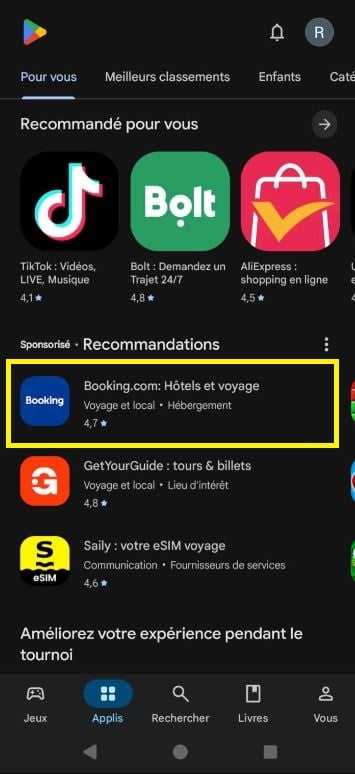
- Right below the name, you'll see the number of downloads displayed as a rounded figure, for example 10 M+ Where 500 k+.
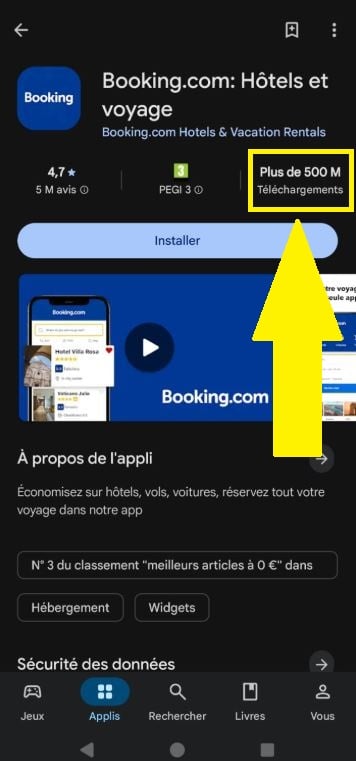
Google displays only one estimation by categories, never the exact number. This is a deliberate choice to protect the developer's business data. When comparing two apps, this order of magnitude is more than sufficient.
iOS Apps (iPhone and iPad)
On iPhone and iPad, the conclusion is clear: the’App Store from Apple does not display No download counter on the public listing. You can only see the rating and user reviews.
To get an estimate, you'll need to use third-party tools such as Sensor Tower, Mobile Action Where App Radar. These platforms offer estimated figures (an order of magnitude, not an exact value), calculated using their own statistical models. It is a useful marketing tool for assessing the popularity of a competing app.
Please note: Their free access options are very limited and often require registration. Key data requires a paid subscription. Sensor Tower remains the best-known and most reliable option for a first try:
- Create an account on the Sensor Tower.
- Access their search interface.
- Type the name of the app and view its estimated number of installations.
Speaking of apps, here are a few that might interest you:







 English