You can upload a video to Vimeo in three ways:
- Via the native download button on the page,
- Since your self-pay If you're a homeowner,
- With a third-party tool as 9xbuddy when no button appears.
The right approach depends on your situation and the rights granted by the creator. We'll tell you everything!

Introduction to Downloading Videos from Vimeo
On Vimeo, l'download option is entirely up to the creator. Each owner chooses whether to allow or block the downloading of their videos Vimeo.
Result: Some show a download icon, while others do not.
The rules also vary depending on your subscription:
- With a subscription Starter or higher, you can enable downloads of your own videos and allow your visitors to download them.
- With the version free of charge, this option is not available: neither you nor your visitors can download the video from the platform.
- Only the connected users can start a download, but only if the owner has given permission.
Please note: the bulk download It is not possible to select multiple files from your library. To check the terms and conditions for your account, the official help center of Vimeo remains the most reliable source.
Prerequisites and Requirements for Uploading to Vimeo
Before downloading a video from Vimeo, check one simple thing: the’download icon appears only if the creator has enabled it.
Without this option, direct downloading from the video page remains stuck.
On the technical side, the player's Vimeo runs on Windows, Mac and most mobile devices. Keep your system up to date to avoid playback or security issues.
Understanding Vimeo's Copyright and Terms of Use
Download for personal use is generally permitted. However, redistributing or using the content for purposes commercial is prohibited without the author's consent.
A video posted on Vimeo remains protected by the copyright, all rights reserved by the creator. Please comply with these terms before sharing or redistributing the file.
If you have any questions, feel free to check out Vimeo's official Help Center.
Check permissions to download a video
If you own a video, you can allow your users to download it from its page on vimeo.com. Please note: No one can download it from the built-in player on another website, but only from the original page.
To enable or disable this option on your own video:
- Log in to your Vimeo account.
- Open your library, then click on the video you want to edit.
- Go to the tab Privacy.
- Enables (or disables) the button Allow downloads.
- The settings are saved immediately, without requiring additional confirmation.
Step-by-Step Guide: Uploading a Video Directly to Vimeo
Here's what to do when the download option is available on the video page.
Download via vimeo.com
The quickest way is to click on the’download icon located below the player. This button opens a menu that lists the various available versions, each with its own quality and file size. Depending on your browser, the video may open in a new tab instead of downloading directly.
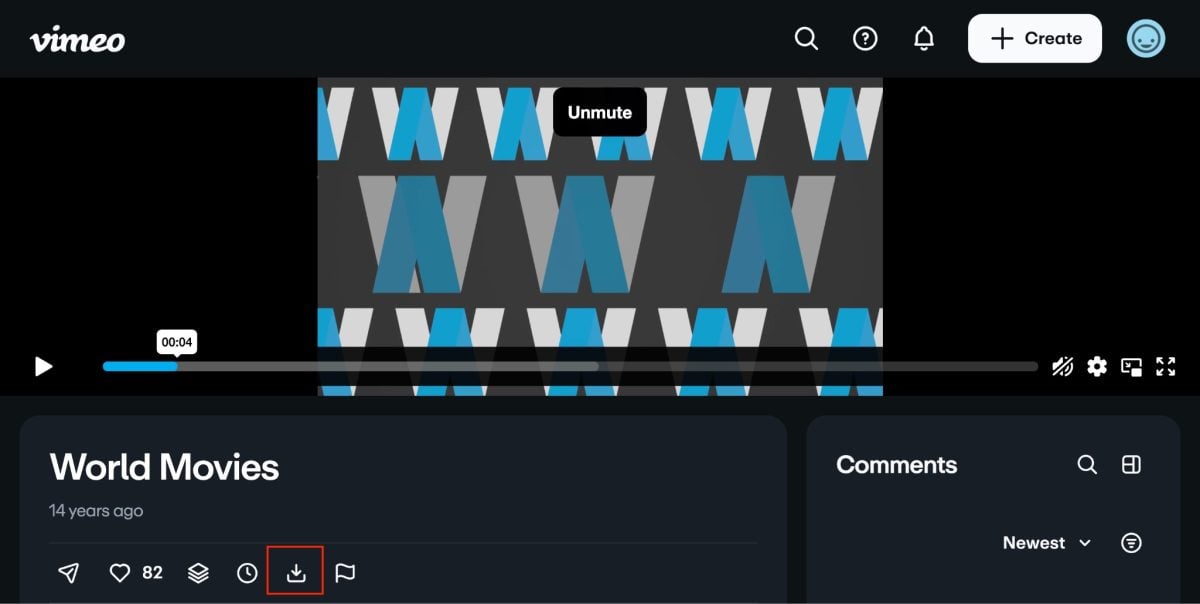
In that case, you can still save the video to your device:
- Under Windows : Right-click the link, then select Save the link as or "Save Target As.".
- On Mac : Hold down the key Control Hold down the key and click the link, then select Download the linked file.
For owners of a video on a paid account
If you are the owner of the video or a member of a team on a self-pay, you can always retrieve your own files from the settings:
- Go to your library.
- Select the video you want to download.
- Click on the options menu in the upper-right corner of the settings page.
- Select Download, then choose the version you want to keep.
A paid subscription gives you more control over the quality and format of the recovered file.
Use third-party tools to download Vimeo videos
If no download icon appears below the video, it means the creator hasn't enabled that option. You can still save the video using a third-party tool, provided that the Vimeo video is public. Here are two reliable solutions.
9xbuddy.com
- Go to 9xbuddy.com from your browser.
- Paste the link to the video Vimeo and valid.
- Select the desired format and version, then download the file.
This tool supports multiple platforms and often offers several file sizes. It's handy when you want to choose between quality and file size. It works just as well for Download videos from Instagram.
yt-dlp (for advanced users)
yt-dlp is a command-line tool that supports Vimeo among thousands of websites. It runs on Windows, Mac and Linux.
- yt-dlp [video link] for a direct download.
- Add the option –video-password if the video is password-protected and you know the password.
It's the most powerful solution for downloading videos Vimeo, with the best Quality and Format Control. However, it does require a basic familiarity with the device.
Regarding rights: Downloading a video for personal use (to watch it offline or share it privately with your family) is generally tolerated. The redistribute or using it for commercial purposes without the author's consent is prohibited and may result in serious legal problems.
Quality, Formats, and Mobile Downloads
Here are a few practical tips to help you avoid any unpleasant surprises before you start your download.
Side quality, the native button lets you select which version to download from among the Available resolutions. Choose the highest version for the best results, but keep in mind that the file sizes rise quickly.
A tool like yt-dlp allows you to choose the quality and format before saving the video Vimeo on your device.
On a mobile device, if you want to download a video from Vimeo directly to your gallery, an online service such as 9xbuddy It's easier to do from a phone.
If you also use other streaming platforms, you can also find out how to download movies and series on Netflix. If you have any questions about the rights associated with your account, the help center of Vimeo It remains the benchmark.
Have you ever used Vimeo How do you download a video? Share your method and any issues you've encountered in the comments!









 English