On Spotify, the music downloads is for subscribers only Spotify Premium.
It is not possible to download a single track; you have to go through a playlist or one album entire. Once downloaded, the audio files are available in offline listening, without internet connexionon computer just like on a mobile device.
Requirements for downloading music from Spotify
Before you begin, make sure you meet these conditions :
- Have a subscription Spotify Premium asset (the account The free version does not allow download).
- Be connected to the Internet at least once every 30 days so that the files remain accessible.
- Use the official app Spotify on computer, android Where iOS.
If you want to reduce the cost of your subscription, check out our guide to pay less Spotify Premium.
How to download music to Spotify on a computer?
The process necessarily involves a playlist. You can't Download A single track: First, add it to a playlist, then download there playlist in its entirety. Here are the steps more ..:
- Find the music at Download and click on the little (+) to add it to a playlist.

Button to add music to a playlist. ©Antonin for Alucare.fr - Press that same button again button, then Select the playlist destination in the list.

Select the playlist to which you want to add the music you're downloading from Spotify. ©Antonin for Alucare.fr - Access your library and open the playlist that contains the song.

Playlist containing music to download on Spotify. ©Antonin for Alucare.fr - Click on the download button at the top of the playlist. The audio files download directly to your computer.
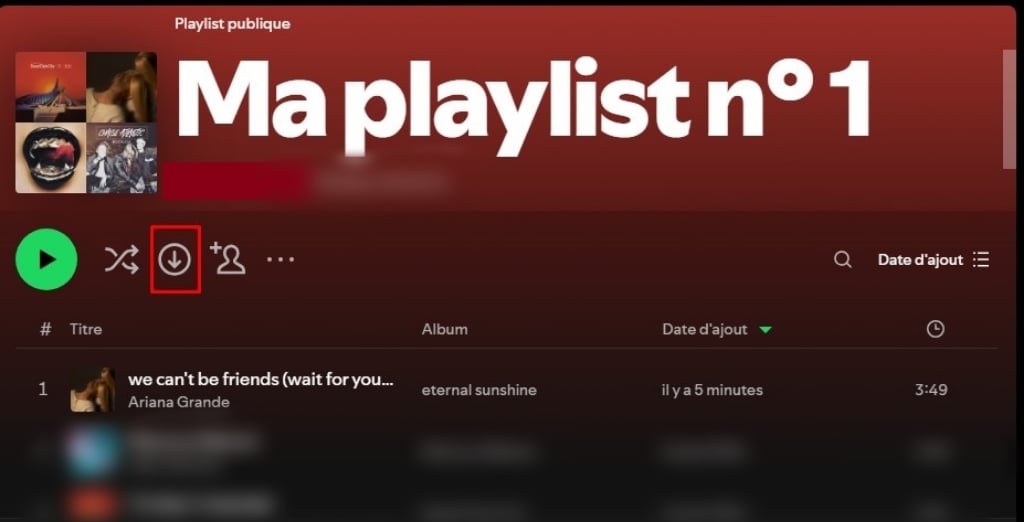
Button that lets you download a playlist on Spotify. ©Antonin for Alucare.fr
This option also works for the podcasts and the albums.
How to Download Music Spotify on a phone?
Explanatory video in French by Alucare, ideal complement to the page. View video (you can use YouTube's automatic translation)

The logic is the same as on computer. The tutorial works on the Android and iOS devices, with a subscription Spotify Premium asset. Here are the steps :
- Open the app Spotify, then add the music at Download in a playlist.

Button for adding a song to a playlist on the Spotify mobile app. ©Antonin for Alucare.fr - Press this again button, then Choose a playlist in the list.
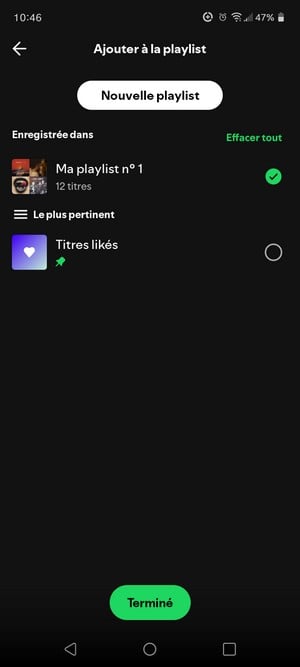
Add a song to a playlist on Spotify. ©Antonin for Alucare.fr - Access your library and open the playlist that contains the song.
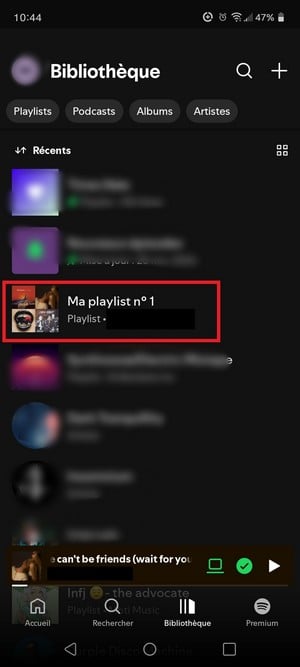
Playlist available for download in the library on the Spotify mobile app. ©Antonin for Alucare.fr - Enter the playlist, then press the download button. The audio files will then download to your phone.

Button to download a playlist on the Spotify mobile app. ©Antonin for Alucare.fr
You can also Download an entire album or some podcasts in the same way: the download button appears directly on their page.
How can I listen to my music offline after downloading it?
Once the download All done—you can listen to your music without internet connexion. To switch to off mode line, open the settings of Spotify and activates the’option corresponding.
The songs that haven't been downloaded will then appear intoxicated and can no longer be read. This is useful for saving your data mobile devices on the go.
Reminder: You must connect the application connects to the Internet at least once every 30 days to preserve the’access to files downloaded.
How to add local music files to Spotify ?
Spotify also allows you to’to add your own files sound premises (in the format MP3, MP4, FLAC Where OGG) to your library. Here are the steps on computer :
- Open Spotify on your computer.
- Access the settings via the profile icon in the upper-right corner.
- Go to the section Local Files and activates the’option.
- Select the folder containing your files sound premises.
- Your files will then appear in your library Spotify and you can to add to one playlist.
On Android devices, this feature is not available. On iOS, it was removed from the versions recent updates to the app.
Can you transfer your music? Spotify to another streaming service?
The audio files downloaded from Spotify cannot be exported or transferred to another service. They are encrypted and can only be read within the app. However, you can transfer your playlists from one department to another using dedicated tools such as Soundiiz.
This type of tool copies your song list to another one music sound platform (Deezer, Apple Music, YouTube Music…) without export them files themselves.
FAQs
Where do the songs downloaded from Spotify ?
The audio files Downloaded files remain within the app. They cannot be exported as files classics: Spotify stores them in a folder specific to each device.
To find this location:
- On computer, open your profile Spotify.
- On Mac, go through the app's menu.
- On android, go to the settings from the app.
- In any case, look for the line listed under the’option Offline storage location.
These files can only be read in the app Spotify. They cannot be opened with another reader sound.
Can you download music without a Premium subscription?
No. the download excluding line is for subscribers only Spotify Premium. There is no official method with a account free.
If you want download music On other platforms, check out our guides for Deezer and YouTube.
Is it legal to download music from Spotify ?
the download excluding line submitted by Spotify is totally legal. It is one of the benefits of the’subscription Premium and complies with the conditions ofuse of the platform.
However, third-party tools allow you to’register the stream sound while reading to get files exportable. This practice violates the conditions ofuse of Spotify and may, depending on the country, violate the Politics copyright. Some accounts have already been blocked for this type of’use : It's best to avoid it.
What should I do if the download doesn't work?
If the download of music fails at Spotify, here are the steps To be verified:
- Make sure your subscription Spotify Premium has been very active since your account.
- Check your connection Internet: the download requires a line active.
- Check the available storage space on your device : THE audio files can take up space.
- Close and restart the app Spotify.
- If the problems If the problem persists, uninstall and then reinstall the app. Your data of account will not be lost.
How many tracks can you download from Spotify ?
Spotify Premium allows Download to 10,000 titles by device, up to a maximum of 5 devices. Beyond this limit, you must remove files existing ones to Download new ones.
Other articles on Spotify are available on the website.








 English
Hejsa jeg er komet til air ændre min offline lagerplads til at være mit skrivebord, og vil gerne have tilbage til det den var på før, men jeg er ikke sikker på hvor det var placeret. Så vil høre om du ved hvor offline normalt som standard ligger på en Mac
Hola,
En un Mac, el almacenamiento sin conexión por defecto de Spotify suele estar en la siguiente carpeta:
~/Library/Application Support/Spotify/PersistentCache/Storage/
Si has movido esta carpeta y quieres devolverla a su ubicación original, puedes :
Cerrar Spotify antes de hacer ningún cambio.
Mueve la carpeta que has cambiado a la ruta anterior.
Reinicia Spotify para ver si todo funciona correctamente.
Si no encuentras la carpeta, puedes probar a mostrar los archivos ocultos abriendo el Finder y pulsando Cmd + Mayús + . (punto).
Espero que te sirva de ayuda.