mSpy is a mobile monitoring software that can be installed on a phone Android Where iPhone to follow their activities remotely. You can then access the SMS, calls, social media, and location GPS from an online dashboard. It is primarily used as software for parental control, to ensure the security of a minor online. Here's how it works and step-by-step instructions for installing it.
Important : set up mSpy on someone's phone without their consent is illegal in most countries, including France. The most common legal use remains the parental control of a minor whose device you own.
Discover mSpy :
Mspy: How does it work exactly?
mSpy is installed directly on the phone being monitored. Once installed, the app collects data from the device and sends it to a online control panel to which only you have access. Monitoring is therefore done entirely remotely, without needing to call us again after installation.
This is what mSpy allows you to actually:
- Access to messages on the social networks : WhatsApp, Skype, Facebook Messenger, Instagram, TikTok, Viber, Telegram, Tinder, Snapchat, Kik and Line ;
- Tracking online activities, including web browsing and thehistory navigation ;
- Monitoring calls and calendar events; ;
- Consultation of SMS, emails, contacts and discussions Google ;
- Access to Pictures and videos stored on the device; ;
- Follow-up GPS location real-time and zone alerts (geofencing) ;
- A keylogger which records every keystroke entered on the keyboard.
To quickly understand what mSpy what it does and what it doesn't do:
| What mSpy do | What mSpy doesn't do |
|---|---|
| Read more SMS and the messages from the social networks | Getting Started on Android without physical access to the phone (5–10 min) |
| Follow the GPS localization in real time | To be established legally on an adult's device without their consent |
| To consult Pictures, videos and browsing history | Monitor Web sites viewed without prior installation |
| Record keystrokes with the keylogger | Ensure the privacy if the device changes hands |
Here's a quick demonstration to verify your discount when you sign up for your subscription mSpy :
Explanatory video in French by Alucare, ideal complement to the page. View video (you can use YouTube's automatic translation)

mSpy installation: How to install mSpy step by step on Android?
The installation of mSpy on a device Android takes place in 3 steps. You need an account, a physical access to the target phone and a stable internet connection.
Step 1: Create an account and choose a subscription
- Start by creating your mSpy account. From this control panel, you'll then be able to find all the information about the activities on the monitored phone.
To create a free mSpy account :
- Fill in your e-mail address on the website; ;

- Choose the device type to watch (Android Where iOS), or decide later; ;

- Select one of the Different mSpy Subscription Plans, then click on "BUY NOW ;
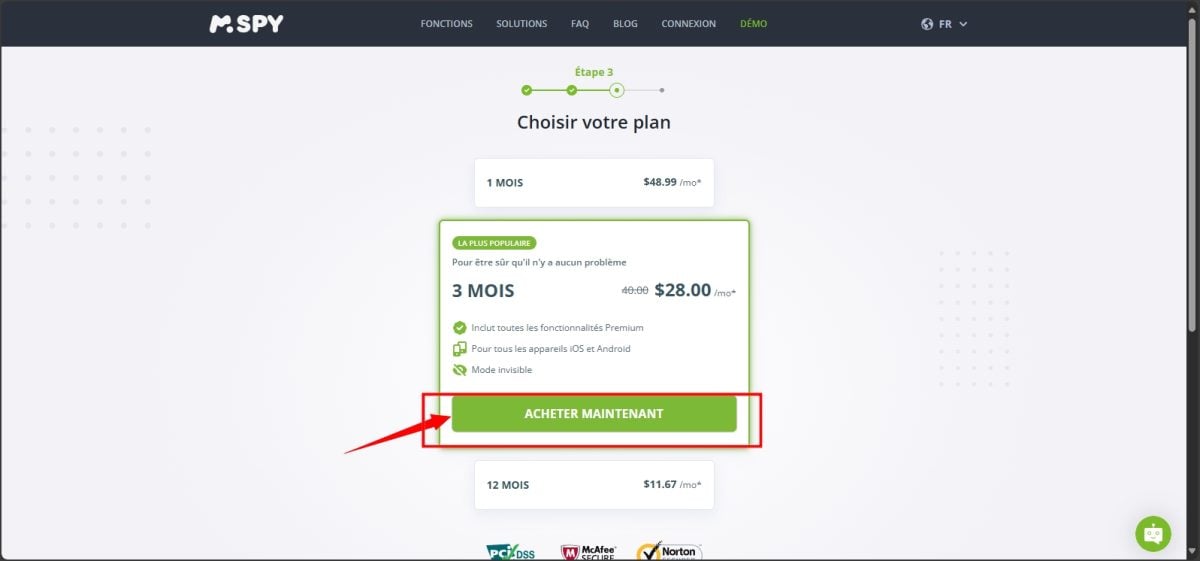
- Fill in the details for the payment and click on VALIDATE MY ORDER.

Once the purchase is complete, you'll receive an email configuration link, your username and your password. Be sure to keep this information safe: it gives you access to your control panel.
Step 2: Install mSpy on the target phone
For this step, you need to have a physical access by phone Android target.
1) Disable the Play Protect function
Before installation, disable Play Protect on the device you want to monitor. Make sure the phone is unlocked, connected to the internet, and has enough battery life.
- Open the Play Store and tap your profile picture in the upper-left corner; ;

- Go to Settings and turns off «Improving the Detection of Dangerous Applications» ;
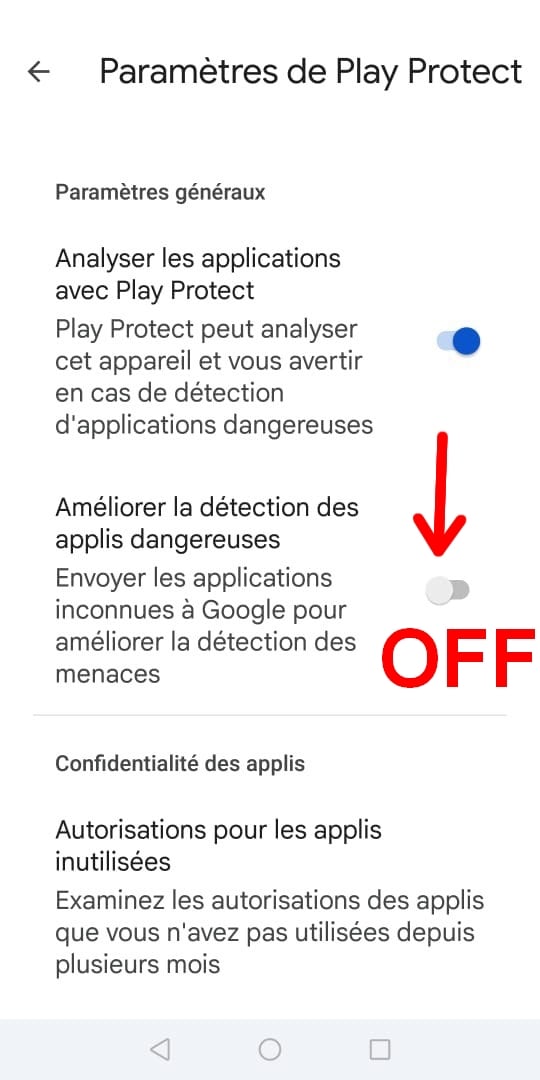
- Similarly, disable the analysis scans of Play Protect via the "Disable" tab.

2) Download mSpy on the target phone
- Open Chrome on the target phone; ;
- Paste the configuration link provided by mSpy in the address bar;
- Press «Enter» ;
- Complete the captcha, then click on "Download " ;
- If a box appears at the bottom of the screen, select Open, then Settings and Accept ;
- Click on Next ;
- Once the download is complete, open the’application mSpy.
3) Install mSpy
- Select «Authorize» in all the windows that appear, to give mSpy access to information on the phone; ;
- Confirm all authorizations required requested by the assistant; ;
- Click on Finish to complete the installation.
Step 3: Start monitoring
Log in to your account mSpy to track the target phone remotely from your dashboard. The software runs quietly in the background, without alerting the user.
To learn more, find out if mSpy can be detected on Android and iPhone.
mSpy installation : How to install mSpy step by step on iPhone?
On a iPhone, the installation of mSpy goes through two methods distinct: synchronization via iCloud or via Wi-Fi. In both cases, you start with the same first step.
Step 1: Create an mSpy account and sign up for a subscription
Visit the website mSpy To create your account:
- Create an account and select a subscription. To get a discount of -40%, remember to use promo code mSpy ;
- Once you've purchased your subscription, choose iOS as the target device.
Step 2: Choose Your Installation Method
Via Wi-Fi synchronization
Prerequisites : l'iPhone The target device and your computer (PC or Mac) must be on the same local Wi-Fi network. This method requires an initial connection to the’iPhone to a computer (USB cable) for setup. Synchronization then takes place via Wi-Fi.
- Install the’Wi-Fi synchronization application (included with your subscription) on your PC or Mac ;
- Connect the’iPhone on your computer using a USB cable; ;
- The software backs up all the data from the target phone and sends them to your account; ;
- Unplug the’iPhone and you're done.
Through iCloud sync
Prerequisites : The iCloud Backup must be turned on on the target iPhone (Settings > Apple ID > iCloud > iCloud Backup), and you need to have your iCloud login credentials. Without an active backup, no data is uploaded.
- Select the method iCloud Sync and follow the instructions; ;
- Log in to mSpy using your own login credentials; ;
- Fills in the identifiers iCloud from your loved one's device; ;
- Of them notifications are sent: one via email iCloud, and another on the phone in question; ;
- Enter the 6-digit code received to complete the pairing; ;
- Patient 10 to 20 minutes, while the tool collects the data; ;
- Once the collection is complete, you can view data of the target phone.
Step 3: Monitor activities from your dashboard
Once you've completed these steps, you can start the remote monitoring from your online control panel. You can then:
- Geolocate the device using the GPS and access media (Pictures, videos) stored on the phone; ;
- Receive a copy of the text messages and social media directly on your computer, whether from WhatsApp, Messenger, Snapchat Where Instagram ;
- View details of the calls : who, when, and for how long; ;
- Go to the’browsing history and to Web sites viewed on a phone.
the keylogger The built-in feature also records everything typed on the keyboard, and the geofencing alerts you as soon as the device leaves a defined area.
To note : When using the iCloud method, the data comes from backups (updated approximately every 24 hours). Real-time GPS tracking and the keylogger are available only with a full installation (Android or iPhone via Wi-Fi).
The requirements depend on the device:
- On android, a one-time physical access (5 to 10 minutes) is required to install the application.
- On iPhone via iCloud, only the target's iCloud credentials are required. And, if two-factor authentication is enabled, a one-time verification code that must be retrieved once.
In the as part of parental supervision On your minor child’s phone—which you own—these requirements are not an issue. However, the CNIL recommends that you inform the child that this monitoring is taking place.
Legal Notice: in France and in the European Union, It is prohibited to monitor an employee without their knowledge. Monitoring on a work device is only permitted if the employee is informed, a policy is signed, and the measure remains proportionate (GDPR). Be sure to comply with the privacy personal data and the applicable legal framework.
Other features of mSpy Check out:
Discover all the features of Mspy
How mSpy Works: Review
Users appreciate it mSpy for its simplicity and its efficiency. Here are the most common points mentioned in the feedback:
- L'quick installation : You download the app, install it on the target device, and you're all set; ;
- L'user-friendly interface and the online dashboard makes it easy to access data, even if you're not tech-savvy; ;
- Monitoring the web browsing and contacts works reliably once it is in place.
On the downside, some users find it inconvenient that physical access to the phone is required for the initial setup. Others report occasional compatibility issues depending on the device or system version. It's not a deal-breaker in practice, but it's good to know before you get started.
To Read the full review on mSpy, click here.
Other articles on mSpy See:








 FR
FR  RU
RU  EN
EN  ES
ES  IT
IT  DE
DE  ZH
ZH  PT
PT  ID
ID  JA
JA  DA
DA
i got it work same like xNspy
Ronald, I totally agree with you, but have you tried XnSpy's keylogger feature? Dude, it's off the charts! 🔥
Dear Alucare
Mohon infonya. Apa solusinya jika tidak bisa mengakses telepon target? Apakah bisa melacak 3 target kalau hanya satu akun?
Tks.
You need access to the telephone + yes you can
Good morning.
What to do when you don't have access to the target phone?
Please reply.
Hello, I work for Alucare, if you have a question don't hesitate to ask it on the Alucare discord: (link at the bottom of the site)
Buongiorno posso ascoltare le chiamate di mio fi?glio con i suoi amici
Hello
Could I install mspy on the REDMI A1?
Hello, I work for Alucare, if you have a question don't hesitate to ask it on the Alucare discord: (link at the bottom of the site)
Hi friends how are you