To claim your drops and your Twitch Chain Points without having to stare at your screen all the time, an extension like Automatic Twitch: Drops, Moments and Points Automates everything right from your browser.
She collects the rewards for you while the stream runs in the background.
What are Twitch Chain Points?

The chain stitches are a rewards system built into each channel Twitch. Contrary to popular belief, they are not not reserved for subscribers : Any viewer can earn them simply by watching a stream.
Viewers earn points based on their viewing time, calculated based on the number of minutes and hours spent watching a stream. You can also earn points by following the channel, participating in the chat, or joining a raid.
The subscribers also benefit from a multiplier (often doubled) on their winnings, which quickly increases the number of points they've earned.
Each partner or affiliate streamer can create personalized rewards for your community and customize them to your preferences. Once you've earned points, you can use Chain Points to:
- Highlight a message in the chat by highlighting it.
- Send a sound or content specified by the streamer.
- Exchange for personalized rewards specific to the chain.
This system is primarily designed to reward the most loyal viewers and to strengthen ties with the community.
What are the features of Auto Twitch?
The expansion Automatic Twitch: Drops, Moments and Points takes care of repetitive tasks for you.
It automatically requests your Drops, your Moments and your chain stitches while you're watching a stream, without having to click on the dot icons that appear in the chat.
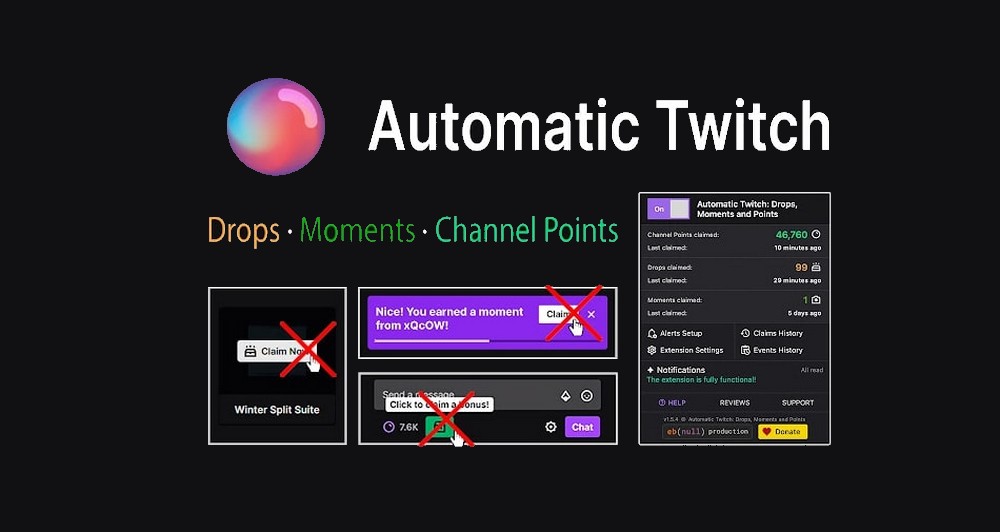
Here are the main features of this extension:
- She collects the Drops, them Moments and the chain points on each eligible chain.
- It stores the’history your requests as well as statistics on your communications.
- It keeps a list of your participation, for example, when you join a raid.
- It automatically cancels the switch to raid channels if you'd rather stay on your channel.
- She opens the menu Predictions in a pop-up window at the top of the video player.
- It displays a preview of the feed when channels appear in the sidebar.
- It can hide Twitch extensions for a cleaner look.
- She changes the’tab icon to see at a glance which stream is currently playing.
- If there is a reading error, it Restart the stream all by herself.
- It reopens hidden tabs and prevents inactive tabs from being closed by the browser.
What are the benefits of Auto Twitch?
The main benefit of Automatic Twitch: Drops, Moments and Points, ...is that it claims your rewards for you. You just let an eligible stream play while you watch, and the extension takes care of everything without any action on your part, including the point icons in the chat.
In practical terms, here’s what the tool offers you on a daily basis:
- No configuration For basic functions: Once installed, it runs on its own.
- Regarding the advanced features Enable this feature as needed for more demanding users.
- Compatible along with other Twitch extensions already installed in your browser.
- It goes through the Internal APIs from Twitch rather than through the interface, which makes it more stable.
- A system for’detailed alerts, a history of your earnings, and cross-browser synchronization.
There is still one important safety issue to consider. It concerns a third-party extension, which is not affiliated with Twitch, and some versions have already been reported for opening unsolicited advertising pages.
Be sure to check the recent notifications and requested permissions before logging into your account.
To view the official description and the latest updates, check out the extension's page on the Chrome Web Store.








 English