Remove someone from your friends list on Facebook It happens to everyone, whether it's a malicious contact or an ex you want to cut ties with.
Here's exactly how to do it, and what happens next.

How do you remove a friend from your Facebook list?
The process is almost the same on mobile and on a computer. Here are the steps to follow to remove a friend on Facebook :
- Open the app Facebook or visit the site using your browser.
- Type your friend's name in the search bar at the top of the page.
- Go to their profile, then click on the "Friends" button.

- In the drop-down menu, click on Remove friends.
- Confirm by clicking on To confirm.
If you can't find the person's profile in the search bar, this is often a sign that his Facebook account is turned off. In that case, the friendship connection disappears on its own, and you don't need to do anything.
To take it a step further, you can also learn how to analyze a Facebook account to better understand how others see you.
How do I block a Facebook profile?
You can do more than just remove someone from your friends list on Facebook : You can just go ahead and to block. Once she's blocked, she can no longer view your profile, add you as a friend, send you a message, or see you in her news feed.
Here's how it works:
- Go to the profile of the person by name or by search bar Facebook.
- Click on the three points in the upper-right corner (next to "Publications" and "About" on a computer).

- In the menu that appears, click To block.
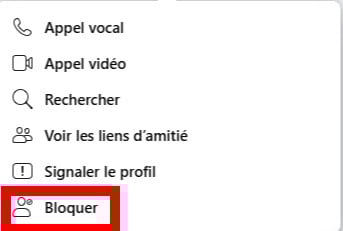
- Indicates the reason for blocking if Facebook It asks you to do this, then confirms by clicking the button.
If you want to know if someone has ever blocked on Facebook, there are also some unmistakable signs.
When you remove a friend on Facebook, does he or she see it?
Facebook doesn't send any notifications When you remove someone from your friends list, that person doesn't receive an email or a notification in their news feed.
She can still figure it out by visiting your profile. If the "Friends" button has disappeared and displays the following instead Add, she quickly realizes that she's been removed from your friends list Facebook.
Take some time to think before you act.
A study by the researcher Christopher Sibona (University of Colorado) reveals that 40 % people would avoid someone in real life who had deleted them from Facebook. Deleting something may seem like no big deal online, but it can leave traces far beyond the screen.
How do I recover a deleted friend on Facebook?
It all depends on what you did. If you just blocked If you want to, you can go back through your settings to Facebook account. Note: Once unlocked, the friendship is not not automatically restored.
If you've definitely deleted When a friend on your list is removed, the connection is lost on both sides, and it cannot be restored with a single click. You must send a new friend request. Here's how:
- Type your friend's name in the Facebook search bar.
- Click on their profile to open it.
- Press the button Ajouter.
The person receives your request and must accept it. Until they do, you are not friends again on Facebook.
What happens when I block someone on Facebook?
Impact on Posts and Photos
When you block someone on Facebook, you will no longer see their old comments, posts, photos, stories, or shared content.
The same is true in reverse: the person you've blocked can no longer view your profile either.
Everything she published disappears from your news feed. For other users, your respective posts will remain visible as before. If you're looking for it in the search bar, She no longer appears in the results.
Impact on Calls
Once blocked, the person can no longer call you via Facebook. The opposite is also true: you can't call him anymore either.
Messages on Messenger
Your past conversations on Messenger are not deleted: they remain visible, but you can no longer send yourself new messages.
Please note, "Blocking on Facebook" and "blocking on Messenger" are two separate actions. A classic deadlock on Facebook doesn't always block private messages in the app Messenger.
To completely block communication, you must also block the person directly in Messenger.
Shared group discussions remain accessible even after being blocked. If you join a group that the blocked person is part of, Facebook warns you before you log in in the conversation.
And what happens when I unblock the person on Facebook?
Unlocking removes all restrictions. You can once again view his new publications, his comments, and the tags associated with his profile on Facebook. Old content that was hidden is now accessible again.
The person is not added automatically to your friends list. If you want to be friends with her again, you'll need to send her another invitation from her profile.









 English