To make an anvil in Minecraft, you need to 3 iron blocks and 4 ingots iron items placed on the crafting table.
This tool then allows you to repair, rename and improve your weapons, tools and armor thanks to the enchantments.
Here's a step-by-step guide on how to make and use it.
Tuto Minecraft : What's an anvil for?

L'anvil is a block used to repair and rename items in Minecraft. She also blacksmith's shop for your gear, allowing you to apply specific enchantments to your tools and weapons.
Its main uses can be summarized in three points:
- You can repair a damaged tool or piece of armor.
- You can rename an object to which you can give the name of your choice.
- You can finally combine cast spells by placing an enchanted book on the item you want to upgrade.
For example, a nearly broken iron pickaxe regains its durability when you combine it with a second one or with iron ingots.
This is one of the main advantages of the anvil over a simple enchantment table : You choose exactly which enchantments to apply.
The anvil remains fragile at in practice. Every repair or enchantment has a chance of damaging it, and it eventually ends up being destroyed after several uses. You can mine it with any pickaxe: it has a durability of 1,200 and a hardness of 5.
How to make an anvil
To make an anvil in Minecraft, you'll need two ingredients:
- 3 iron blocks
- 4 iron ingots
Since one iron block requires 9 ingots, you'll need a total of 31 iron ingots for this recipe.

Next, place these ingredients in the 3×3 crafting grid on the crafting table, like this:
- The row of the high : an iron block in each of the three squares.
- The box power plant : a single iron ingot.
- The row of the down : one iron ingot in each of the three squares.
The two middle side squares remain empty. You then get your anvil in the result box.
This recipe is the same in both the Java and Bedrock versions of the game. All you have to do is place the block on the ground to use it and start repairing your tools.
How to use an anvil
To use a anvil, right-click on it. A window will appear with two input fields and one output field. This is where you'll repair, enchant, and rename your items.
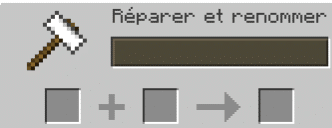
Repairing an object with an anvil:
There are two ways to repair tools and weapons:
- Second place identical objects in the slots. The anvil combines the durability of the two tools while retaining their enchantments.
- Place the item to be repaired along with its manufacturing material. For a diamond pickaxe, adds a diamond. The repair is partial, so you must repeat the process depending on the remaining durability. This method does not work for bows or shears. To find out how repair a bow, check out our guide on this topic.


Each repair at the anvil costs experience points. The more times an item has been modified, the higher the cost.
How to Enchant a Book with an Anvil:
The anvil is also used to transfer the magic of a book as an object. Give a concrete example.
- You ask a iron pickaxe in the first slot and an Enchanted Book (Efficacy IV) in the second.
- The exit space gives you the pickaxe with the enchantment applied, in exchange for a few experience levels.
You can also combine two identical books to create a higher-level enchantment. To avoid getting the “Too expensive” message, first combine the books in pairs, then apply the result to your tool last.
Renaming an object with an anvil:
You can rename your tools, weapons, tags, and creature eggs. Place the item in the first slot, type the new name in the field at the top of the interface, and then retrieve the result.

the renaming add 1 level at the cost of the operation, without increasing the penalty from previous work. For an item that has never been modified, it therefore reverts to just 1 level.
You can also Rename storage blocks and interface (chests, furnaces, funnels, stills, enchantment tables…). The name then appears at the top of their interface. In current versions of Minecraft, a renamed chest retains its name even if you break it and place it again.
One last point to keep in mind: The anvil deteriorates with each use and is eventually destroyed after several repairs.
The fall of the anvil
An anvil suspended in midair falls like a block subject to gravity. If it falls on a creature or a player, it deals damage. The amount of damage depends on the height of the fall.
For example, an anvil that falls from a height of 6 blocks deals 4 hearts of damage.
When the anvil falls on certain fragile blocks, it shatters instantly, and you can pick up the item on the ground. This happens on a nenuphar, a spiderweb, a slab, a cake, a pressure plate, a sign, a trapdoor, or a barrier.
Conversely, if the anvil falls on a solid block not listed above, it will not break. However, it may become damaged over time as a result of repeated falls.
In fact, there are three stages of deterioration visible in the game:
- The New Anvil; ;
- The Chipped Anvil; ;
- The damaged anvil.
After this final stage, the anvil is destroyed for good.
How do I repair an anvil in Minecraft?
Each use for repair Where enchant An item has a 12 % chance of damaging the anvil by one level. This doesn't affect its functionality, but the block wears down until it is eventually destroyed. The problem is that an anvil cannot be repaired.
So you should keep the crafting recipe handy: 3 iron blocks and 4 iron ingots.
The fall can also accelerate this wear and tear, or even shatter the anvil in a single blow. Its behavior is similar to that of sand, gravel, concrete powder, and dragon eggs, which also fall under the influence of gravity.
Anvil Minecraft "too expensive": Why this message and how to remedy it?
When the cost of a set reaches 40 experience levels or more, the’anvil displays «Too Expensive» and blocks the repair. The more often an item is put through the anvil, the higher its future cost becomes. In fact, each use doubles its labor penalty (1, 2, 4, 8…).
Contrary to popular belief, renaming an item does not reset this counter. To avoid the «Too Expensive» message, you need to be careful about the order of your enchantment combinations on the anvil.
- First, combine your books Combine them in pairs before applying them to your tool or weapon.
- If you want to remove enchantments or reduce the cost, use a grindstone instead of the enchanting table.
A concrete example:
Serves four enchantments, merge two books together, then the two more, and finally combines both results. This way, you use the anvil fewer times on the same item. You push the maximum limit further and repair or enchant more items without wasting your experience.
How do you make an anvil in Pixelmon?
Pixelmon is a mod for Minecraft which combines the base game with the universe of Pokémon in the open world.
Good news: Anvil-making is still practiced there simpler than in the classic game. It even requires fewer materials.
To make an anvil in Pixelmon, you just need 8 iron ingots.
Here is the recipe:
- Open a crafting table.
- Place the 8 iron ingots on the grid, filling all the squares except the one on the far right in the middle row.
- Pick up your anvil from the reward slot.
There you go—you've got your anvil in Pixelmon ! Note that in this version, the anvil is mainly used to produce metal plates, bases, and lids for Poké Balls.
Its use is therefore different from that of the anvil in vanilla Minecraft, which is designed for crafting Balls.
Now you know how to use the anvil, what it's for, and its special features—whether you're repairing and renaming items, dealing with the «Too Expensive» message, or playing with the mod. Pixelmon.
Check out our guides at Minecraft :









 English