Minecraft offers 16 food colorings various. These dyes are used to color wool, beds, glass, terracotta, banners, leather armor, and even powdered concrete.
Each one is made from flowers, plants, or materials harvested from nature, sometimes by combining two existing dyes.
Primary dyes
Primary dyes are obtained directly from natural sources. You harvest a flower, a plant, or another material, and then turn it into a dye at your workbench. Here is a summary table listing the sources and ingredients.
| Color | Natural Spring | Ingredients to Use |
|---|---|---|
| White | Bone powder, white tulip, lily of the valley | 1 bone powder OR 1 flower |
| Black | Octopus ink sac, pink Wither | 1 ink pouch OR 1 flower |
| Red | Poppy, red tulip, rose, beet | 1 flower OR 1 beet |
| Yellow | Dandelion, sunflower | 1 dandelion OR 1 sunflower |
| Blue | Lapis lazuli, cornflower blue | 1 lapis lazuli OR 1 bluebell |
| Green | Cactus | 1 cactus, baked in the oven |
| Light green | Sea gherkin | 1 oven-baked pickled sea cucumber |
| Chestnut | Cocoa beans | 1 cocoa bean |
| Orange | Orange tulip | 1 orange tulip (or red and yellow) |
| Pink | Pink tulip, peony | 1 flower (or red + white) |
| Light blue | Blue Houstonia | 1 blue (or blue and white) Houstonia |
| Cyan | Combination | Blue dye + green dye |
| Purple | Combination | Red dye + blue dye |
| Magenta | Allium, lilac | 1 flower (or purple + pink, or red + blue + pink) |
| Light gray | Daisy, white tulip, blue houstonia | 1 flower (or gray + white) |
| Grey | Combination | Black dye + white dye |
Some useful details. The bone meal It is primarily used as fertilizer, but since version 1.14, it can also be turned into white dye. For green and light green, you'll need to use a furnace: cactus yields green, and sea cucumber yields light green. The cacao beans are collected from jungle tree trunks and yield brown dye directly.
Orange dye can also be made by mixing red and yellow, without adding any flowers.
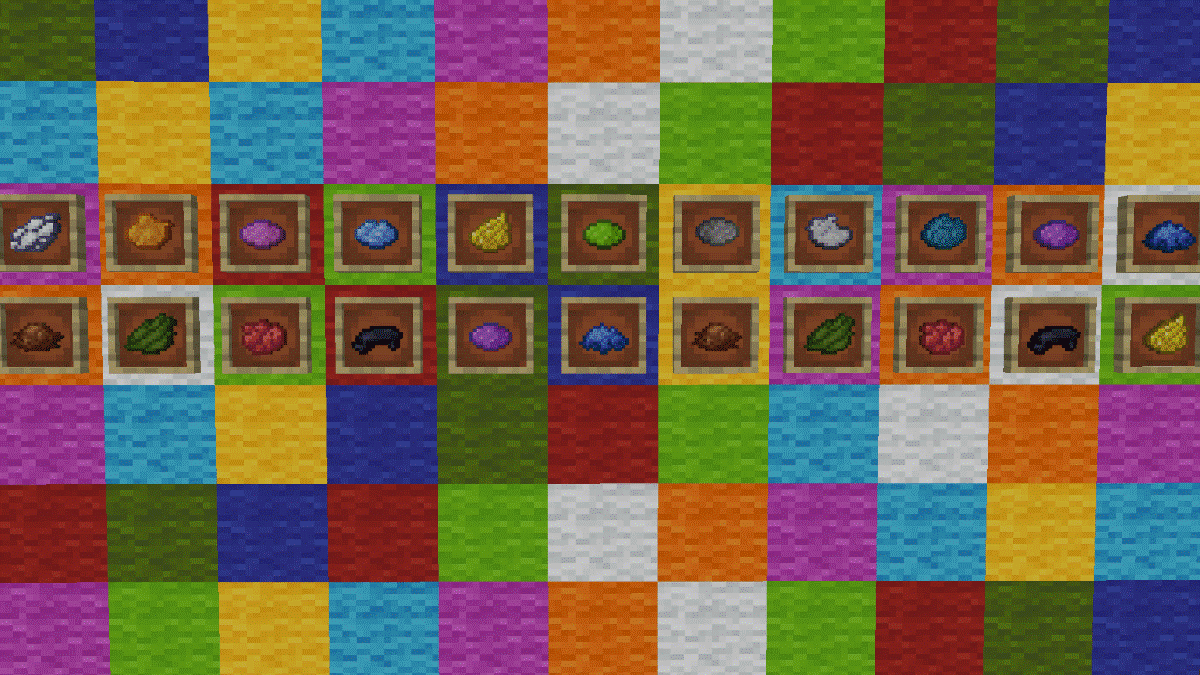
Gray dyes
Neutral tones include white, black, gray, and light gray. Note that bone white does not produce a gray dye, but rather a white dye. True gray dye is obtained by combining two other colors. Here’s a quick summary to help you figure it out.
| Dye | Ingredients | Manufacturing |
| White dye | Bone powder, white tulip, or lily of the valley | Place one of these ingredients alone on the workbench. A bone block will first turn into 3 bone powders. |
| Black dye | Ink sac (released by an octopus) or pink from the Wither | Place the ink sac by itself on the workbench to obtain black dye. |
| Grey dye | Black dye + white dye | Combine the two dyes at the workbench to make 2 gray dyes. |
| Light gray stain | Blue Houstonia, white daisy, or white tulip | Place the flower by itself on the workbench. You can also mix gray dye and white dye. |
It should be noted that the’Allium does not fall into this category: it produces magenta dye. If you want to take your character customization a step further, you can also check out our guide to change skin Minecraft.
Uses
Once you have your dyes, you can dye a wide variety of items. The rule is almost always the same: place the item you want to dye, along with the dye of your choice, on the workbench. Here are the main uses, along with the exact recipe.
Making Colored Concrete Powder
To make powdered concrete, you'll need 4 blocks of sand, 4 blocks of gravel, and 1 dye. Place all the items on the workbench—the order doesn't matter. You'll get 8 blocks of colored powdered concrete.
Color the terracotta
Surround 1 dye with 8 terracotta blocks on the workbench to obtain 8 colored terracotta blocks at once. It’s an excellent material for adding character to your walls, just like The Minecraft Campfire can add a warm touch to your creations.
Dyeing Wool
Wool is the most common item to dye. Combine 1 block of white wool with 1 dye at the workbench to make colored wool.
Coloring Glass and Tinted Glass
Place 8 glass blocks around 1 dye in the center of the workbench to obtain 8 blocks of colored glass, ideal for luminous stained-glass windows. The same principle applies to windowpanes—those thin sheets of glass.
Dye the beds and banners
A bed is stained by combining it with the desired stain on the workbench. For banners, you can either make a pre-colored banner using dyed wool, or dye an existing banner to change its background color or add patterns.
Dyeing Leather Armor
Leather armor is the only type of armor you can customize with dyes. You can dye a piece of leather armor right at the workbench by combining it with the dye of your choice.
By mixing different dyes, you can create unique shades. If you want to explore more’other crafting mechanics progress, take a look at Weakness potions on Minecraft.
Color the boxes Shulker
To color a box of Shulker, combine your box (plain or already colored) with 1 dye at the workbench. The items stored inside don't move when you change the color, which is very handy for organizing your inventory by color.
Other coloring pages
Dyes are also used to color candles and the text on signs, and to make fireworks in a variety of colors. As long as an object can take on multiple shades, a single dye is all it takes to personalize it.
In Creative mode, you can also use a command to apply a color code details on certain items, such as signs. If you want to take your adventure even further, you can also check out the list of boss Minecraft to take on new challenges.








 English