Yes, Overwatch 2 is Cross-Play. In this free video game since 2022, PC, PlayStation 4/5, Xbox One/Series and Nintendo Switch play together in the same games. All you need to do is link your console to a Battle.net account.
A small nuance in competition (we'll come back to this below). We explain everything, including how activate or deactivate Cross-Play.

Overwatch 2: Is Cross-Play available?
A quick reminder: the Cross-Play functionality allows players on different consoles to join the same multiplayer game online. Thanks to Cross-Play, a player on PlayStation can compete or cooperate with other players on PC, Xbox or Switch, and vice-versa.
As for Overwatch 2, YES, Cross-Play functionality is now available on the game. Cross-Play is now possible between the following consoles and platforms, as Overwatch is cross-platform:
| 🔎 Platform | 🎮 Cross-Play | ☑ Cross-Progression |
|---|---|---|
| 🎮 PlayStation 4 | ✅ | ✅ |
| ⭕ PlayStation 5 | ✅ | ✅ |
| 🕹️ Xbox One | ✅ | ✅ |
| ❎ Xbox Series X|S | ✅ | ✅ |
| 👾 Nintendo Switch | ✅ | ✅ |
| 💻 PC | ✅ | ✅ |
How do I activate Cross-Play on Overwatch 2 in 2026?
To activate the crossplay on Overwatch 2 and play with your friends on different platforms, you need to link your console to your Battle.net account. Don't worry, it's very simple:
- Log in to your Battle.net account (or register, it's 100 % free!): https://eu.account.battle.net/login/fr/
- Then go to CONNECTIONS“ section” (CONNECTIONS)
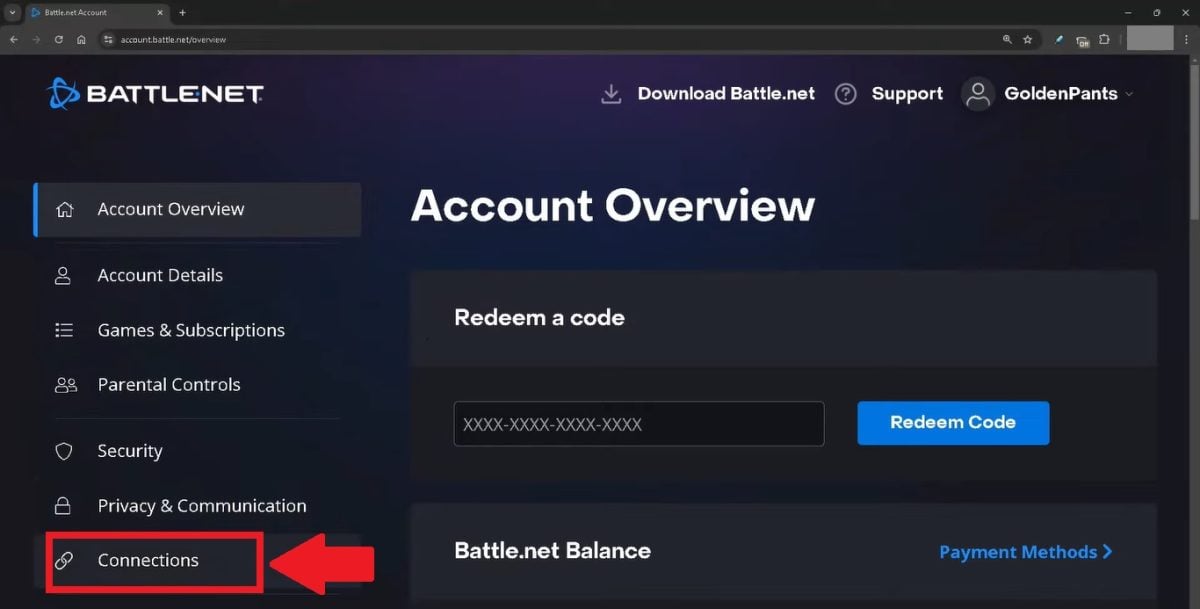
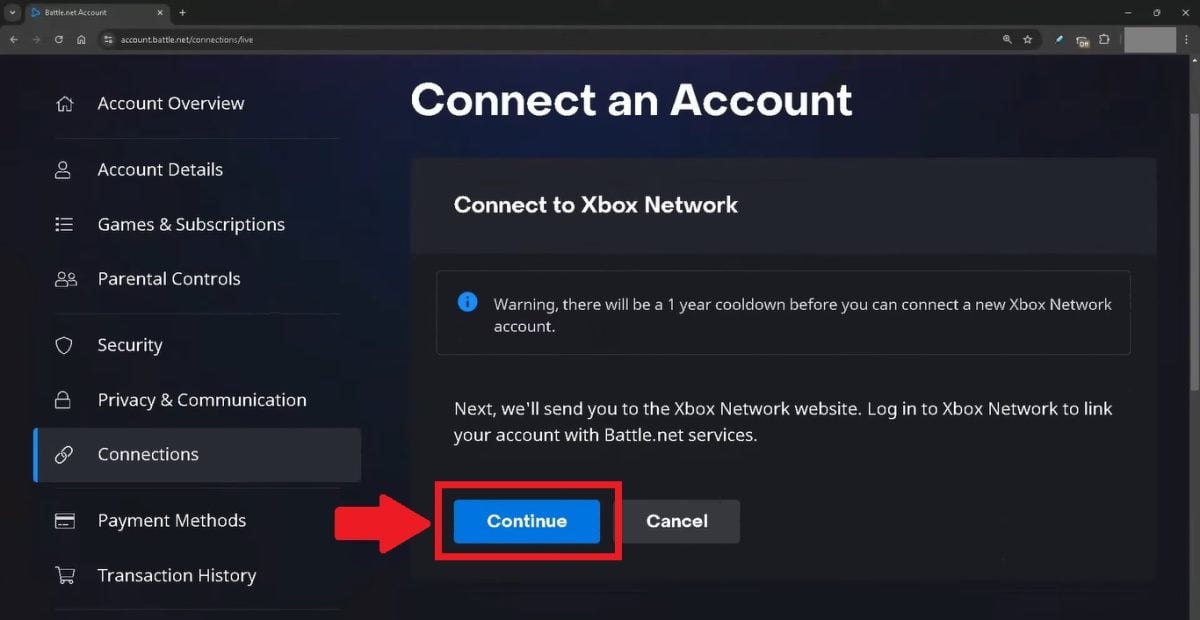
- Select the console you want to connect, then click “CONNECT” (CONNECT)

- Then click on "CONTINUE” (CONTINUE)
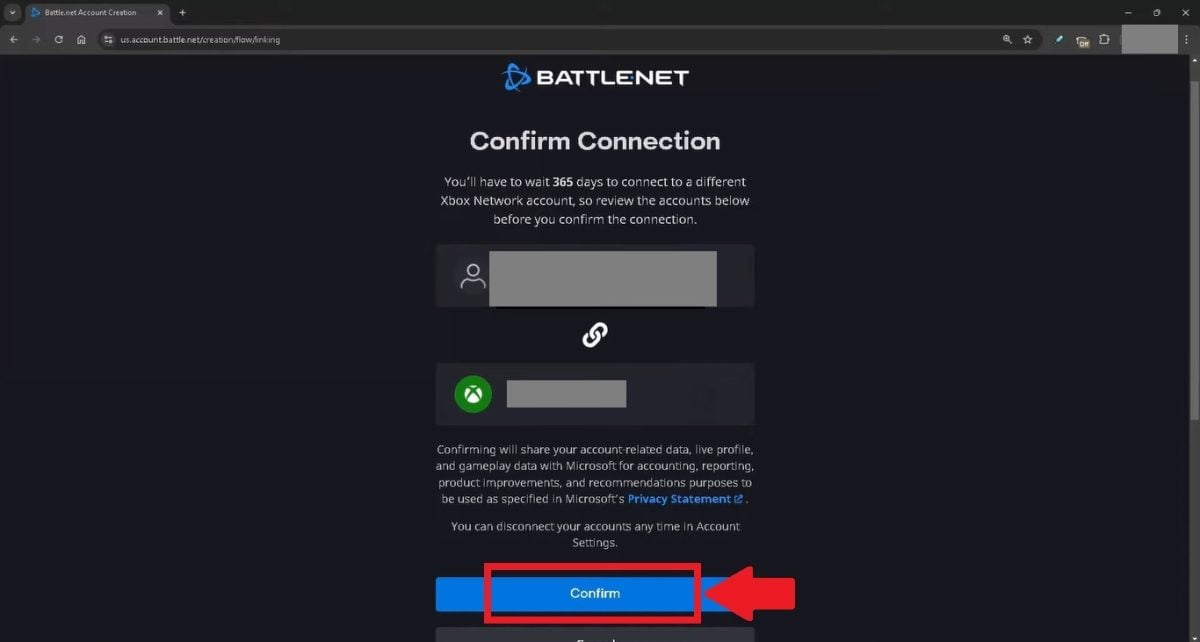
- Then on “CONFIRM” (CONFIRM) to validate the merging of your account
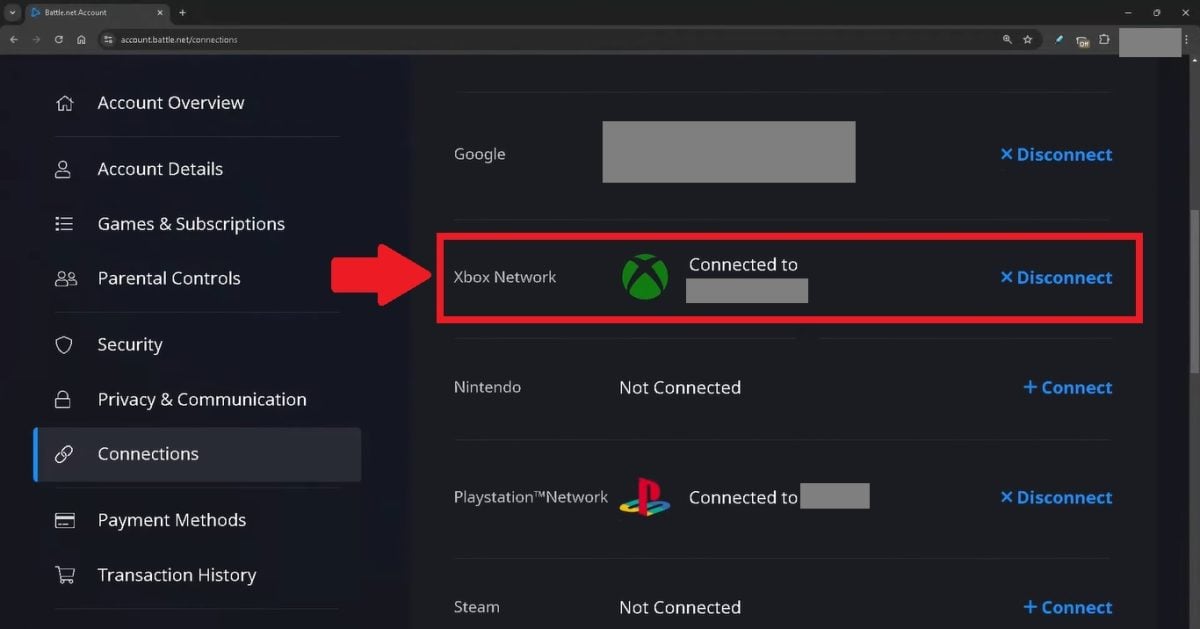
- Once back on the CONNECTIONS, you will see that the connection is activated
➡️ The next step is to add your friends playing on other platforms so you can play with them. Don't worry, it's not complicated either! Here's how to do it:
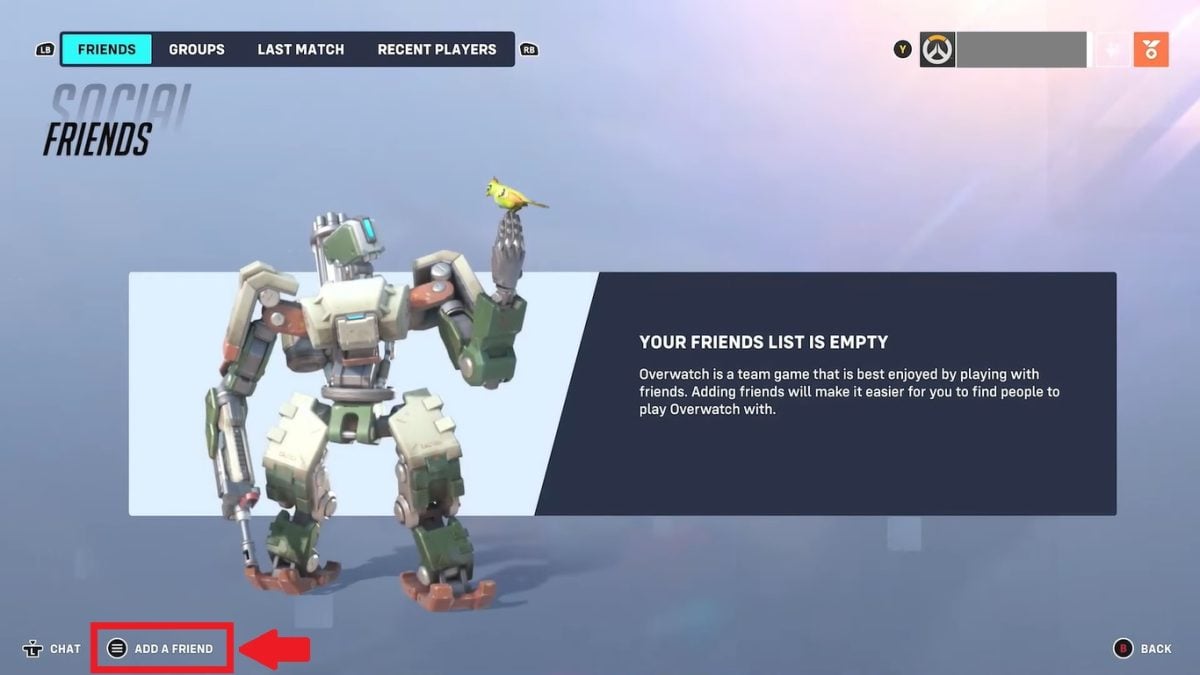
- Launch Overwatch 2, then click on the “SOCIAL” button”

- Then click on "ADD A FRIEND”, bottom left
- Type Battle.net tag or mail from your friend, then click on “SEND THE INVITATION”
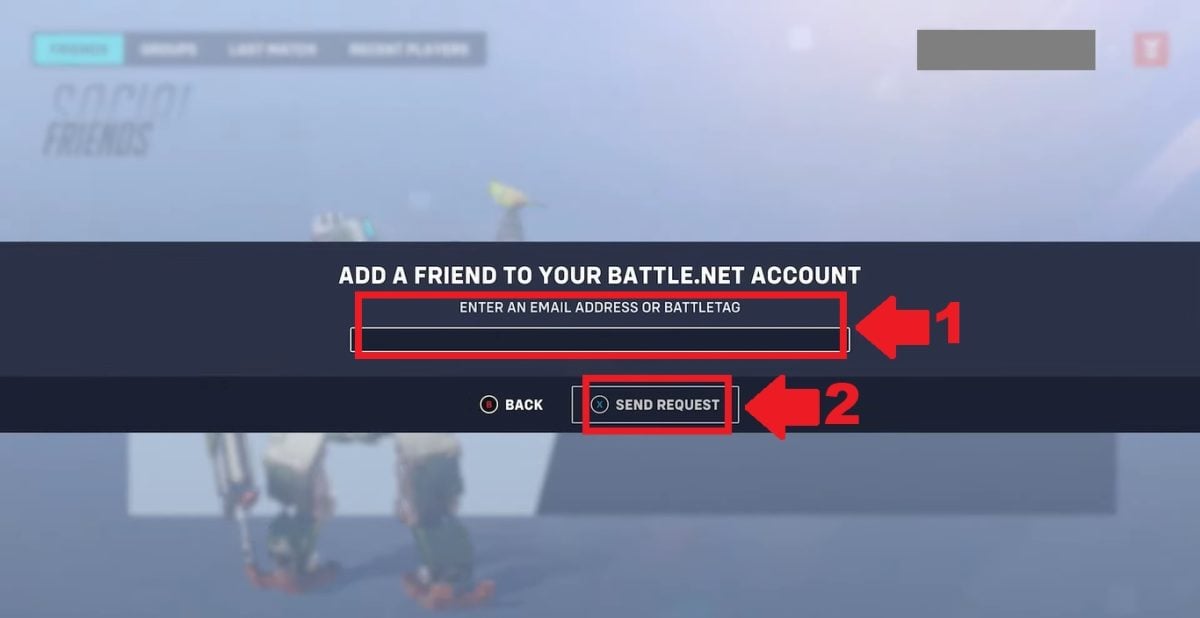
- Once your request has been accepted, your friend will appear in the “Friends”from the Social interface

Competitive cross-play: the rules you need to know
the Overwatch 2 Cross-Play does not work in the same way in all game modes, and in competitive play there is even a special case introduced with season 18, released on August 26, 2025. Here's a summary of the rules before you and your friends go ranked.
Quick Play and Arcade
Mixed PC + console groups authorized in non-competitive modes such as Quick Game and Arcade.
And good news : if you stay in control, you keep your aim assist, even when playing with friends on a PC. You only lose it if you switch to the Mouse/Keyboard pool yourself by plugging in a keyboard-mouse.
Competitive: no ranked PC + console
In ranked, mixed PC + console groups are prohibited. If a PC player joins the group, the competitive mode becomes unavailable. So it's impossible to play ranked with a friend who's playing on a PC if you're on a console.
Competitive pools
In competition, the matchmaking separates players: PlayStation, Xbox and Switch share a console pool, while the PC has its own.
Since season 18, a console player who plugs in a keyboard-mouse can contact PC pool. In this case, the’aim assist remains disabled, even when you return to the joystick.
By testing ourselves, the controller/keyboard-mouse difference is obvious:
- By staying at the joystick in Quick Game with a friend on PC, the’aim assist remains very active.
- As soon as we switch to the pool Mouse/Keyboard, the loss of sighting assistance is immediately apparent.
How do I disable Cross-Play on Overwatch 2?
Prefer to play only against players from your own platform? Visit Cross-Play is activated by default on console, but can be deactivated in less than a minute:
- Go to the Options.
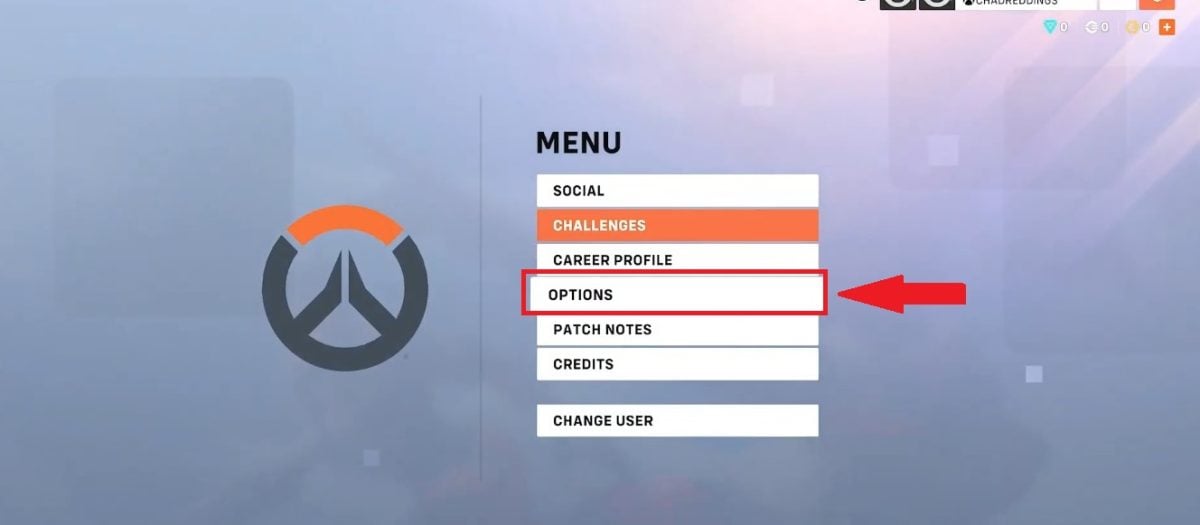
- Then click on Gameplay.

- Disable Cross-play option.

⚠️ Attention This option is not available on PCs, where Cross-Play is still active.
Is Overwatch 2 Cross-Platform?
The Cross-Platform games (multi-platform in French) refer to games that are available on several platforms so you can play on PC, PlayStation or Xbox.
Cross-Platform functionality also enables cross-over progression between different platforms (cross-progression). Players can synchronize and transfer their progress from one console to another!

About Overwatch 2, YES the game is Cross-Platform. Cross-Platform progression is also available: for example, you can start a game on PC, then continue it on PS4 or Xbox One without any problem.
FAQs
Can you play Overwatch 2 with friends who are on other platforms?
YES. Overwatch 2 is a crossplay game, so you can find them even if they're on a different machine.
Is it possible to chat with players from different platforms on Overwatch 2?
YES, Overwatch 2's Cross-Play feature allows you to chat with players on other platforms. The voice chat is accessible to everyone, whatever console you're playing on.
Do I have to pay extra for Overwatch 2 Cross-Play?
NOPE, There is no subscription or additional fee required to unlock the Cross-Play feature in Overwatch 2. It is 100 % free, All you need is an internet connection!
Are there limits to cross-play on Overwatch 2?
Overwatch 2 Cross-Play has two limits main products.
In competitive, In this case, it's impossible to form a mixed PC + console group: ranked is played between players from the same platform family (consoles together, PCs apart).
And as soon as a console player joins the pool PC, for example by connecting a keyboard-mouse since season 18, the’aim assist is disabled. Apart from ranked, the experience remains identical on all platforms.
Can I transfer my data from one platform to another in Overwatch 2?
YESfunctionality, the cross-over progression Overwatch 2 allows you to synchronize and transfer your data from one platform to another without any problems. This means you can keep your progress, stats, skins, and more, no matter which console you play on.
On Overwatch 2, can I merge my accounts from different platforms?
YESYou can merge your Overwatch 2 accounts (PC, PlayStation, Xbox, Nintendo Switch), but to do so you must also go to Battle.net and link all your consoles to your Battle.net account.
⚠️ You can only merge’a single account per platform to your Battle.net account. Take the time to choose your accounts carefully before doing so, as the process can only be done once.
Should Cross-Play be enabled or disabled?
Our advice:
- If you play mainly for fun and your friends are on PC, leave Cross-Play enabled. You keep your aim assist in Quick Part.
- If you are a console gamer competitive who finds PC opponents too strong, deactivate it to meet only controller players.
Is Cross-Play enabled by default on Overwatch 2?
YES on console Cross-Play is active from the start, but you can disable it in the options if you prefer. On PC, on the other hand, it is always active and cannot be deactivated.
How can I find out which platform my friend is playing on?
Overwatch 2's Social menu separates your friends into two groups : those of your platform on one side, and the “Other platforms” list on the other.
So you know whether they're playing on the same platform as you or elsewhere, without seeing the detail (Xbox, PlayStation, Switch or PC) for each friend.
Is Cross-Play ping worse on Overwatch 2?
NO, Cross-Play does not degrade your ping. Overwatch 2's matchmaking places you first and foremost on the servers in your region, regardless of other players' platforms.
You now know everything you need to know to enjoy the Cross-Play on Overwatch 2 If you have discovered other methods to activate this feature, please feel free to share them with us in the comments section.
And for even more articles on multiplatform games:








 English