In brief
Positives
- Several features: GPS location, message viewing, contact list, etc.
- Monitoring of Applications and Social Media
- Discreet application
- User-Friendly Dashboard
Negative points
- High price for a short-term subscription
- Physical access required
- Complex Setup on iOS
Umobix at the best price
- For a one-month subscription 49,99 €
- Price for a three-month subscription 29,99 €
- Price for a 12-month subscription 12,49 €
Umobix is spyware designed to remotely monitor the phone a child's: calls, messages, social media, and GPS localization.
He quietly settles in at android and iOS, and is primarily aimed at the parental control.
Opinions are mixed: comprehensive features, but high prices in light of the results.
Here’s our honest take on what the app is really worth.
| Site | Umobix |
| Price | From 12.49 €/month (12-month contract), up to 49.99/month. The price is the same on iOS and Android. |
| Features | Incoming, outgoing, and missed calls, and their duration. Messages received, sent, and deleted. Social media apps (Facebook, WhatsApp, Instagram). Photos, videos, location. Keylogger. |
| Languages | English, French, German, Spanish, Portuguese, Turkish, Russian, Arabic, Chinese. |
To explore the interface and features on your own:
What do users think of Umobix?
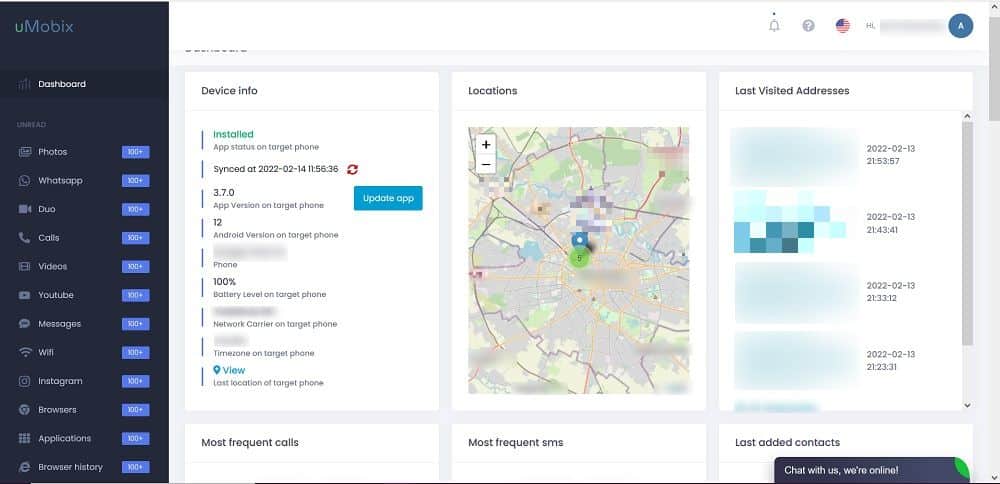
Like any tool, Umobix has its pros and cons.
On the one hand, many parents appreciate the discretion the app's ease of use and simplicity of installation, both on iOS than on android.
The data goes back to real time to the dashboard, and the features cover the basics: calls, text messages, location, and social media.
On the other hand, the main criticism concerns the value for money. This value for money is often mentioned in negative reviews: several users find the tool a bit basic given the subscription cost. In addition, some users find the tool difficult to set up on iOS.
In a nutshell, Umobix is a good solution for monitoring a child's activities remotely. However, it isn't the most obvious choice if your needs are limited to a basic parental controls.
If you want to compare it with other tools, software such as mSpy, Hoverwatch Where Xmobi are also worth checking out. For an overview, see our comparison of the best spy software.
Also remember that Monitoring a device without the owner's consent is illegal, except for the phone of a minor for whom you have legal responsibility.
Umobix: description
Umobix is a spyware designed for the remote phone monitoring. It is installed on the target device (smartphone or tablet) to track its daily activity.
Many parents use it as a tool for parental control to keep an eye on their child's cell phone, and it's a serious option if you're looking to track your child's phone no headaches.
For a online dashboard, you can view the SMS and messages, the calls, them photos and videos, as well as social media activity such as WhatsApp Where Facebook. There GPS localization also goes back, often in real time.
The app works on Android and on iOS.
Umobix: what are its features?
The features of’Umobix cover a wide range: calls, Text Messages and Messages, social media, and location.
Monitoring Call History
Umobix gives you access to the’complete call history : date, time, duration, and type (outgoing, incoming, missed, or rejected).
The associated contacts are also tracked. The entire process is carried out discreetly, without the person under surveillance noticing.
Contact tracing
You can access the entire directory of the device, along with the details for each contact : emails, links to social media, etc. This is useful for quickly identifying an unknown contact or a risky situation without having to ask your teenager about it.
Message monitoring
The app gives you access to the SMS and to the messages received, almost in real time. You can also see the sender's information (name, number), organized in a clear list.
This feature helps to Protect Your Child from Inappropriate Messages, like sext messages.
Monitor social apps
From the dashboard, you can track your child's activity on the main social apps : Facebook, WhatsApp, Instagram and others.
You see who he's chatting with, you read his online messages and you can access the photos and videos shared.
The Keylogger function
the Keylogger records each key press, without the person being monitored knowing it. Each entry is dated and associated with the relevant application.
This allows you to read the private messages even in encrypted messaging apps.
Track Your Child's Location
The real-time GPS tracking lets you know where your child is at all times, especially when they're out on their own. This specific feature is available only to Android. On iOS, the data is transmitted via iCloud, with a more limited level of detail.
The app remains in stealth mode on the monitored phone, without leaving any visible trace for the user. The screen time The child's [...]. shows no signs of abnormality.
How much does the software cost?
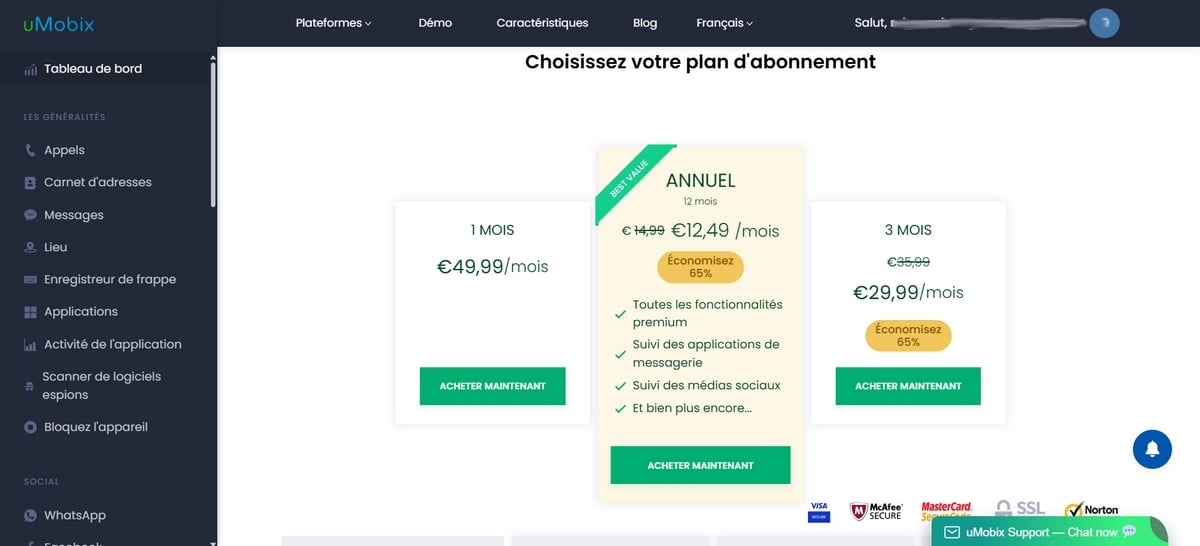
Umobix applies the Same price on Android and iPhone. The only factor that affects the rate is the term of employment.
The longer your commitment, the lower the monthly cost. Here are the details of the subscription prices :
| Term of Employment | Price |
|---|---|
| 1 month | 49.99/month |
| 3 months | 29,99 € |
| 12 months | 12,49 € |
A weakness to note:
Umobix does not offer a free trial version. To try out the tool, you have to sign up for a subscription right away. This is a drawback compared to some competitors that offer a demo.

How do I install Umobix?
To install Umobix, you need a physical access on your child's phone, for at least a few minutes. The process varies depending on the device: on android, you install an app directly; on iPhone, everything depends on the credentials iCloud.
In both cases, here are the common steps to start with:
- Visit the official website to Create your account Umobix.
- Choose the subscription plan depending on the length of service (1, 3, or 12 months).
- After your purchase, you'll receive a confirmation e-mail with your username and password.
- Log in to your dashboard to start the setup.
Installation on Android
On a device android, you download a file APK directly on the target phone.
You must allow the unknown sources in the settings, then grant the necessary permissions (location, messages, calls). Once configured, the app switches to stealth mode and becomes completely invisible on the screen.
Installation on iPhone (iOS)
On iPhone, no app to install on the device. All you have to do is enter the iCloud credentials of the target device in your account Umobix.
A key point: the iCloud backup must be enabled on the monitored iPhone; otherwise, the data won't be sent to your dashboard.
Data Synchronization
Once the setup is complete, the first data and updates arrive in a few minutes. The dashboard It then updates regularly, and you can remotely view calls, text messages, apps, and the GPS localization from any browser.
No special technical skills are required to use it.
It is primarily aimed at parents who want to discreetly monitor their child's phone activity.
What are our thoughts on Umobix?
Umobix is a comprehensive and effective software solution for discreetly monitoring smartphone activity.
However, its monthly fee (one month of subscription) of €49.99/month remains high, and the lack of a free trial prevents users from testing it before purchasing. The features on iOS are also more limited than on Android.
Our review of Umobix: 3,6/5 : A solid option if you sign up for 12 months, but not very cost-effective for a one-time, one-month need.








 FR
FR  RU
RU  EN
EN  ES
ES  IT
IT  DE
DE  ZH
ZH  PT
PT  ID
ID  JA
JA  DA
DA