To track your child's phone, you have two options. The first is free of charge : native tools such as Google Maps, Google FamilyLink on Android or the app Locate on iPhone.
The second one is paying and more comprehensive : a spy apps dedicated as mSpy Where EyeZy.
Here are the two methods in detail, along with the specific steps for locate the device and manage your children's screen time with peace of mind.
Monitor Your Child's Phone with Mspy
Monitor Your Child's Phone with Eyezy
How can you track your child's phone for free?
Before paying for a monitoring app, try them out free solutions. They are more than enough to locate your child on a daily basis.
The three native methods listed below work just as well on android than on iPhone, and all allow for the real-time location sharing without installing any third-party software.
With Google Maps
With Google Maps, you can see the Your Child's Location directly from your device. This option is based on the position sharing linked to their account Google. First, you need to set up the app on his phone.
Here's how to enable location sharing:
- Turn on location services on your phone.

- Install Google Maps on his device.
- Open the app and tap the blue dot (Location).

- Click on your profile picture.

- Open the menu, then press Location Sharing.

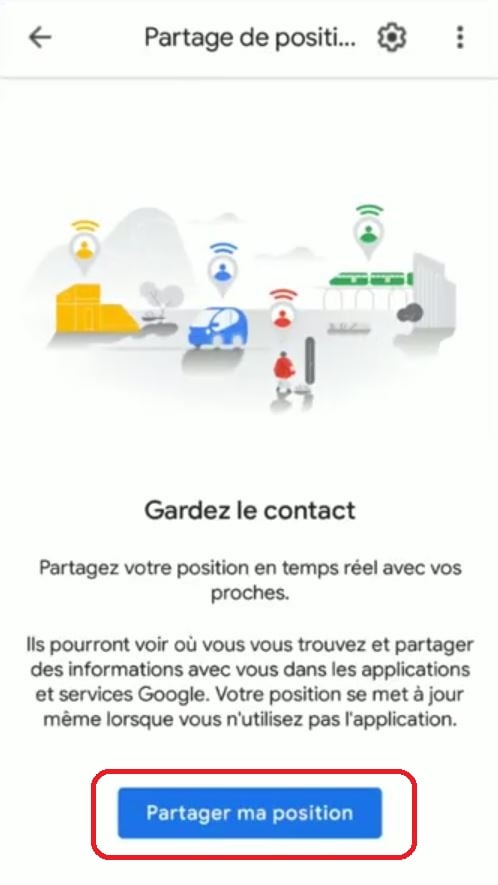
- Click on Share my position.
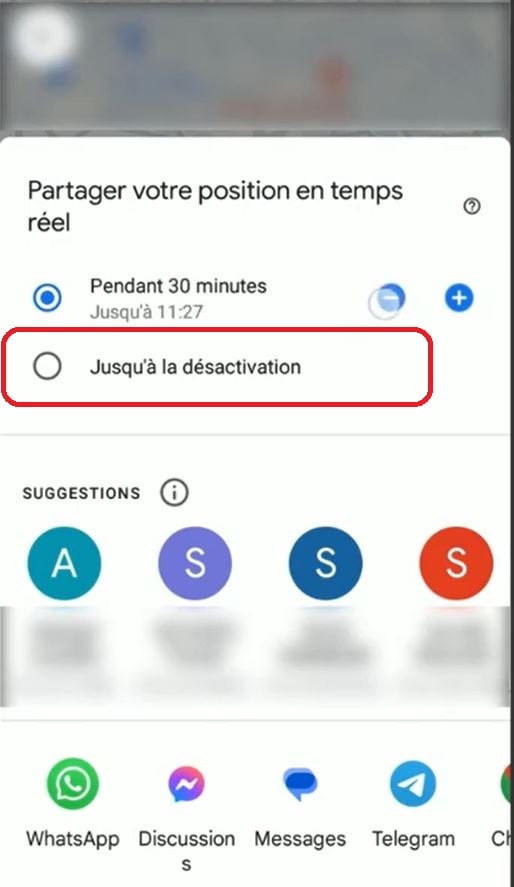
- Choose Until you turn it off to set up permanent sharing, and select your account as the recipient of the share.
- His location will then appear on your map Maps.
To obtain the most accurate position, enable location accuracy in your phone's settings. Also, remember to leave the mobile data where the Wi-Fi always enabled.
With Google Family Link on Android
Google Family Link is the official parental control app from Google. It requires separate installation on both devices.
This way, you can control cell phone your child's screen time and manage it using these features:
- Find Your Phone on a map and track its movements; ;
- Manage Applications installed and confirm each purchase on the Google Play ;
- Filter the Web sites and inappropriate content on the Internet; ;
- Receive notifications on its actual use; ;
- Monitor screen time and set limits by app.
To set up tracking, create a Google account For your child, set up Family Link on your phone, then link the two accounts via the family sharing. You can then access the monitoring features from your parent dashboard.
With the Find My app on iPhone
On iPhone, the application Localiser (Find My) manages the Family Location Sharing free.
First, turn on the Family Sharing In the settings: Family members will then appear in the tab People, provided that everyone agrees to share their position.
To learn more, add Temps d’écran (Screen Time). That way, you'll be able to limit screen time, block explicit content, and monitor your child's app usage.
What the Law Says About Tracking a Minor's Location
In France, a parent has the legal right to locate one's minor child. There CNIL However, it recommends informing the child in a way that is appropriate for their age and maturity. This is a recommendation, not a strict requirement. Above all, keep in mind that principle of proportionality : Continuous monitoring is considered disproportionate and is therefore not recommended.
How can you monitor your child's phone using a spy app?
To go beyond just free location tracking, you can use a monitoring application installed on your child's phone. Some aren't very reliable, but two really stand out: mSpy and EyeZy.
You can also find other tips for track your daughter's phone in our dedicated article.
These apps give you access to much more than just your child's location:
- The GPS localization live on a map; ;
- Monitoring SMS and messaging services such as WhatsApp ;
- Call logs and contact list; ;
- Filtering of apps and websites; ;
- Monitoring social media activity (Instagram, Snapchat…).
What You Need to Know Before You Get Started: It's better to prioritize the trust and use these tools only when truly necessary.
Mspy

mSpy is the most comprehensive option for going beyond localization. It is a software program for advanced monitoring, rather than just parental controls. Its main features:
- GPS Geolocation : You can track your child's location in real time from an online dashboard.
- Geotagging : You set up safety zones (home, school, etc.) and receive alerts when your child leaves or arrives there.
- Reading Text Messages and Inbox Messages : You can view the discussions on WhatsApp, Messenger or via text message, without rooting or jailbreaking the device.
- History of Applications and the Web : You can see the apps that are installed and the websites you've visited.
Installation is still simple:
- Create your account on the mSpy.
- Choose your subscription and select the system (Android Where iPhone).
- Install the app on your child's phone by following the steps below.
- Log in to your dashboard to track location and activity.
Choose Mspy by clicking here :
⏮️ Monitor your child's phone with Mspy ⏭️
EyeZy
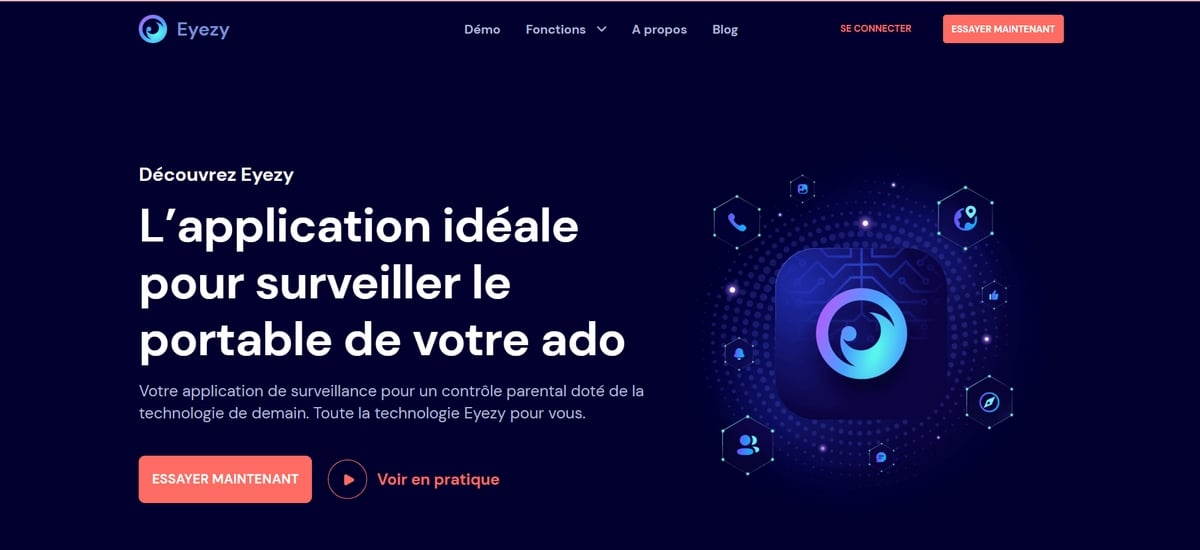
EyeZy is a direct competitor of mSpy, with a nearly equivalent set of features. You can access the essentials of your child's activities:
- The GPS location in real time ;
- Messages and conversations on social media; ;
- Recorded calls and contacts; ;
- Apps installed on the device; ;
- Internet browsing history.
All you have to do is install the app on the device you want to monitor, then log in to your online account to get a full view what your child is doing on their phone.
Choose Eyezy by clicking here :
⏮️ Monitor your child's phone with Eyezy ⏭️
No matter which solution you choose, the key is to manage screen time and monitor apps in a way that’s appropriate for your child’s age.
Anyway, choose an app from parental control that actually works to monitor your child's phone.









 English