The healing potion in Minecraft Instantly restores health points: 2 hearts at Level I, 6 hearts at Level II. To craft it, you'll need a still, a vial of water, and some wart from the Nether and a slice of sparkling watermelon. Her instant treatment saves your skin in the middle of a boss battle or in a dungeon, without waiting for the rejuvenation potion.
Tutorial Minecraft: What is the purpose of the Minecraft healing potion?
The healing potion (Potion of Healing) triggers the effect of instant treatment. It immediately restores your health points. There is no waiting period, unlike regeneration, which restores your health gradually. Unlike poison, instant healing takes effect all at once, with no lasting effects.
Level I restores 2 hearts, or 4 health points. Level II restores 6 hearts, or 12 health points. This healing effect works in all editions of the game: Minecraft Java Edition as Minecraft Bedrock Edition.
This potion comes to your rescue when you don't have time to heal yourself with food. It's ideal for boss battles, dungeon exploration, or dangerous expeditions into the Nether and theEnd.
The instant heal deals damage to the undead
Here's something many players don't know. On undead creatures, the effect is reversed and causes damage instead of healing. This applies to zombies, skeletons, drowned, and withers.
So you can turn your healing potion into a weapon against these creatures, as long as you cast it on them as a single-use spell. Conversely, a healing potion has no effect on other mobs, which do not share a health bar with you.
How do I make a healing potion in Minecraft?
The recipe for a healing potion is simple. To make a whole batch at once, gather these ingredients: one still, vials of water, a wart from the Nether, a slice of sparkling watermelon and some blaze as fuel. These recipes work the same way in all editions of Minecraft, whether you play in Java Edition or in Bedrock Edition.
First of all, you'll need vials. To make them, place 3 glasses on a workbench.
Here's how to arrange them to make your vials: 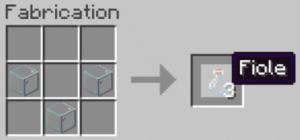
Now that you have your vials, you'll need a still. This item is used to craft all the potions in the game. Without it, you won't be able to brew your own potions. You can also store your finished potions in a cauldron to keep them within reach.
To make it, gather these items:
- 3 stones
- 1 stick of blaze (You get them by killing blazes in the Nether)
Here's how to arrange the objects to get it: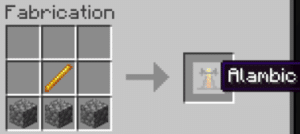
Next, place your still in your base. Right-click to open its interface. This is where you'll create your potions—up to three at a time. Don't forget to fill your vials with water first.
Level I Healing Potion Minecraft
Now let's move on to creating your healing potion level I. It triggers an instant healing effect, which restores 2 hearts (4 health points) all at once. Unlike regeneration, this healing effect has no duration: it takes effect only once.
Items needed:
- 1 wart on the Nether
- 1 slice sparkling watermelon
- 1 powder of blaze (fuel for the still, not an ingredient in the potion)
Go to the interface for the still you created earlier. You'll need fuel to power it: that's what the powder is for blaze. Place it as shown in the image below: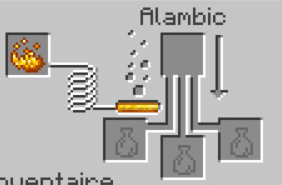
Tip: To craft a sparkling watermelon slice, surround a watermelon slice with gold nuggets.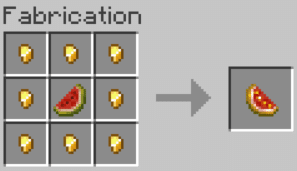
Next, follow these steps:
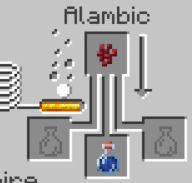
- Place the vial of water at the bottom and the stopper from the Nether Go up to get a strange potion:
- Add the sparkling slice of watermelon to the strange potion:
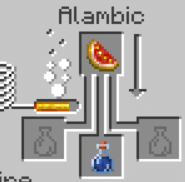
You now have a Level I healing potion.
Healing Potion Minecraft Level II
To create a healing potion level II and restore 6 hearts instead of 2, adds a luminous powder For your Level I healing potion: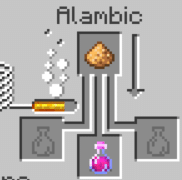
However, there's no need to add any Redstone : The healing effect is instantaneous and does not last over time. Therefore, there is no persistent version of this potion. The game also does not offer a version of this effect that lasts over time, regardless of the edition.
You can also mix it with a fermented spider's eye to create Minecraft damage potion, formidable against creatures.
Disposable Healing Potion Minecraft
To cast your potion instead of drinking it, turn it into single-use potion. Place your healing potion in the vials at the bottom of the still, then add some gunpowder in the top ingredient slot. The healing effect is then applied on impact, which is handy for healing a friend from a distance in the middle of combat. This variant is available in all editions of Minecraft.
Summary Table of Variants
| Variant | Added ingredient | Effect |
|---|---|---|
| Healing Potion I | Sparkling Watermelon Slice | Restores 2 hearts (4 health points) |
| Healing Potion II | luminous powder | Restores 6 hearts (12 health points) |
| Disposable Healing Potion | Gunpowder | Launches and heals on impact |
| Damage Potion | Fermented Spider Eye | Deals damage to creatures |
A useful tip: The instant heal actually deals damage to undead creatures like zombies and skeletons. Instead, cast a healing potion on these creatures to heal them.
If you run into a problem, ask your question in the comments.
See the rest of the guides on Minecraft:









 English