Do you manage a server Discord And what if you need to discipline a member? There are three possible measures: expulsion, suspension, and ban. Each one has a different scope on the server.
An expulsion temporarily removes a user; an exclusion suspends their rights for a specified period; and a ban permanently removes them.
This Guide to Sanctions Discord helps you understand the differences between each moderation measure and choose the appropriate penalty.
Sanction
Features
Duration
Option to return to the server
Details
Expulsion
Remove a member from the server.
Temporary (not precise)
Yes
A member who has been removed can rejoin as soon as they receive a new invitation.
Exclusion
Temporarily revoke the user's permissions on the server.
60 seconds to 1 week
Yes
As soon as the time period expires, the user regains access to the server.
Ban
Permanently remove a user from the server.
Permanent
Nope
The banned user will no longer be able to join the server.
1. Expel members from your server
Banning is the first penalty you should be familiar with when managing a server Discord. Here's how it works and when to use it.
What does it mean to kick a member from a Discord server?
"Expel" means that you're going to remove the user on your Discord server. They will no longer be a member of your server. However, this penalty is only temporary:
Expulsion often serves as a warning: «You’ve gone a little too far; be careful when you come back.»
Use this action when a member has committed a minor offense against your community. Administrators can ban a member with just a few clicks. In any case, warn the user beforehand: this is a best practice for moderation that helps prevent many problems.
How to expel a member from his Discord server?
Expelling a member is very simple. Here are the steps to follow:
Right-click on profile picture, either directly in a chat room where he posted, or from the member list on the right.
A context menu appears. Click «Kick [member]» to open this window:
As you can see, you can specify the reason for eviction before confirming. This reason is useful for keeping a clear record.
Good to know: The ban appears in your server logs. To access them, open your server settings (in the top-left corner, where your server name is displayed), then go to «Server Logs» under the Moderation category.
2. Kick a member from your server
Here are the key points about the’exclusion of a member. A temporary penalty, different from a ban, that keeps the user on your server but silences them.
What does it mean to ban a member from your Discord server?
This measure ensures that the person stays on your server Discord, but no longer has any rights.
She will not be able to write, respond, or join a voice chat room.
She will only be able to read messages already sent in text chat rooms.
This penalty is temporary. Its duration ranges from 60 seconds to 1 week. Once the time period has elapsed, the member automatically regains all of their rights.
How do you ban a member from your Discord server?
The process is very simple on both computers and mobile devices:
Right-click on the profile photo the person's name (if they've just posted in a text chat), or their name in the member list on the right. On mobile, press and hold their profile.
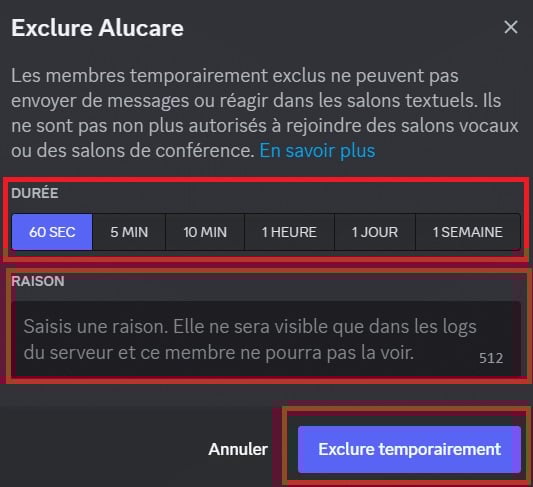
Then, select "Exclude [member]". This window appears:
In this menu:
You choose the Duration of the suspension 60 seconds, 5 minutes, 10 minutes, 1 hour, 1 day or 1 week.
You can add a reason. It will only be visible in the server logs; the banned user won't be able to see it.
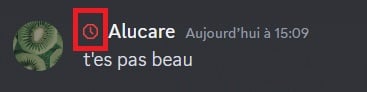
To view all the exclusions that apply, go to the server logs :
Access the server settings by clicking on the server's name in the upper-left corner.
Then open «Server Logs» in the Moderation category.
How do you remove a ban from a member of your Discord server?
If you think you've banned a member for too long, you can revoke his expulsion at any time. To do this:
Access a user's profile through the server's member list or by clicking on their profile picture if they've posted in a text chat room.
Click «Stop blocking [member]».
A window displays the remaining ban duration.
Confirm by tapping «Stop Excluding.».
3. Ban a member from your Discord server
This measure is final. Here's what you need to know before applying it.
What does it mean to ban a member from your Discord server?
Banning a member from your Discord server is the most severe penalty a moderator can impose. The user is removed from your community and loses all access to the server.
Unlike a kick, a ban is permanent. The person will no longer be able to join your server, either through an invitation link or by any other means. Bans are reserved for the most serious cases, such as repeated violations of the rules.
How do you ban a member from your Discord server?
To ban a user on your server Discord, proceed as follows:
Right-click on their profile in a text chat room. If they haven't posted anything, click on their name in the list of members on the right.
Select «Ban [member]» from the context menu. This window will appear:
You can select one of the following options as the reason:
Suspicious account or spam.
Compromised or hacked account.
Non-compliance with server rules.
If none of the options apply, click «Other» and enter your own reason. This way, you’ll have a clear record of your decision.
You can also delete messages sent by the user in text chat rooms. They do not disappear automatically. Choose the time range from which you want to delete them, from the last hour up to 7 days prior.
Finally, you can ban multiple members at once. Select them all, then follow the same steps.
How do you lift a ban on a member of your Discord server?
You can reverse a ban at any time. The list of all bans is available in the server settings. To access it:
Click on your server name in the upper-left corner, then open «Server Settings.».
In the «Moderation» category, go to "Bans." You'll then see a list of banned users.
Click on a person to see the reason for the action.
To lift the penalty, click «Revoke Ban.».
The user will be able to rejoin your server.
FAQs
How do I join a Discord server that I've been banned from?
A ban on Discord blocks your account on the affected server. In the most serious cases of non-compliance with the platform's rules, Discord may, in turn, extend the penalty to your IP address.
Bypassing a ban by creating a new account—with or without a VPN—is considered ban evasion.
This practice violates Discord's terms of use. If a member or administrator reports it, you risk having your account permanently suspended. The proper course of action is to contact the server moderators to find out why you were banned and ask to be reinstated.
Do I receive a notification after a ban on Discord?
Discord users are not notified when they are banned from a server. They simply notice that the server has disappeared from their list.
If you're looking for a server that doesn't is no longer displayed, this means you've been kicked, banned, or that the server has been deleted. You won't receive any message informing you of the penalty or the reason for it.
What is the difference between expelling, excluding, and banning a member?
These three sanctions do not have the same scope. The’eviction Removes the member from the server, but they can rejoin using an invitation link. A temporary ban prevents the user from sending messages for a set period of time, ranging from a few minutes to several days.
the ban is the most severe penalty: the member is permanently banned and cannot return. Administrators and moderators must choose a penalty appropriate to the severity of the situation.
To lift a ban, an administrator goes to the server settings, opens the list of bans, and selects the option to revoke the ban.
And feel free to check out our other articles on Discord. The comments section is open if you'd like to share your thoughts on the topics discussed above.
👍Your opinion
The article is informative
The article is objective
The article answers my question
Content up to date
🎉
Thanks for your opinion!
Thank you for taking the time to give us your opinion.
This content is originally in French (See the editor just below.). It has been translated and proofread in various languages using Deepl and/or the Google Translate API to offer help in as many countries as possible. This translation costs us several thousand euros a month. If it's not 100% perfect, please leave a comment for us to fix. If you're interested in proofreading and improving the quality of translated articles, don't hesitate to send us an e-mail via the contact form! We appreciate your feedback to improve our content. If you would like to suggest improvements, please use our contact form or leave a comment below. Your feedback always help us to improve the quality of our website Alucare.fr
I'm the entire alucare.fr team.
The purpose of this profile is to put online articles by former authors who no longer work on the site after having improved them.
At alucare.fr, our aim is to provide truthful, up-to-date information. That's why, when we update an article by an author who no longer works with us (or who now occupies a higher position), we place it on this author account.
Social Media and Contact:
Alucare is an free independent media. Support us by adding us to your Google News favorites:
2 comments on the discussion forum for " What are the different possible penalties on Discord? "
Hello
For the second time I've come to complain about alucar because I've just logged in and I filmed the capture to keep proof that alucare doesn't give the dice every time because it's already been several times that both have been given to me even though I've just logged in, so when will I get my money back for all the dice I've lost 😡😡😡😡😡
Hello,
There's no point in saying it's our fault. The problem lies with the game itself, which doesn't give you the dice, not with us. We ONLY share the links that scopely gives us.
Available on :PC, Mac, Linux, Android, iOS, PlayStation, Xbox
Antonin Choplin
How
What are the different possible sanctions on Discord?
What are the different penalties for Discord? Find out everything you need to know in our guide!
Alucare.fr
Guides & How-To's
Alucare
Alucare - video games, tutorial, High-tech AI and Web
ALUCARE INDUSTRY LLP is the company behind alucare.fr. The managing director of ALUCARE INDUSTRY LLP is Antonin Choplin. The alucare.fr website is designed to help website visitors in their research, whether in the world of video games, the web or elsewhere.
I'm the entire alucare.fr team. The purpose of this profile is to put online articles by former authors who no longer work on the site after having improved them. At alucare.fr, our aim is to provide truthful, up-to-date information. That's why, when we update an article by an author who no longer works with us (or who now occupies a higher position), we place it on this author account.
What are the different possible sanctions on Discord?
Alucare.fr reviews on Trustpilot
Discord
Discord is the application I need to use the most. So, if you're looking for a tutorial, what's new, how to get Discord Nitro, how to change your password, or how to embellish your texts in Discord, etc., this is the place for you. This section is for you!
Here you'll find all the articles relating to Discord!










2comments on the discussion forum for " What are the different possible penalties on Discord? "