You want to change Twitch username because it no longer matches your channel or games of the moment?
✅ Good news: you can change your username every 60 days (about 2 months).
We show you how change your channel name on PC and since the’mobile app, and the pitfalls to avoid.
Username VS Display name
Before continuing, we need to clarify one thing that is blocking some users. Twitch your account has two idifferent identities, the user name and the displayed name.
Here's what you need to know:
Rules for your Twitch username
To choose your Twitch name, It's important to know that the platform doesn't let all usernames through.
Here's what you need to know:
- ✅ It must include 4 to 25 characters
- ✅ Letters, numbers and underscore (_) only are allowed
How do I change my Twitch username on PC?
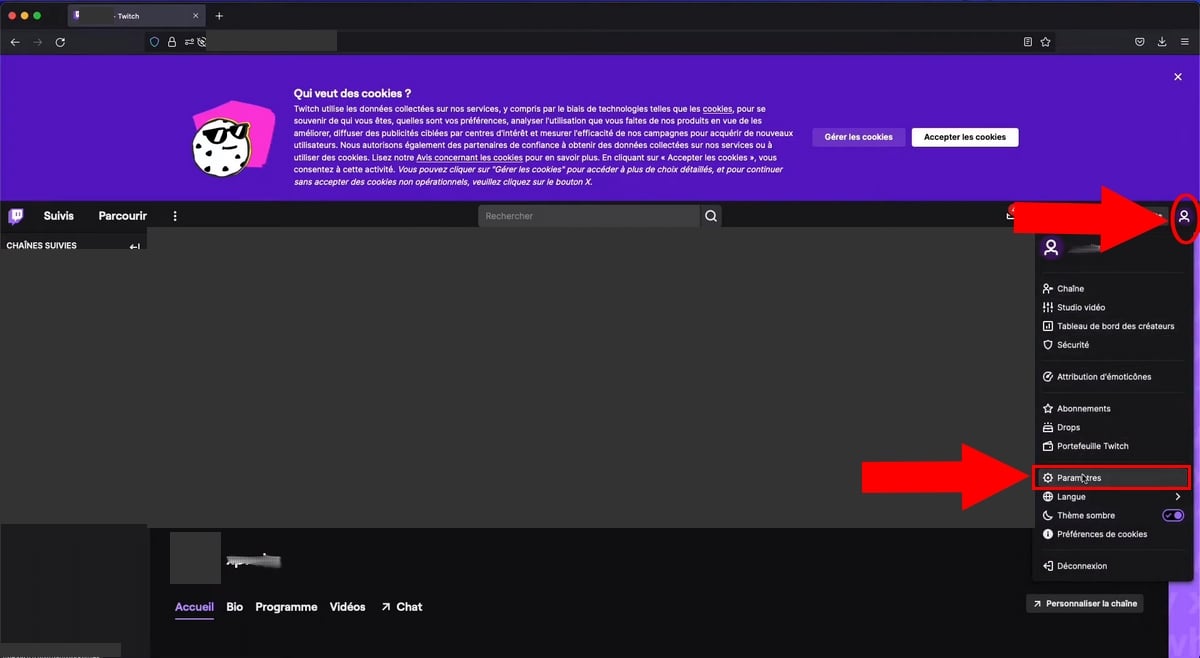
- Login to Twitch then click on your avatar top right
- Then click on Settings
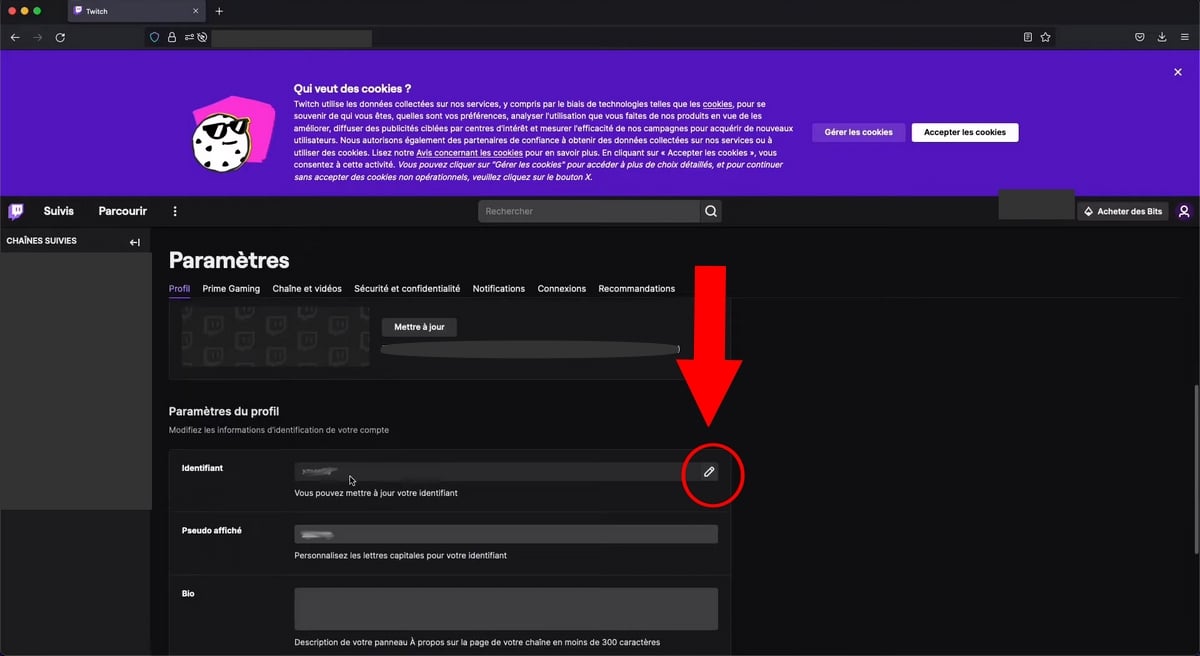
- In the Profile tab, locate the User ID field
- Click on the pencil icon ✏️ to the right of the username and enter your new username.
- Confirm with the code received by e-mail.
⚠️ Don't put the code in place of the nickname, otherwise it will become your nickname. NEW NAME !
How do I change my Twitch mobile username?
Here's how to change your mobile username:
- Open the application Twitch
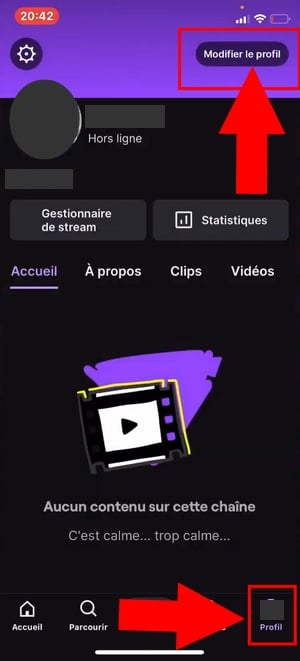
- Go to your profile photo
- Click on Modify profile at top right of screen
- Press on Pseudo to modify it
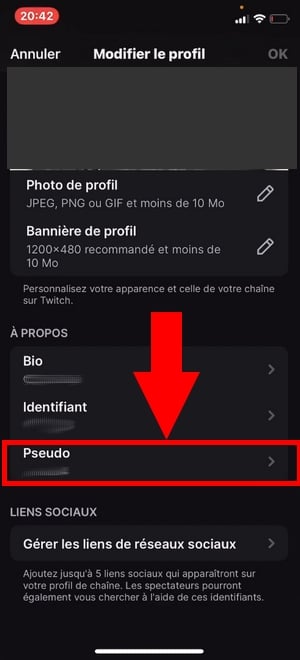
- Now select a new username for your chain Twitch, then confirm. If you're stuck for inspiration, check out our gfree nickname generator !
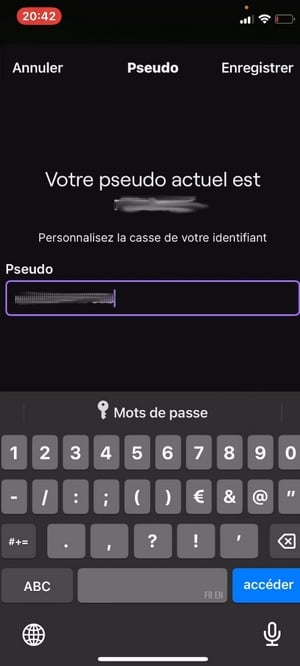
👉 Important note:
- If you don't see the option in the Twitch application, go to twitch.tv online from your phone's browser (desktop mode).
What happened to your old Twitch username?
Your followers and subscribers remain automatically associated with your channel: the’Your account ID does not change, and your VOD and video clips remain available.
Only the address of your Twitch channel is updated. Please note, however, that the URL of your channel (twitch.tv/anciennom) does not redirect to the new one.
Thus :
- You have to update yourself external links to your channel: Twitter bio, YouTube description or Discord.
- Don't forget to tell your community after changing your name, so that it can easily find your profile and the URL of your channel.
💡 Good to know: Changing your Twitch name doesn't affect the content of your channel. Your replays (VOD), your video clips and the game category you broadcast in remain the same. Whether you play video games, Just Chatting or music, the procedure for changing your username is the same.
Changing a Twitch username : Common problems
You wanted to change your name and Twitch YOU blocks ? Here are the 3 most common reasons:
1. Twitch asks you to wait
The waiting period or Cooldown is of 60 days since the last change.
2. You can only change the case
It's normal: Twitch refers to your displayed name, not your login.
It is case-sensitive only (upper/lower case). editable. To change your real nickname, this is the Identifier field, see section Username vs. Display name above.
3. Nickname refused / already taken
If you're experiencing this problem, it's probably because :
- ❌ The nickname is already used,
- ❌ Either it is still in reservation (6 months after abandonment),
- ❌ Either it contains prohibited characters.
Feel free to review the rules mentioned above.
FAQs
How many times can you change your Twitch username?
You can change your username every 60 days. There is no annual limit for name changes.
Why isn't my Twitch username available when it seems to be inactive?
This Twitch username may be reserved 6 months after abandonment, attached to a account suspended, or a former Partner.
Please note that the name of a former partner is not almost never released.
Twitch tells me I can only change the case, why?
Because Twitch targets your display name (display name), where only the upper/lower case changes.
Your user name is modified separately in Settings ⇒ Profile ⇒ Identifier.
Will my followers lose me if I change my nickname?
Nope. Note that your Twitch account ID remains unchanged: your followers and subscribers remain associated with your channel. Even after you've changed your Twitch name, they'll still continue to follow you.
Do I need a verified e-mail address to change my username?
Yes. Your Twitch account must have a verified e-mail address, as this is the one that receives the confirmation code.
If not, check in Settings ⇒ Security and confidentiality before starting the modification.
Will I lose my VODs and clips if I change my username?
Nope. Your VODs, clips, channel points, subscriber badges and chat history remain attached to your channel.
Only the URL of your channel changes, while the content of your account remains unchanged.
All in all, you now know how to effectively change your Twitch username ! And if this tutorial has helped you, don't hesitate to add a comment :).
You can also read our other guides and articles on the subject:
If you have any questions, come and discuss them on Discord :








 English
And so, for me, it's impossible to change my username twitch at the moment.
You have to wait a little while, as mentioned in the article 🙂
Hello, I have his two messages:
– "You can only change the case of your username."
– “You cannot change your username, only the use of capital letters.”
Currently, you can only change the MAJS. For example, if your username is ALUCARE, you can change it to alucare or AlUcArE, for example 🙂
Hello,
Now it's 2 months that you have to wait to change your nickname.
Hi, yes that's what I marked 🙂
I'm a fan of croutons
I hadn't seen the comment mdrrr