To contact Instagram support, the most direct route goes through the’application : go to Settings and Activity > Help > Report a Problem.
It’s the only official channel that actually responds to inquiries from individual accounts. Email is no longer monitored, there’s no phone support for individuals, and regular mail is only useful for legal matters. This complete guide shows you all the ways to Contact Instagram.
1. Contacting Instagram by email: What Still Works
Instagram no longer offers email support to individuals. The historic address support@instagram.com still exists, but it is abandoned and unattended. To write about this is to risk being left behind no response.
Historically, Instagram offered three URLs depending on your device type :
- support@instagram.com : the general address.
- iphone-support@instagram.com : reserved for Apple devices (iPhone, iPad) for app bugs.
- android-support@instagram.com : the equivalent for the Android-powered devices.
These addresses were used solely to indicate a technical bug in the app, with no guarantee of a response.
If you try to’send an email, give yourself the best chance of success. Explain your problem in one or two clear sentences. Include attachments if necessary. For a problem like not being able to Reactivate your Instagram account, the help center is still much more effective than an email.
2. Contact Instagram on social networks
To get in touch with Instagram via the social networks, there are several official accounts: on Facebookon X (formerlyTwitter) and on Instagram himself. You can send a direct message to try to contact support.
These accounts are mainly used to share announcements and advertising. Individual responses are rare.
Here are the official financial statements Meta Contact:
- Official Instagram Account : instagram.com/instagram
- Instagram for Business : instagram.com/instagramforbusiness
- Instagram on Facebook : facebook.com/instagram
- Instagram on X : twitter.com/instagram
3. Contact Instagram by post
You can send a mail at the headquarters of’Instagram. This is the least convenient method, reserved for formal or legal procedures that require a written record.
The address of the corporate headquarters is as follows:
- Instagram, LLC, 1601 Willow Road, Menlo Park, CA 94025, United States.
It is the headquarters of Meta, Instagram's parent company. Plan for a much longer processing time than for the other solutions.
4. Use the Instagram app
L'Instagram application remains the most Fast and the most reliable to get help. The integrated help center covers most common issues, and that's where you can report a problem directly on Instagram. Here's how to access it:
- Since your profile, tap the icon menu in the upper-right corner of the screen to open Settings. Depending on the app version, the label may be «Settings and Activity» and the icon's location may vary.
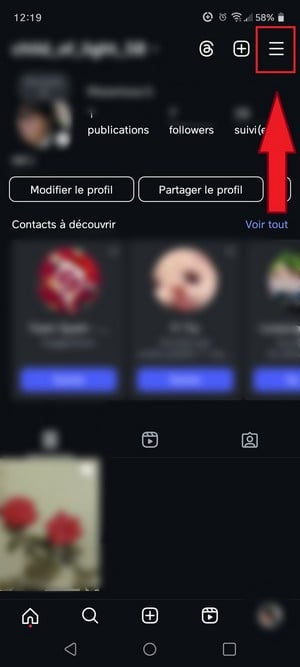
Button for accessing settings on Instagram. ©Antonin for Alucare.fr - Scroll down and tap "Help to open the Instagram support.

Help in the Instagram app settings. ©Antonin for Alucare.fr - Choose the option that best suits your needs to report a specific malfunction.
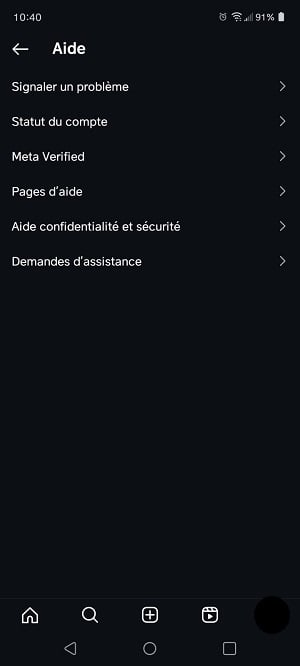
Issues to report to Instagram Support. ©Antonin for Alucare.fr
Each option covers a different use case:
- Open «Report a Problem» If you encounter a problem related to offensive content or a bug in the app. Instagram asks you to shake your phone on the relevant screen to submit the report.
- «Account Status» and Meta Verified relate to managing and improving your account.
- Go to the «Help Pages» to view the articles on frequently asked questions. Type your issue into the search bar to find the appropriate solution.
- Go through «Help, Privacy, and Security» for anything related to the’access to your account or the protection of your data.
- In «Requests for Assistance», you'll find the reports sent and received, as well as tracking monetization.
The interface changes frequently. If you can't find the right path, go directly to the Help Center at help.instagram.com to find the same ones forms of Instagram contact. These forms cover the main scenarios: suspended accounts, reported content, and requests for assistance.
5. Contact Instagram by phone
Instagram does not offer phone support For individual customers. There is no phone number you can use to contact support for a standard account issue. Contact Instagram by phone is therefore not an option for personal accounts.
There's just one exception: if you manage Instagram advertising and if you have a problem with your campaign, you can contact Instagram support through the support service of Meta by phone:
- +1 650 543 4800
This number corresponds to the headquarters of Meta in the United States. The call is not free, and your carrier may charge a surcharge, which is usually announced at the beginning of the call and itemized on your bill.
For any personal issues (account hacked, blocked Where suspended), but rather through the report within the app.
FAQs
What kinds of issues can you report on Instagram?
You can contact the support Instagram in several situations:
- Your account has been blocked, suspended, or hacked.
- Do you have a problems with one or more users of the network.
- Are you having trouble with the advertisement on Instagram.
How long does Instagram support take to respond?
The timeframe varies depending on the complexity of your request. It includes a few hours to several days to get a response. The clearer and more specific your message is, the faster it will be processed.
Why consult Instagram's help pages?
Before contacting support, the help pages enable’get help quickly on instagram without waiting for a response. The official help center contains articles on common issues with the platform.
There you'll find answers to:
- The protecting your account and piracy; ;
- The privacy and your data; ;
- the report content ;
- the account suspension.
You can access it directly at help.instagram.com.







 English
Instagram support is a bad joke. Absolutely NO ONE, not even their Stone Age AI reads them! One of the Report Buttons on the Desk Top version has no code attached so NOTHING happens when you click report.
its really difficult to contact instagram...