To open an APK file on a PC, you need a Android emulator. An APK file is designed to android, not for Windows, so your computer can't run it directly.
The simplest solution is still BlueStacks : You install it, drag and drop your APK into it, and the app launches in a few seconds.
What software can I use to open an APK file on a PC?
On Windows, an APK file does not launch like a file .exe : Your operating system simply can't run it on its own.
So you need a Android emulator, that is, software that recreates the environment Android on your computer. It lets you run your mobile apps and games directly on Windows.
The most affordable option is still BlueStacks, an emulator free, well-known and easy to get the hang of.
How to open an APK file on your PC using BlueStacks ?
The method is quick and requires no technical skills.
With BlueStacks, you can use your app just like you would on a smartphone, without needing a phone. Here are the steps:
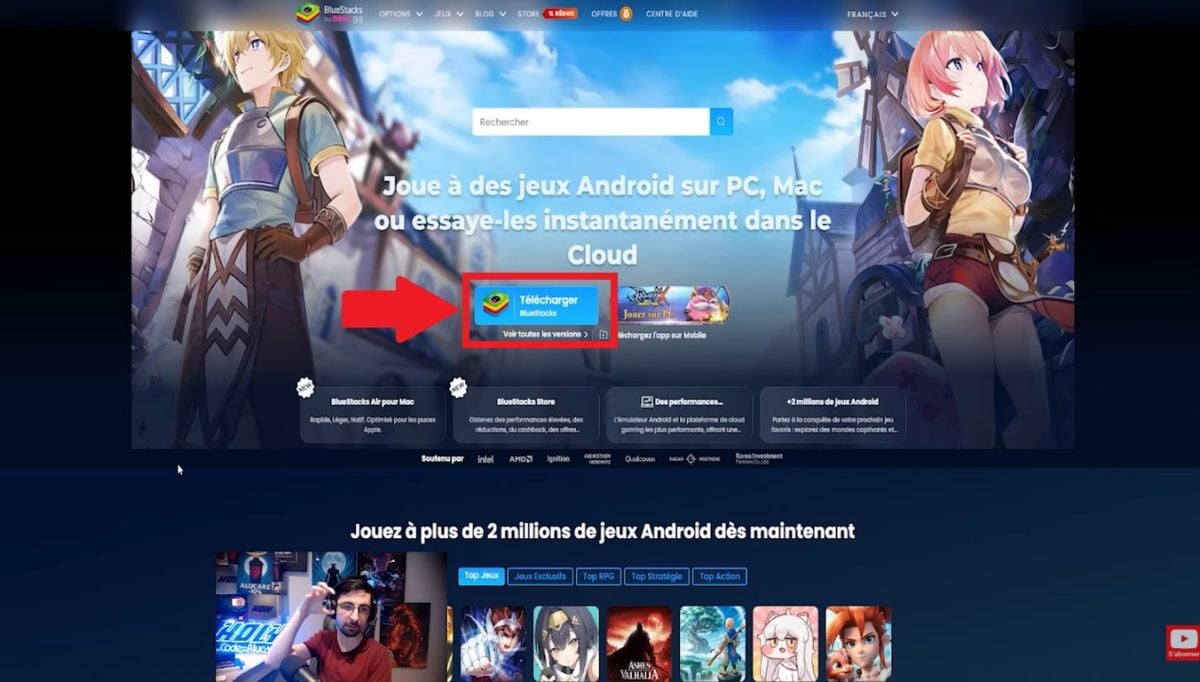
- Go to BlueStacks.com, the publisher's official website.
- Download and then install BlueStacks on your computer.
- Launch the’emulator from the icon on your desktop Windows.
- Import your APK file in two ways: by simply drag and drop in the window, or by clicking the button Install APK in the side menu.
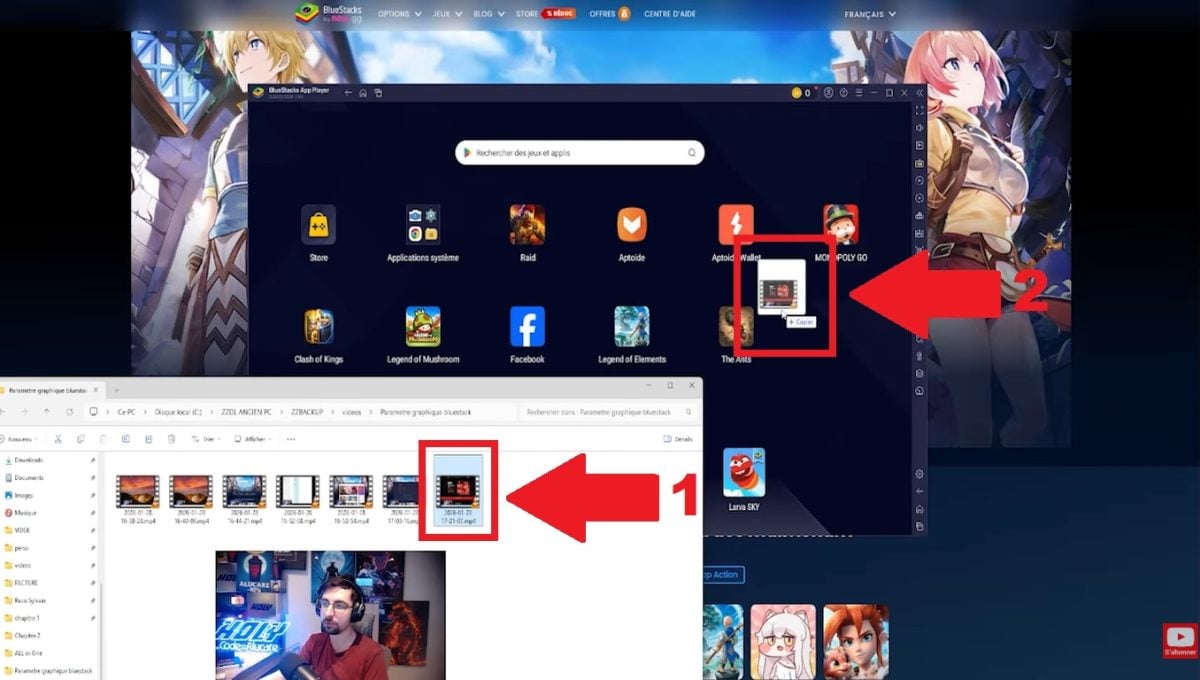
- BlueStacks automatically installs the app in just a few seconds.
- Click on the app icon in your library to launch it.
To learn more, check out our tutorial on’installation of APK files on PC.

What other tools can I use to open APK files on my PC?
BlueStacks isn't your only option. There are several others Android emulators allow you to install an APK file on Windows, each with its own strengths:
- NoxPlayer : Useful for all Android apps, not just games. Its development has been on the back burner for a while, with updates coming infrequently.
- MEmu Play : designed for Windows, lightweight and easy to install on a low-spec computer.
- LDPlayer : perfect for games, with a built-in store. It's one of the the most actively updated emulators, neck and neck with MuMu Player.
- GameLoop : both an emulator and a gaming platform developed by Tencent, but its development seems to have slowed considerably since 2024.
Why choose BlueStacks How do you open APK files on your PC?
BlueStacks It stands out from other emulators for several specific reasons, which are as follows:
- A reliable and widely used tool : You can safely open your APK files there, as long as the file comes from a trusted source (the official website or a reputable developer).
- A simple and intuitive interface : It only takes a few clicks to install an app and launch your APK.
- Regular updates : You'll always have access to the latest features and strong security.
- Direct access to the Google Play Store from the interface, which is convenient for installing Android apps without having to search for each file manually.
When it comes to gaming, BlueStacks remains a reliable choice for playing mobile games on a big screen. Here's what's in store:
- More than 2 million compatible games.
- Excellent care keyboard, mouse, and gamepad.
- Regarding the predefined configurations for shooting or strategy games (MOBA).
- A multi-instance mode to launch multiple applications at the same time.
In practice, you retain the experience and the performance a real Android device, right within Windows.
FAQs
What is an APK file, and what is it used for?
A APK file is the installation format for the Android applications.
It contains everything needed (code, resources, configuration information) to install and run an app on an Android smartphone or tablet.
It's the equivalent of a file .exe to Windows.
Why use special software to open an APK file on your PC?
The Android applications are not intended for Windows. Without Android emulator, your computer simply can't run an APK file.
Software such as BlueStacks recreates a full Android environment on your PC.
How do I install an APK on Windows 11 without an emulator?
There was a native solution on Windows 11 : THE Windows Subsystem for Android (WSA), developed by Microsoft. Support for it ended on March 5, 2025.
Today, a Android emulator It's still the most reliable way to install an APK on your computer.
Is it really safe to open an APK file on a PC?
The security depends above all on the APK file source and the emulator you're using. To be on the safe side:
- Download your APK files from trusted sources, such as the Google Play Store or the official website of the developer.
- Use a tool that is recognized as BlueStacks to open them on your computer.
A file from a questionable source may contain spyware or steal your personal information.
With a reputable emulator and an APK from a trusted source, the process remains simple and secure.









 FR
FR  RU
RU  EN
EN  ES
ES  IT
IT  DE
DE  ZH
ZH  PT
PT  ID
ID  JA
JA  DA
DA