Change your name in Monopoly Go takes less than a minute. You’re only allowed a single change, so choose your username carefully before confirming.
Join our server Discord to get all the latest tips on Monopoly Go :
How to Change Your Name on Monopoly Go: Step-by-Step Instructions

Before you begin, make sure you're properly connected to your account. It's what saves your username and your progress in the game. If you need to log out To switch accounts, do that first.
Step 1: Open the menu
- Open Monopoly Go on your smartphone.
- Press the hamburger menu (the three lines) at the top of the screen to access the main menu.

- Next, select your profile icon (your current avatar) to open the customization window.
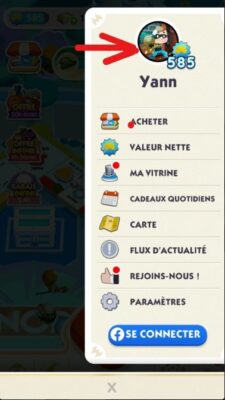
Step 2: Change your username
- On the profile page, tap the pencil placed next to your current name.
- Delete the old username, then enter the new one.
- Press «Submit» to confirm the name change.
That's how your friends and other players will recognize you in the game. Choose a name that truly represents you: you won't be able to change it a second time.
How to Change Your Avatar in Monopoly Go
Customizing your profile isn't just about your name. You can also change your profile photo and your avatar in Monopoly Go.
From the same profile window, here are the steps to follow:
- Press your current avatar displayed in the window.
- Next, select a new model from the avatars provided.
- Click "Validate" to apply the change.
Contrary to what the name suggests, you can change your avatar several times. This is your chance to get creative and customize your profile to suit your preferences. The available avatars expand as the game progresses, so check back often to see what's new.
A good avatar enhances your social experience in Monopoly Go : Your friends and other players see your profile icon every time you interact with them.
Why should you customize your profile on Monopoly Go?
In this mobile board game inspired by the classic board game Monopoly, your profile is your calling card. Your name and avatar appear every time you play with your friends, trade cards, or participate in events.
Effective customization has several advantages:
- Your friends make it easier for you to recognize yourself in the game.
- You can enhance your gaming experience by expressing an identity that reflects who you are.
- You stand out from the other players at events and tournaments.
- This strengthens the sense of community with other players who are playing the same board game.
It's a small detail, but it matters. Take the time to choose a username that will last, since you'll only have one chance to change it.
How many times can I change my name on Monopoly Go?
the A name change is allowed only once in Monopoly Go. Once this change has been made, you won't be able to make any further changes to your profile directly from within the game.
If you can no longer change your name, it's most likely because your one-time change has already been used. You can contact the game support, but we can't guarantee that further changes will be allowed. It's best to keep this in mind before confirming your username.
In the meantime, enjoy the game's other features: for example, you can trade your cards with your friends or pick up the free dice links of the day to make faster progress.
Helpful Tips and Guides on Monopoly Go
To enhance your experience and find more tips on the game, check out our related articles:









 English