Ready to disappear from the world instagram ? Would you like to know how to delete your account? Look no further, you've come to the right guide!
Find out here what you need to do to delete your Instagram account irreversibly!
By the end of this article, you will be able to :
- Delete an Instagram account on mobile (Android and iPhone),
- Delete an Instagram account on PC,
- Delete an Instagram account without password (to which we do not have access),
- Disable an Instagram account temporarily,
- And as a bonus, discover the frequently asked questions users think about when they want to delete an Instagram account!
How do I permanently delete an Instagram account?
1. On iPhone
To achieve this, you need :
- Login to the account to be deleted,
- Have the password of it.
To delete your Instagram account from the mobile app:
- Meeting on instagram and click on your profile,
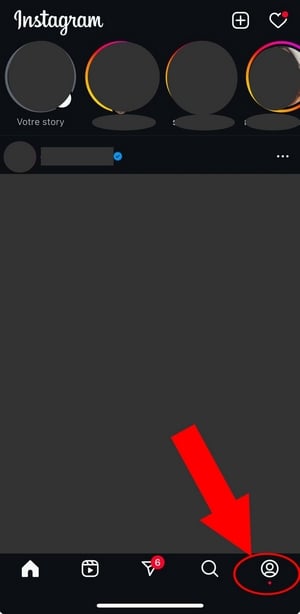
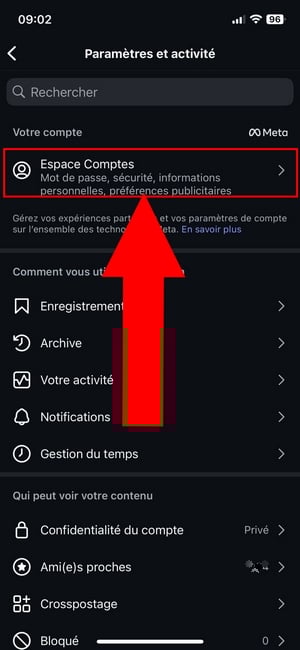
- Press the top right menu,

- Press on Account Areathen on Personal information,

- Click on Account ownership and controlthen on Deactivation or deletion,

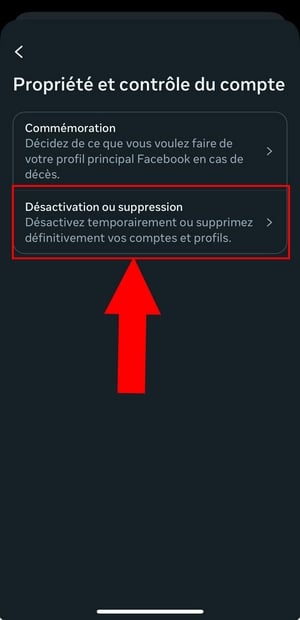
- Select profile you wish to delete,
- Press on Delete account and finally on Continue to delete your Instagram account permanently.
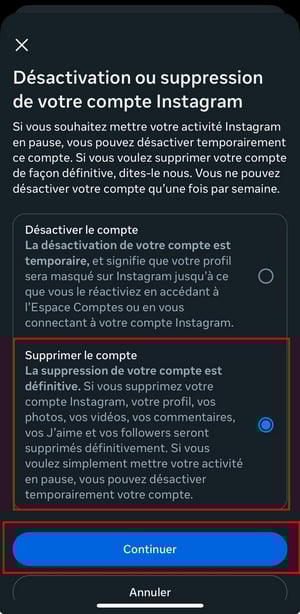
- Then select the reason for which you would like to delete your Instagram account then Continue.
- And finally, you must enter your password to confirm deletion.
2. On Android
- Log in to your instagram account,
- Go to your Instagram profile or on your profile photo at bottom right to access your profile,
- Tap the More Options menu at the top right of the screen.
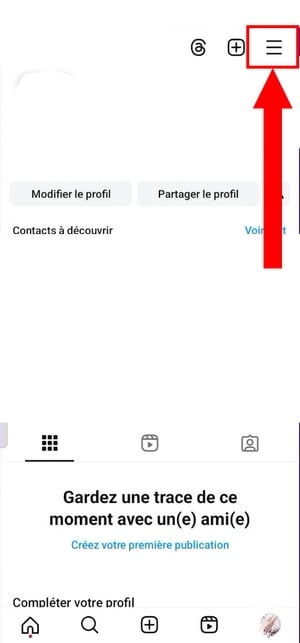
- Click on Account Areathen on Personal information.

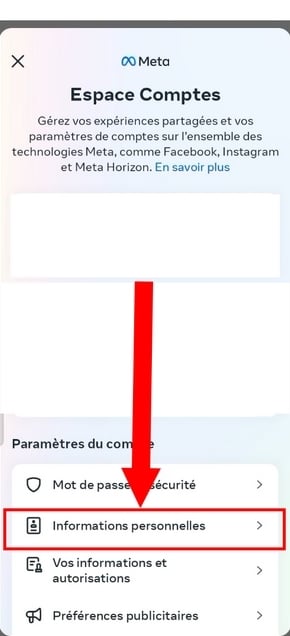
- Press on Account ownership and controlthen on Deactivation and removal.

- Select the account you wish to permanently deactivate (Instagram/Facebook account),
- Press on Delete accountthen on Continue,
- And finally, fill in your password to perform this action!
2. How do I delete an Instagram account on my PC?
Now that you know how delete an Instagram account on mobileAre you wondering how to achieve this on the web?
Here are the steps to follow:
- Meeting on your accountthen click on the 3 horizontal lines at the bottom left of the screen to display the settings,
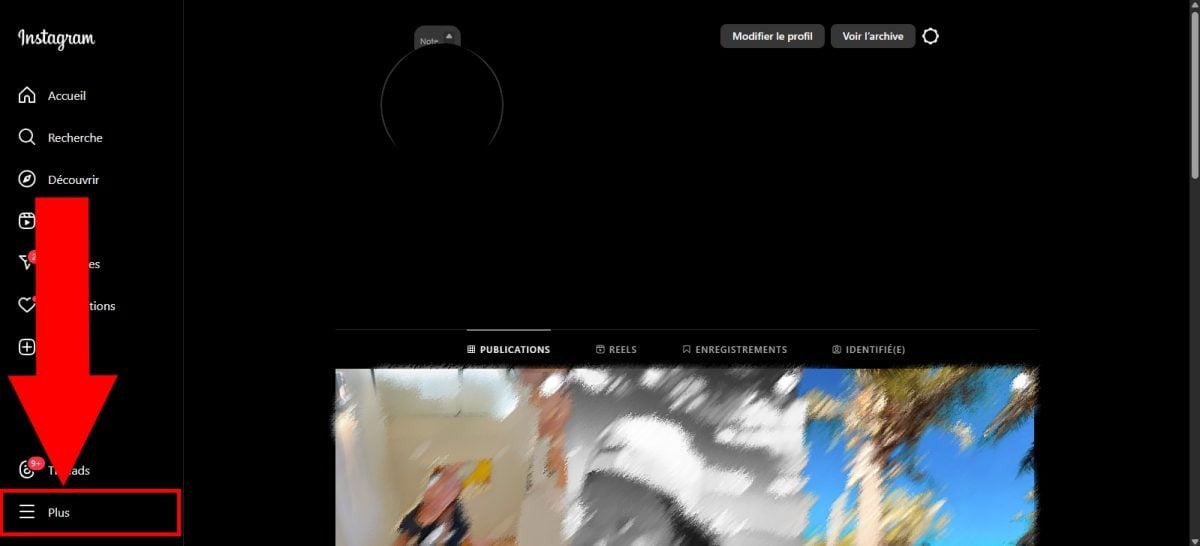
- Once on the Account Area, click on Personal information then on Account ownership and control,
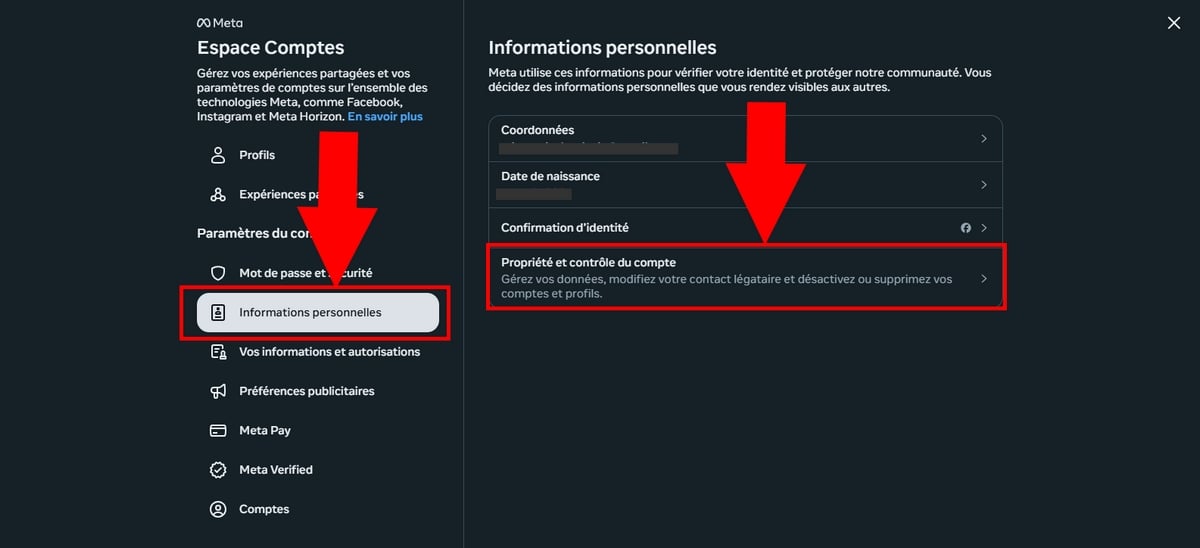
- Select option Deactivation or deletion,
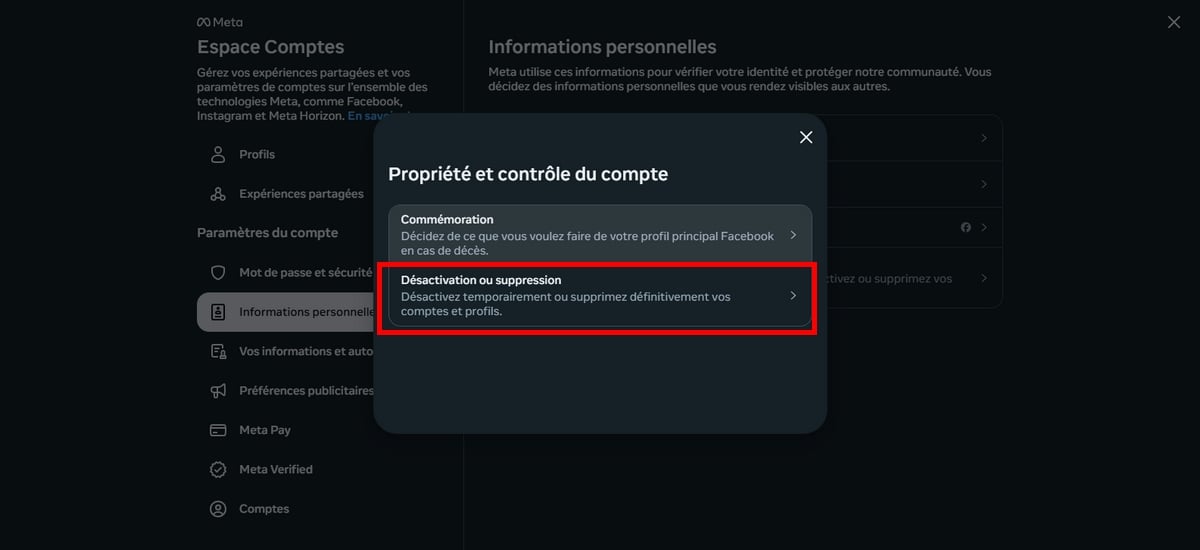
- Select profile you wish to delete,
- And finally press Delete account then confirm the action by clicking on Continue.

- Once you click on Continue, a new window will open where you must enter your password to confirm this action!
Bonus: Tip before deleting your account!
Before deleting your account, we recommend that you connect to your account and download a copy of your informationsuch as your photos and posts. Instagram allows you to download your Instagram data on your device.
As a result, you can choose the medium, the date and the information you want to keep. To request a backup of your data on Instagram:
- Go to the : Your business ⇒ Download your information ⇒ Request a download. You'll find all the steps to upload your Instagram data on this article focused on the Instagram basket.
How do I deactivate my Instagram account?
To deactivate your Instagram account, you must go through all the steps mentioned in this article until you reach the page where you can choose delete account where the disable, whether you have an iPhone, Android, or PC.
Once you are in this menu, it's very simple! You just need to select the option Deactivate account instead of Delete account.

Here is how this option appears on mobile devices:
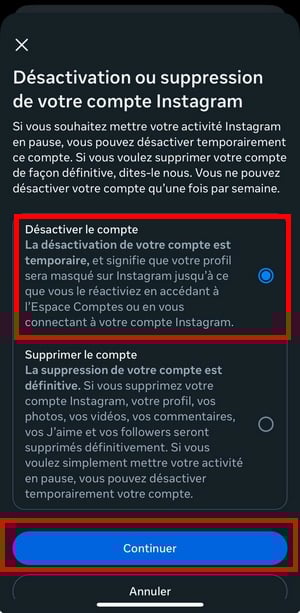
And of course, just like deleting your account, you must enter your password to confirm this approach.
FAQs
Deleting an Instagram account without a password: is it possible?
Regardless of the device you use, iPhone, Android, or PC, you cannot delete an Instagram account unless you have the password for the account in question, in addition to the account's login details.
Therefore, if you have forgotten your password, you must reset it to access and delete your account. For security reasons, Instagram cannot delete an account for you, without password.
Deleting an account VS deactivating an account: what's the difference?
If you want to stop spending time on instagram permanently, the best option is to delete your Instagram account! However, if you want to hide temporarily your account and pause it, the best thing to do would be to deactivate your account!
To summarize the differences between delete and deactivate an Instagram accountHere's a table to help you:
| 📖 Information | ⛔ Delete an Instagram account | 🔕 Deactivate an Instagram account |
|---|---|---|
| Insta account and data | Permanently deleted | Temporarily hidden |
| Data recovery | Possible but not beyond 30 days | Possible at any time |
| Account recovery | Yes, but you must not exceed 30 days after deleting your account. | Yes, just log back into your account with your login and password. |
| Consequences | Information about your profile, your photos, videos, comments, videos, feedback and your latest instagram followersetc. are permanently deleted. | Information on your profile, photos, videos, comments, videos, reactions, subscriptions are temporarily hidden until you reactivate your account. |
Will deleting my Instagram account delete my meta account?
No. Deleting a meta does not result in the removal of your other meta accounts.
Therefore, if you have selected your Instagram profile only when deleting your Instagram account, only your Instagram account will be deleted.
How do I delete just one contact?
Don't want to delete your entire account? Here's how to delete just one contact:
Explanatory video in French by Alucare, ideal complement to the page. View video (you can use YouTube's automatic translation)

How do I reactivate my Instagram account?
a) Deletion :
If you have permanently deleted your Instagram account, you can have one month (i.e. 30 days) to reactivate it again. After this period, you will no longer be able to retrieve your data.
To reactivate it, just log in to your account using your usual login and password.
However, please note that if your account was deleted due to a violation of the Community rules, you may not be able to re-register with the same username.
b) Deactivation
If you have decided to temporarily deactivate your Instagram account, simply reconnect to the social network at any time to reactivate it.
I can't delete my Instagram account: What should I do?
On Instagram, you must be the account owner to delete it.
As a result, once logged into account Instagram, you must re-enter your password to confirm its deletion or deactivation!
Can I delete my account without a password?
Nope. You must have password to delete it.
Can I delete another Instagram account?
As mentioned above, in order to delete an Instagram accountyou need to log in to the :
To do this :
- Click on your Instagram username to access your profile.
- Then press the three small points next to "Edit Profile,"
- From the drop-down menu, select “Logout" to log out of your current account,
- Once disconnected, you can then reconnect to the account you wish to delete, entering your username and password.
- Follow the previous instructions to access the page “Delete your account", then click on one of the reasons provided and re-enter your password to permanently delete it.
By following these steps, you can delete another Instagram account to which you have access and the necessary rights. Make sure you are logged into the correct account before proceeding with the deletion, as this action cannot be undone!
How long does it take to delete an Instagram account?
An Instagram account is not deleted instantly. You have to wait between 30 days (sometimes even 90 days) after the request for deletion so that it disappears forever.
After this period, it and all your information will be permanently deleted, and you will no longer be able to retrieve them.
Therefore :
- The content of your account remains subject to the Terms of Use and at the Instagram Privacy Policyand will not be accessible to other platform users.
- And since the deletion process can take a long time up to 90 days, Copies of your content may be retained after this period in the backup system, used to recover your data in the event of loss, disaster, or software error.
- Instagram also reserves the right to storing your information for legal reasons, in the event of a breach of the terms and conditions or for risk prevention measures, in accordance with its Privacy Policy.
If you're sure you want to permanently delete your Instagram account, you must have saved important information in advance, because once the account is deleted, there will be no way to recover them.
In conclusion :
- To delete an Instagram account:
Check your Account area ⇒ Personal information ⇒ Account ownership and control ⇒ Deactivation or deletion ⇒ Delete account and choose the reason why you want to delete it, and finally enter your password to confirm this action!
- To deactivate an Instagram account:
Follow the same steps to deactivate an Instagram account BUT opt for Deactivate account Instead of deleting the account, after selecting the profile to deactivate on Instagram, right after the option Account ownership and control.
- Deleting and deactivating an account are not the same thing:
Deleting and deactivating an Instagram account are not the same thing. The first option is final, which is why it is recommended that you take the time to think about this decision, as it will have a lasting impact on your presence and activity on the platform. However, the second is temporary.
But in any case, you must have the password to be able to carry out these actions!








 English