One of the advantages of Spotify is that it allows us to listen to our favorite songs offline. Not sure how to proceed? Follow the guide.
This article deals with three points following :
- Download content for offline listening
- Switch on Spotify's offline mode
- To consult offline content
1. Download content for offline listening
Explanatory video in French by Alucare, ideal complement to the page. View video (you can use YouTube's automatic translation)

To download content on this platform:
- You must start with save it to a playlist. You'll then need to download the latter, as it's impossible to download content individually on this platform.

Button to add music to a playlist. Mia for Alucare.fr - Go to the playlist, then click on the icon shaped like DOWN ARROW to download the playlist including the desired song.

Button for downloading a playlist from Spotify. Mia for Alucare.fr
More details on how to download music from Spotify are available in our article on the subject.
2. Activate Spotify offline mode
Switching on the offline mode is different depending on the device you are using. Nevertheless, the process is very straightforward.
On your mobile
Here is what you need to do on themobile app :
- Click on the profile photothen go to Preferences and privacy.
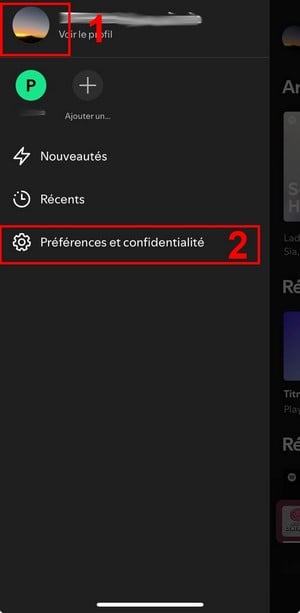
Profile then Preferences and Privacy. Mia for Alucare.fr - Click on Reading (if you're using iOS) or on Data saving and offline mode (if you're on Android).
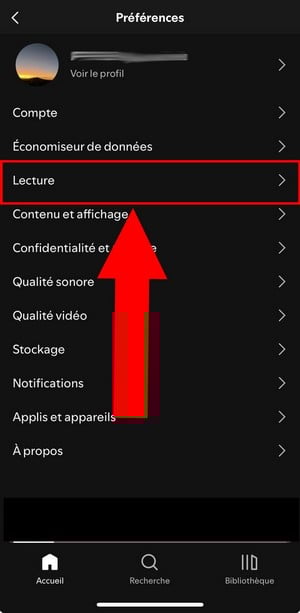
Playback in Spotify Preferences. Mia for Alucare.fr - Disable Offline mode.
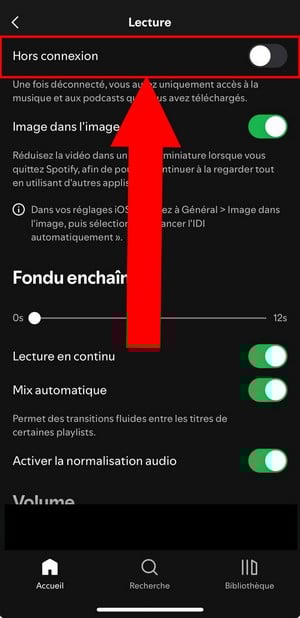
Spotify offline mode. Mia for Alucare.fr
You will notice that content you have not downloaded becomes gray and you can't read them.
On computer
To use Spotify on your computer, follow these steps:
- Click on the 3 horizontal points at the top of the screen.
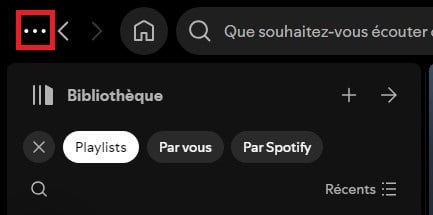
Three horizontal dots on Spotify. Mia for Alucare.fr - Then go to File.
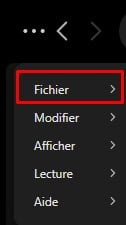
File section on Spotify. Mia for Alucare.fr - Click on Offline mode for disable if it is enabled.
If you are on Macgo to the Applethen enter Spotify and disable offline mode. You'll see non-downloaded content grayed out and unavailable for playback.
3. View content offline
You will find your downloaded content in your library on Spotify.
- Downloaded songs, albums and playlists are all available in this section.
- These contents stand out for their small green arrow to his right.
Please note that it is important to connect to the internet using Spotify. at least every 30 days to keep your downloads active. If you don't do this, you risk losing your songs.
Did you know that you can save money on your subscription and pay less on Spotify Premium ? Our article on the subject outlines the steps you need to take to take advantage of it.
FAQs
How do I quit offline mode?
Simply follow the same procedure as for starting offline mode mentioned earlier in the article. However, here you must activate functionality “Offline mode.”
Why doesn't Spotify's offline mode work?
There are several reasons why Spotify offline mode doesn't work. In this context :
- Ensure that you are not logged in on more than five machines.
- Disable apps to automatically clear the cache.
- Disable thebattery saving.
If none of these solutions work, consider reinstall the Spotify app.
Can I listen to music offline with a free account?
Unfortunately, offline music listening is reserved for accounts. Spotify Premium. However, you can use third-party applications to download content from Spotify and listen to it offline. Here are a few apps to choose from:
- Spotify Music Converter ;
- Sidify All-In-One;
- Audacity ;
- Wondershare Streaming Audio Recorder.
What are the conditions for using offline mode?
To use this feature, you must :
- Have a Premium account.
- Have a active Internet connection to download content and listen to it online from time to time, as mentioned above.
- Have at least 1 GB of free space on your device.
- Do not exceed five-unit limit.
Please feel free to visit the section Spotify on our website to discover other content similar to this one.
In short, the Spotify offline allows you to enjoy your downloaded content anywhere, anytime, without the need for an Internet connection.
Do you find this feature useful? Share it with us comments your opinion on it. We look forward to hearing from you.








 English