In the vast overview of functions Offered by Instagram, the ability to repost a story is an effective way to interact with your audience.
This article looks at how to repost or republish a story on Instagramwhether you're tagged on it or not.
How do I repost an Instagram story?
No matter what model of phone you have, the steps for reposting someone's story on Instagram are the same. Here, we show you how. repost an Insta story on iPhone or Android.
Nevertheless, some considerations of note:
- To publish someone else's story on your account, it is imperative that your Insta username is mentioned in the post. If you're wondering what an Instagram ID is, it's simply your IG username.
- However, there are a few alternatives which we will share with you in this section of the article.
Let's explore some resting scenarios commonly encountered original content.
Repost a tagged story on Insta
If another user mentions your name in his storyThere are two easy ways to republish it:
First method
- Display your MP Instagram via the icon located on the right side up or by swiping left from anywhere in your feed.

Messaging button in the main Instagram interface. ©Mia for Alucare.fr - Click on the message notifying you that you have been mentioned in another user's story and select "Add to your story” at the bottom of the screen.

Instagram MP notifying you that someone has tagged you in their story. ©Mia for Alucare.fr - Before publishing, customize your version of the story by adding text, music, or stickers indicating the location, temperature, time, or even hashtags, etc. You can also set the privacy settings for the story (public or followers). The icons at the top right are used for all edits, including access to GIFs and stickers.
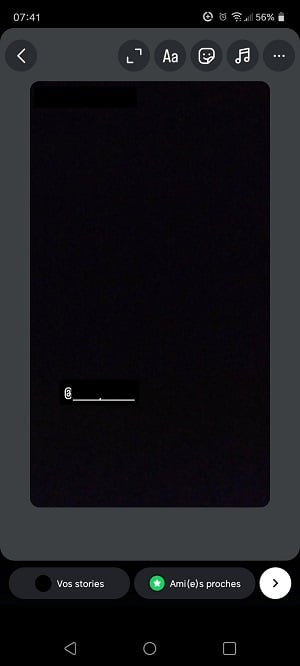
Customize the story to republish. ©Mia for Alucare.fr
In addition to text and stickers, you can also add links to redirect your subscribers. Here's how to do it:
Explanatory video in French by Alucare, ideal complement to the page. View video (you can use YouTube's automatic translation)

Second method
Whether view stories directly of other users is your habit, here's another convenient way to republish them.
On another user's Instagram story where you are mentioned, the option "Add to your story" is also displayed at the bottom of the screen. Select this option as shown in this image.

Republish a story on Insta without being tagged
You may often feel the urge to share a story in which you are not mentioned. Perhaps you have spotted a captivating story from another user or a great product photo from a local company.
So you're wondering how you can repost :
- Unfortunately, Instagram does not currently offer no integrated method for repartitioning Stories where you are not mentioned. Sharing only works for simple posts.
- However, there are still options available to you. To repost on Insta without tagging, the solution is to use your phone to make a screenshot or by recording the story.
The steps are simple. Here's what you need to do.
Step 1: Capture or record
On a capture on smartphone :
- Simultaneously press side button and volume knobthen release them quickly.
- A thumbnail will appear briefly in the lower left corner. The image will be saved to your photo gallery, ready to be shared in your Instagram story.
To record the screenthe method differs slightly.
- First, open the Insta app and swipe down from the top of the screen to access the control center.
- Then search for thesquare icon for screen recording.
- A 3-second countdown precedes the start of recording.
- Don't worry about capturing the entire story, because you can edit the recorded clip.
- To stop recording, simply look at the bottom of the phone and tap therecord icon screen.
Please note that this feature is not available on all smartphones. You can download a third-party application screen recording software if you don't already have it. Select a tool such as Super Screen Recorder, as this can be an ideal alternative in this context.
Step 2: Republishing the story
Post the screenshot or screen recording to your own Instagram story, as if you were going to post a new storyThis simple solution is ideal for sharing an Instagram story when you haven't been tagged.
How to share your Insta story?
If you wish to configure the republishing stories from your own account, simply :
- Examine your settings Then go to your profile and tap the three-line icon at the top right.

Button for accessing settings on Instagram. ©Mia for Alucare.fr - From there, you need to select “Sharing and reuse Instructions for adjusting your Instagram activity sharing settings will be displayed.
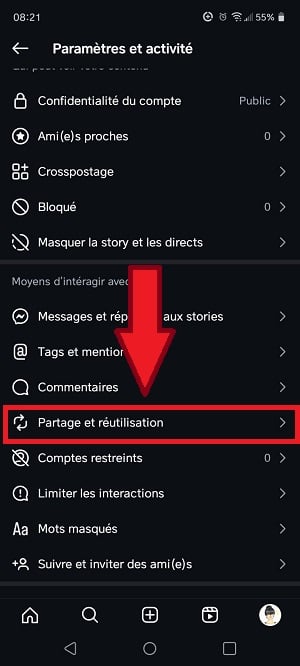
Share and reuse option in Instagram settings. ©Mia for Alucare.fr - Here, check “Publication and real stories” as well as “Stories in messages ".
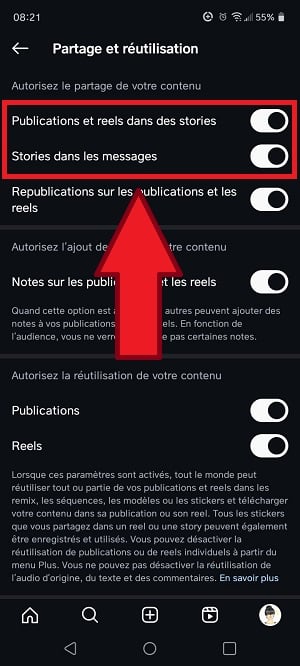
Options to check to enable republication of Instagram stories. ©Mia for Alucare.fr
This will enable other users to republish your stories.
FAQs
What is a repost?
A repost is an action that share content already published by another person on Instagram or any other social network. You can use this feature on photos, videos, text content and more.
Is it possible to edit a story for republishing on Instagram?
The desire to carry out a customizing a story Before reposting in your own, the question surely crosses your mind. Is it feasible? Absolutely.
Although some facets remain unmodifiable, a few adjustments are within your reach. Please note that the photo or video shared in the original post cannot be directly modified. This content belongs to its original creator and retains its original form.
However, you can add additional items such as text, annotations and stickers, as described above.
Why can't I repost an Instagram story?
In principle, you must be tagged in a story before you can repost it on your account. So, if you can't repost a story, it may be because you have not been identified on it.
The paper airplane button may be available, but it only allows you to share the link to story and not republish it.
The privacy settings of the story's original creator can also limit what you can do with the content. This can also be a problem.
How do I make a deleted story reappear on Insta?
We've all been there: the involuntary deletion valuable online content. However, rest assured, there are ways to recover what you think you have lost. We invite you to read the article "Where is the Instagram Trash?” in this context.
In addition, know that :
- You can recover an Instagram post or story that has been deleted in the course of Last 30 days.
- As for Instagram stories, remember that they automatically disappear after 24 hours. So if you want to find an expired story, turn to your archives.
In conclusion, you can republish an Instagram story when you are tagged in it, but there are a few tricks that allow you to repost the content without needing to be tagged.
It gives you pleasure to share stories to your subscribers? You too can see everyone's stories, including those of your followers. latest instagram followers, as long as you're not blocked. If you have any questions, feel free to ask them in the comments.








 English