Search by image size on google
Hey, since an update in September 2019, it is no longer possible to search for size (in pixels) in the NORMAL way (by clicking on Tools and then choosing the size).
So now you have to do otherwise, I'm going to explain to you all 😉
The technique of searching for images by size.
The goal is to do your normal search and then go to images (or go directly to Google Images to do your search). Then just search for ‘imagesize:’ and after the colon, enter the size you want.
So if you want to search for Dragon with 600×600 in size you have to write:
- Dragon imagesize:600×600
If the results do not display the desired size, it means that there is no image of that size.
Hope this helped you 😉
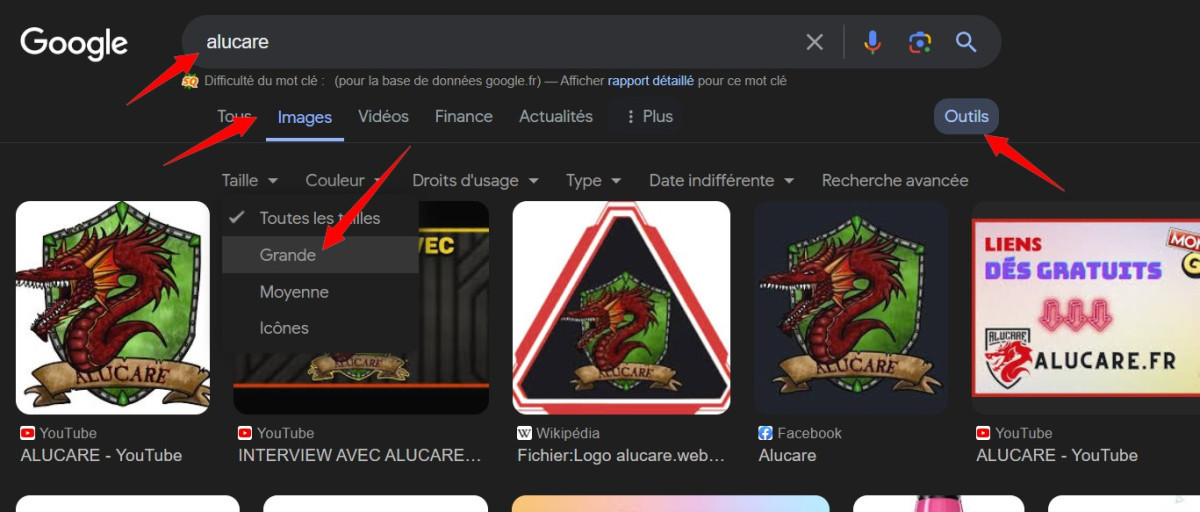
How do I find large images on Google Images?
To search for large images :
- Google your search
- Click on Images
- Then click on “Tools.”
- Finally, choose Grande









 English
Cheer !
I've been looking for a while... It seems so simple... and yet, it had to be found!
Thanks thanks thanks !!
No worries 🙂