TikTok for Business is TikTok's official advertising platform. It lets you create and manage your campaigns, track your results in detail, and increase your brand's visibility among 1.6 billion active users the network's monthly figures.
Whether you're a small business or a major brand, you'll have access to tools reserved for business accounts: precise targeting, a variety of ad formats, and advanced analytics.
What is TikTok for Business?

TikTok for Business is the space dedicated to businesses and brands that want to go beyond a simple personal account.
There, you'll find the classic experience of TikTok, but enhanced with tools and features designed for professionals. Everything is controlled from ads.tiktok.com, the interface for managing your ads and campaigns.
A business account gives you access to brand-specific formats: challenges, branded hashtags, custom effects, or sponsored videos.
The idea behind a branded hashtag is to encourage users to recreate your content and share it, which quickly boosts your visibility and engagement with your community.
On the platform, the commitment rate engagement (likes, comments, and shares) remains one of the highest among social media platforms. That’s why so many companies are banking on short videos to capture their audience's attention and capitalize on current trends.
The video format of TikTok enables rapid reach among active subscribers, far beyond what other social media platforms allow.
How do I create a TikTok for Business account?
The creation of a account TikTok for Business takes just a few minutes. It works similarly to the Business Manager of Facebook : You can manage one or more ad accounts from a single dashboard, depending on your brands or clients.
Here are the specific steps to get started:
- Go to the official platform ads.tiktok.com.
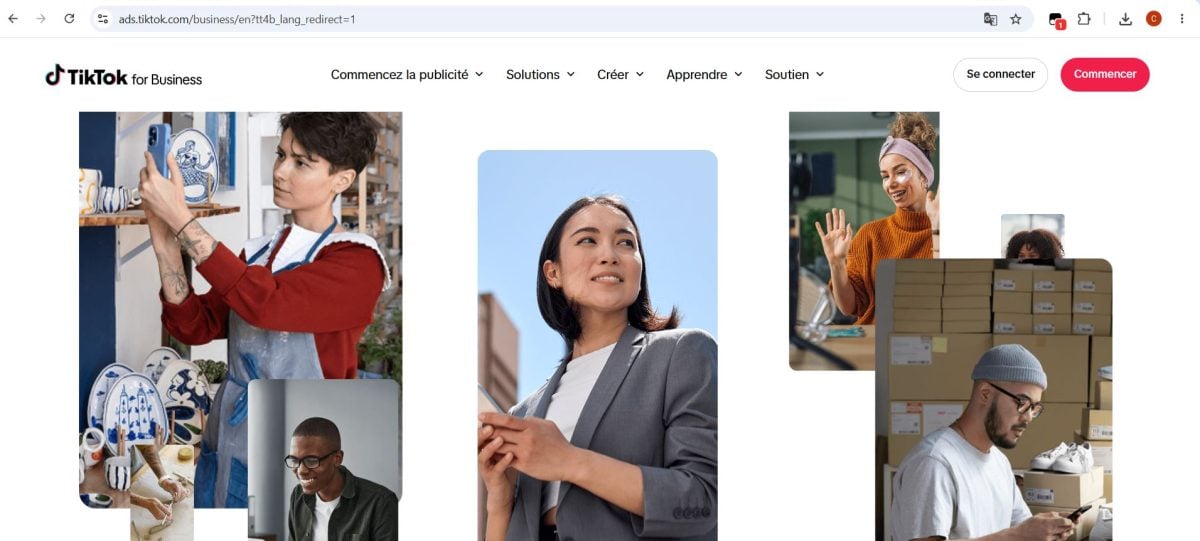
- Create your account and fill out the information about your company : name, country, industry, and currency.
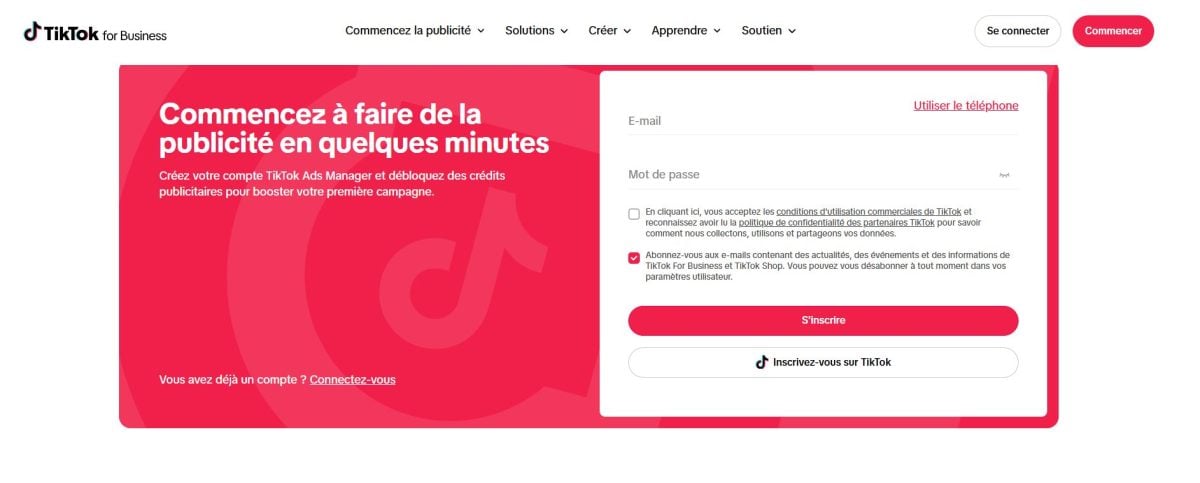
- Confirm the creation of your advertising account.
- Go to the dashboard for the TikTok Ads Manager.
Once your account is active, you can Create, manage, and run your ads directly from this interface. This is also where you can track your data and the performance of each campaign in real time.
What is the structure of a TikTok advertising account?
An advertising account TikTok Ads Manager is based on a structure that three levels, a classic in social media marketing:
- The campaign : the highest level. Here, you set your advertising goal and your overall budget.
- the ad group : Each campaign contains one or more of these. Here, you set your targeting, audience, placement, and bids.
- L'announcement : the video or content that users see in their feed.
In practice, a campaign can include multiple ad groups, and each ad group can contain multiple ads. This allows you to test different formats and different audiences at the same time, so you can refine your marketing strategy over time.
The platform also offers several advertising objectives Depending on your strategy:
- Notoriety : to show your ad to as many people as possible and increase your brand's visibility among users of TikTok.
- Traffic : to drive as many people as possible to your website or app.
- Application Facilities : to increase the number of users who download your app.
- Video Clips : to maximize the number of people who view your content.
- Conversion : to prompt specific actions on your site, such as a purchase or sign-up.
Once your campaign is up and running, you can track your results by real time from the dashboard. You can adjust your budget and targeting at any time to optimize your performance and better reach your target audience.
How do you add your website link to your bio?
Insert the link to your website in your bio TikTok is a key step in your strategy on the platform. It’s this link that turns your visibility into actual traffic and sales. Here’s how to do it:
- Open the app and tap the icon Profile (bottom right) and click on Modify profile.

- Select the field Website In the menu, paste your website's URL, then save.
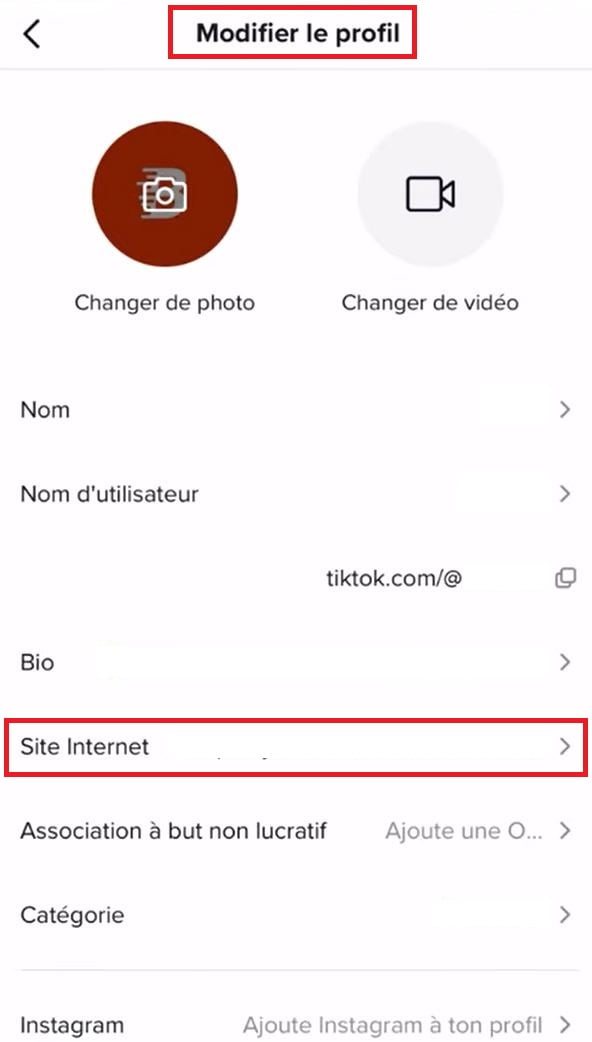
This link in your bio helps turn your audience into customers. It directs your visitors to your store, your contact page, or your product catalog, while strengthening your brand’s image on social media.
Why should you create a TikTok for Business account?
To create a account TikTok for Business gives you access to tools reserved for professionals to grow your brand and boost your sales. The platform is a must-have for any business that wants to quickly gain visibility among an active community.
Here are the main practical benefits for your business:
- Targeting a Specific Audience : You can target your ads based on your target audience's age, location, or interests.
- Boost Your Engagement : the short-form video format and the algorithm for TikTok promote high engagement rates among users and your followers.
- Track Your Results : You can access detailed data about your campaigns and the performance of each piece of content.
- Staying on Top of Trends : You can use popular hashtags to make your content go viral and gain visibility.
- Convert to Sales : You add a link to your website and drive traffic to your products.
The cost of ads varies depending on your goals. It’s a worthwhile investment when you’re targeting a young, active community. Many brands are already using this marketing strategy to quickly build brand awareness on TikTok.
How can you use TikTok for Business to your advantage?
The way you grow a standard account also affects the growth of your account TikTok professional. The best approach is to combine general best practices with the specific levers of TikTok for Business.

Customize your company's image
Personalizing your business creates the impression of an account that the public can truly relate to. By giving your brand a human and authentic face, these viewers become prospective customers.
A business account gains credibility when it inspires trust: your followers see you as your company's representative on the platform.
Adjust your sales approach
TikTok rewards content humane and sincere. So you'll need to adjust your sales approach as your account grows. Before posting a video, take the time to do your research and make sure the content is high-quality.
The platform provides a free analysis tool to understand the behavior of your target audience. It gives you a clear overview of your content and your subscribers. This data serves as a valuable guide for shaping your content strategy and planning your next videos.
Do your research before posting
You can't get results by posting randomly. TikTok is based on a algorithm which is constantly evolving: the more the platform grows, the more accurate the analytics and targeting tools become.
So you need to analyze the key words, current trends and challenges. Without this groundwork, you'll miss out on the viral content that can really boost an account and help you gain new followers.
Build a Real Content Strategy
To stand out from other social media platforms, you need to create a content strategy which makes your videos more visible. Focus on the branded hashtags and the latest trends for reaching a wider audience.
Today, a strong social media presence is crucial, whether you're a small or large brand. Before you get started, identify the strategy best suited to growing your business on TikTok for Business : That's what will make the difference in the long run.
For more information about TikTok, check out:









 English
skajite pojalusto kak mogu poluchit besplatniye manetki
Hello, I work for Alucare, if you have a question don't hesitate to ask it on the Alucare discord: (link at the bottom of the site)