If you have a Discord server, you must manage certain members who may violate your settlementor Discord.
To this end, you can opt for theexclusion, l'eviction where the ban of a person on your server. In this article, we will explain the differences between these penalties and how to use them on Discord.
| ⚖️ Sanction | 📜 Features | ⏳ Duration | 🔄 Ability to return to the server | 🧐 Details |
|---|---|---|---|---|
| Expulsion | Remove someone from the server. | Temporary (not precise) | Yes | You can return to the server as soon as you receive a new invitation. |
| Exclusion | Remove rights of the user on the server. | 60 seconds to 1 week | Yes | As soon as the time is upyou can reintegrate the server. |
| Ban | Do disappear a person permanently from the server. | Permanent | Nope | You can't come back on the server. |
Continue reading for details of the points covered in the table!
1. Expel members from your server
This is the first thing you need to know when using a server. Here are a few details.
What does Expelling a member from his Discord server mean?
This sanction means that you will remove the person on your server Discord. She will no longer be part of your membership. However :
- She will be able to rejoin the server at any time via an invitation or a link from your server.
- An expulsion can be a form of warning that you're going to give your member: "You've pushed the envelope a little too far, so watch yourself when you come back".
Use this penalty when the person has done something that is not extremely serious for your server. In any case, it is always important tonotify the upstream user.
How to expel a member from his Discord server?
It's very easy to expel a member from your Discord server. To do so, follow these steps:
- Right-click on profile picture directly in one of the salons where he has written, or go to the member list on the right.
- A interface will then appear, press "Expel [member]" and you will see this window:

Kick someone from a server on Discord. ©Mia for Alucare.fr
As you can see, you can enter the reason for eviction before validating the approach.
Good to know: The ban will appear in your server logs. To access them, go to your server settings (at the top left, where your server name is located) and navigate to "Server Logs" in the Moderation category.
2. Exclude a member from your server
Here's what you need to know about theexpulsion of a member. We'll go into more detail to help you understand.
What does Excluding a member from your Discord server mean?
This measure ensures that the individual remains on your Discord server but no longer has any rights.
- She won't be able to write, react or enter a vocal salon.
- In addition, it can simply read messages sent to text chat rooms.
This sanction is temporary. It lasts from 60 seconds to 1 week.
How to exclude a member from your Discord server?
To take this stepit's very simple:
- Right-click on the profile photo of the person (if they've just written in a text room), or right-click on their profile in the member list on the right.
- Then click on "Exclude [member]". This window will appear:
As you can see :
- You must select the duration of exclusion 60 seconds, 5 minutes, 10 minutes, 1 hour, 1 day or 1 week.
- Then you can put a patternbut it will only be visible in the server logs.
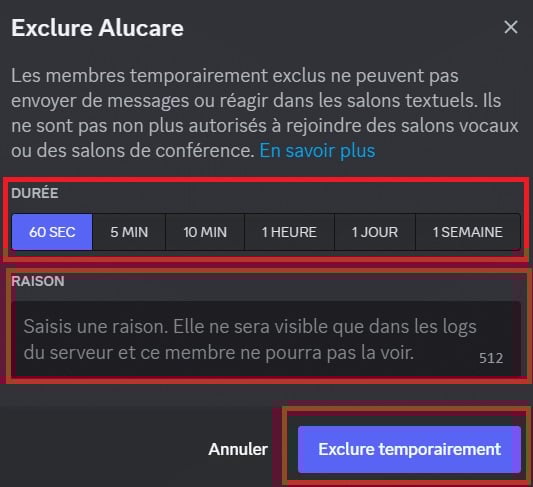
Exclude a member from your Discord server. ©Mia for Alucare.fr
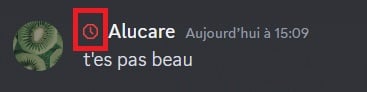
Members who are excluded have a small logo visible next to their username. This logo is only visible to server moderators. Here's what it looks like:
To see the exclusions given, you can go to the server logs. To do this :
- Access to settings (by clicking on your server name in the top left-hand corner).
- Then go to "Server logs in the Moderation category.
How do you remove an exclusion applied to a member of your Discord server?
If you feel that you have excluded a member from your Discord server for too long, you can at any time stop exclusion. To do this :
- Go to individual profile by clicking on their profile in the list of server members, or by clicking on their profile photo if they have spoken in a text chat.
- Then click on "Stop excluding [member]".
- A window appears showing the remaining exclusion period for the member.
- Press on "Stop excluding.
3. Ban a member from your server Discord
This measure has a final. Here are a few details.
What does Banning a member from your Discord server mean?
Banning a member from your Discord server is the penalty the heaviest. The aim here is to ensure that the user disappear from your Discord server forever.
He will no longer be able to join your server Discord, whether via an invitation link, or by any other means. It's an effective way of letting someone know they've done something wrong.
How to ban a member from your Discord server?
To complete this process on your server Discordsimply :
- Make a right-click on your profile in a text chat or if he hasn't spoken, you can click on his profile among the members on the right.
- Then press "Ban [member]" and this window will appear:

Ban a member from your server on Discord. ©Mia for Alucare.fr
You can pre-select a reason :
- Suspicious account or spam.
- Compromised or hacked account.
- Non-compliance with server rules.
If the reason you're looking for doesn't appear, or if you'd like to be more specific, press "Other and write your motif.
If you wish, you can delete the sent messages in text-based chat rooms by the individual concerned, bearing in mind that they are not automatically deleted. To do this, select when you want the messages to disappear (ranging from the last hour to 7 days prior).
You can also apply this penalty to several members at the same time, selecting them together and following the same approach.
How to remove a ban from a member of your Discord server?
You can view all server bans in the server settings. How to access :
- Click on your server name at the top left to access the "Server settings.
- Then, in the Moderation category, access the "Banishments". You can see all the banned people.
- By clicking on one of the people, you can see the reason for the action.
- You can withdraw the sanction by clicking on "Revoke ban".
- By doing this, the individual concerned will be able to rejoin your server.
FAQs
How do I join a Discord server where I am a ban?
Did you know that a VPN for Discord is useful for bypassing a ban on Discord? This is because the block does not occur on the account, but rather on the IP address. To find a Discord server where an account has been banned, it is essential to use a VPN.
The private network allows you to change your IP address, create a new account, and pretend to be a new user on the Discord server. You can choose from many VPNs on the market, including NordVPN. In fact, you can to get NordVPN for free with a few tips.
Do I receive a notification after a ban on Discord?
Discord users are not notified that they have been banned from a server. They can only see that the server has disappeared from their catalog.
In fact, if you're looking for a particular server that doesn't does not displayThis means that you have been kicked from this server or that it has been deleted.
In short, whether you're looking for a penalty temporary or permanentDiscord looks after its users, providing them with everything they need to feel safe and able to cope with any unpleasant situation.
Feel free to check out our other articles on Discord ! The comments section is also open if you'd like to express your opinion on the subjects mentioned above.









 English
Hello
For the second time, I am complaining about Alucar because I just logged in and filmed the screenshot to keep proof that alucare does not give the dice every time, because it has already happened several times that I have been given both when I just log in, so when will I get a refund for all the dice I have lost?😡😡😡😡
Hello,
There's no point in saying it's our fault. The problem comes from the game itself, which doesn't give you the dice, not from us. We ONLY share the links that Scopely gives us.