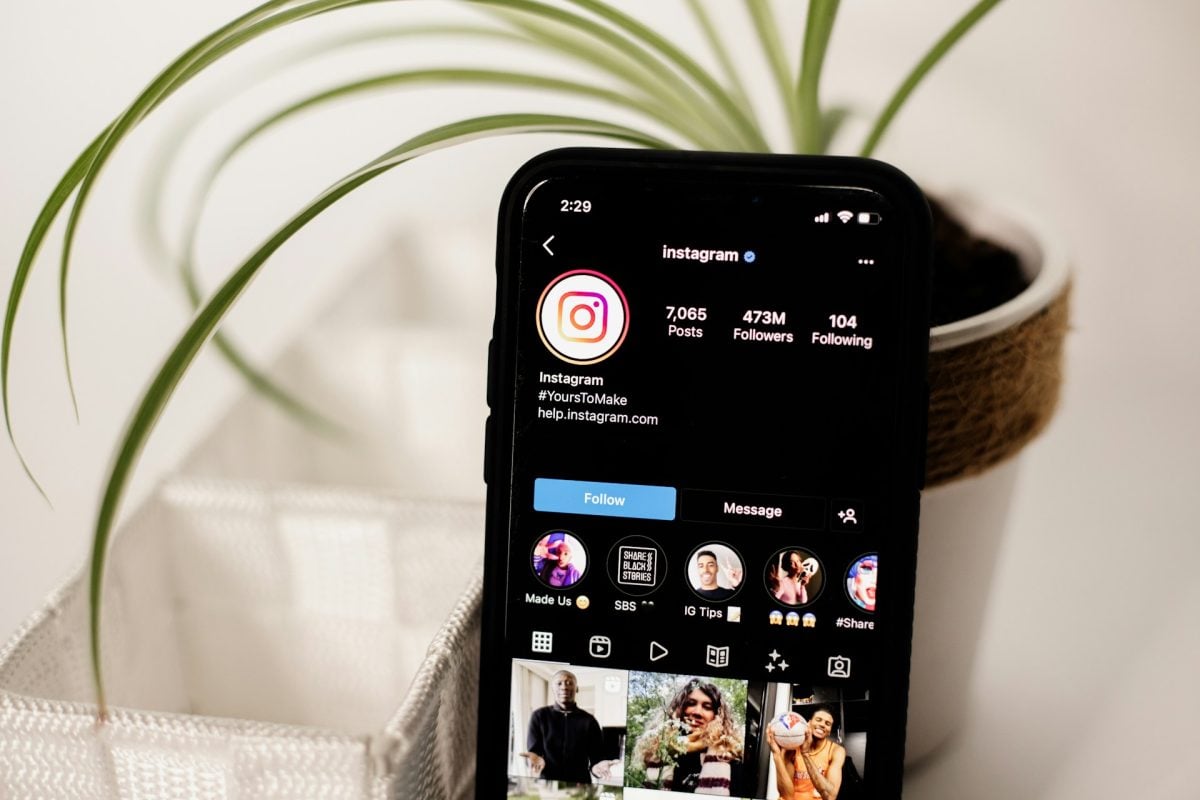
the Instagram feed, that's your profile as seen from the outside : profile photo, bio, post grid, featured stories, and links. Not to be confused with the news feed, which displays posts from the accounts you follow, mixed in with recommended content and ads.
Here's what makes up a feed and how to create one harmonious.
What does “feed” mean on Instagram?
The word “feed” It has two meanings depending on the context, and it's easy to mix them up.
- In everyday language, the feed refers to the news feed : the feed of posts from the accounts you follow, along with recommended content and ads.
- Among the pros in the marketing and on Instagram in particular, the Instagram feed refers to your profile as seen from the outside : all the elements that are visible when someone visits your account.
Another important distinction: don't confuse the grid and the feed. The grid is the a mosaic of square images which compiles your posted photos and videos. It's just a part of the feed, not the entire feed.
Every social media platform has one's own lexicon. A Complete Instagram Glossary is available if you want to look up the other terms.
What does the Instagram feed consist of?

Your Instagram feed isn't limited to your photos. It includes all the items visible on your profile when a visitor lands on your account.
1. The profile photo
She embody your image or your brand's logo. Choose it carefully: it's often the first thing a visitor notices, and it sets the tone for the first impression that you give.
2. Username and display name
Your username (the @pseudo) and the name displayed above your bio contribute to your identity and help people to find. A clear and consistent name strengthens your brand image.
3. Biography
Filling out your bio is still optional, but a A well-written bio improves your visibility. It’s also one of the first posts a visitor reads on your account. You might as well make it a showcase for your universe and your brand.
4. Publication Schedule
The grid brings together all of your publications posted on Instagram. It's a real showcase visual, especially for a business account, and the element that catches the eye the most. A feed harmonious This makes all the difference for your audience.
5. Links
You can add some links that redirect to your website or other pages. Since the latest updates, you can place up to 5 right below your bio, in one easy-to-find spot.
6. Action Buttons
Instagram offers predefined action buttons from which you can choose: Réserver, Envoyer un e-mail Where Appeler, among other things. These buttons mainly appear if your account is in professional or store. The labels 100 Custom % Units are reserved for advertisements.
7. Featured Stories
The Instagram featured stories are also part of the feed. These are the stories posts you've already published that you keep visible right above your grid, to highlight your most important content.
How to create an interesting Instagram feed?

Just a few simple rules are all it takes to get a harmonious feed and consistent. Here are six practical tips for organizing your feed and standing out.
1. Define a graphic charter
Instead of following the latest trends, define a graphic charter solid. It is she who sets your visual identity and ensures that your publishing schedule remains consistent over time.
To build it, set:
- A color palette of two to four shades that you use all the time.
- At least two fonts clearly legible.
- The same filter Where iconographic style applied to all your photos.
A feed in black and white or one that focuses on a single color immediately creates a visual harmony very distinctive. Your audience can recognize you at a glance, whether on Instagram or your other social media platforms. It’s also a powerful tool for establishing your brand image.
2. Use an editorial strategy
High-quality content attracts an audience and fuels the’commitment. Your strategy Editorial content is the key tool for reaching your target audience and delivering the right message to the right audience.
To define it, identify:
- Your key topics, based on your expertise, your target audience's needs, and your Mark.
- The types of publications To create: promotions, fun posts, collaborations, tips.
- Your editorial style : tone, vocabulary, emojis.
A good strategy allows you to post consistently over the long term, in line with your brand, and to create your visuals much faster. It also boosts the’commitment of your audience for each post.
3. Post consistent, high-quality visuals
Once you have your visual identity and editorial strategy in place, focus on the quality of the visuals. A image A sharp, well-composed photo is always better than a sloppy one: it’s what establishes your credibility and attracts an audience.
Treat each photo Before publishing it: brightness, framing, and color consistency with your brand guidelines. In a professional setting, if you’re neither a graphic designer nor a photographer, delegate the creation to someone who will respect the visual identity of your Mark.
4. Preview content before posting it
Planning ahead is essential to maintaining a harmonious feed. By preparing your posts in advance, you can preview your grid and rearrange the order of the images so that each line remains consistent.
Some photo editing apps let you adjust your images while staying true to your color palette, so your Instagram feed always looks consistent.
5. Choose a feed type
the feed type defines the structure of your grid and enhances the consistency of your profile. There are several standard formats for creating a great Instagram feed :
- the checkerboard : You alternate between two types of posts (a photo followed by a quote, for example) to create a checkerboard effect.
- the puzzle : When put together, several tiles form a single large image.
- The schedule by rows or columns, where each row follows a theme or color.
- The feed monochrome, centered around a single dominant shade.
6. Use Instagram's features
The consistency between your profile photo, your bio and your posts are still essential for organizing your feed. Also take advantage of the front-page stories and the links to complete your profile: it’s often these details that convince a visitor to subscribe.
Your feed is much more than just your grid—it also includes your bio and your pinned Stories.
For more tips on instagram, check out the other articles on the site. Have a question? Leave a comment.








 English