Dyno is a free moderation bot for Discord, used on over a million servers.
It manages sanctions, anti-spam, automatic roles, welcome messages and personalized commands, all from a web dashboard, without a single line of code.
Here's how to add it to your server in less than 5 minutes, then configure it.
⚠ Important information :
Dyno no longer plays music (the module has been disabled by the publisher, even though the marketing page dyno.gg/bot still lists «Music Player» as a feature); we’ve provided an alternative below.
Can Dyno still play music?
Nope. Dyno's music module is disabled by the publisher and is no longer available. No need to look for ?play commands: they no longer respond.
If you want to listen to music on Discord, take a look at our guide how to use the Rythm bot on Discord.
How to install and configure Dyno bot on your Discord server?
To install and configure Dyno On your Discord server, follow these steps:
- First, go to the bot's website: https://dyno.gg/. Click the « Add to server »or «Login with Discord».

- Then select the plan that suits you. If you want to use the free plan, click the “Add to server” button next to the option. free package.

- If you are not yet logged in to your account, use your credentials to log in. You will then be redirected to the Discord application. Next, select the server on which to invite the Dyno robot. Please note that administrator permissions on the server are required to complete this step.

- Once you have selected the server, click the « Continue », then click on the « To allow ".

- Confirm the captcha and a Dyno bot configuration page will open. Complete the configuration.

- Now open the’application Discord. Access the server where you added the bot, and you will find the Dyno bot added.
How do I set up custom commands with the Dyno bot?
the Dyno control system is fully customizable: you can create your own shortcuts to automatically answer recurring questions, launch an action or send a standard message. Here's how to add one.
- Go to dashboard for starters.
- Dans la section «Modules»then press «Custom commands».

- Then press «Add command».

- Write it down name order as well as the description. Define what you want the command to do.
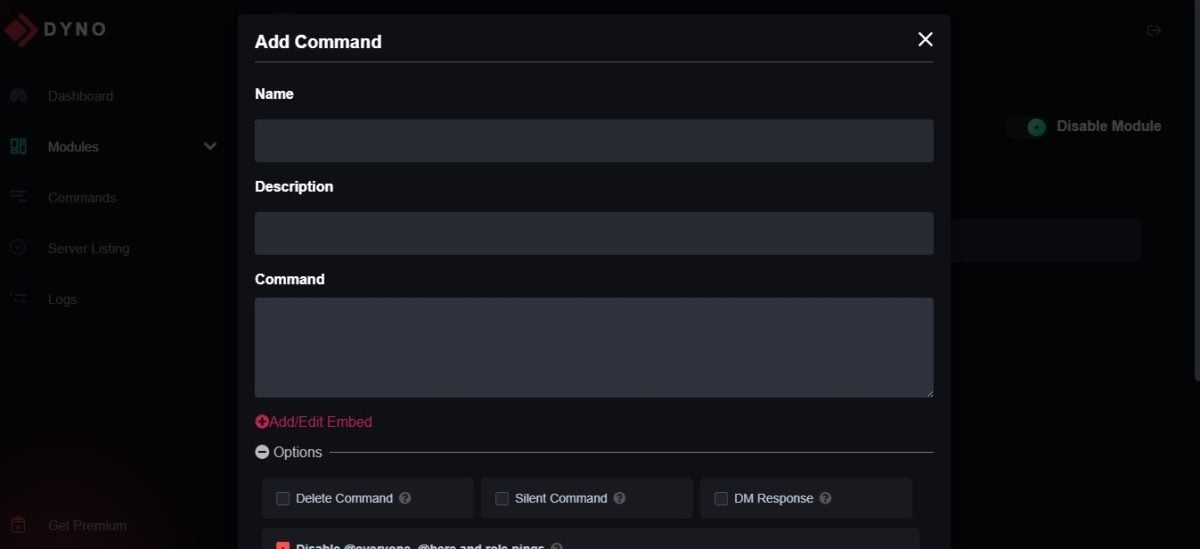
- Click on " To register » to save the order.
- Your new command is active Type his name in the chat, Dyno answers.
What is Dyno really good for today?
Now that Dyno is on your server, here's what it can actually do, and why it's become a must-have for time-saving moderation.
💡 Small practical detail prefix: the default prefix is ?, but you can replace it with another symbol (!, +, -...) if another application is already using it on your server. The setting is made in the Settings section of the control panel.
Automatic moderation (automod and anti-spam)
Dyno watch message floods, invitation links, excessive capitalization, mass mentions and forbidden words.
You activate you want from Modules > Automod, and the bot takes care of the rest: warning, deleting the message or punishing you according to the rule.
Sanctioning without spending the evening
Mute, kick, ban and warn: every sanction can be timed. A command like ?mute @member 1h spam silences the member for one hour, with the reason recorded.
You can also notify a user with ?warn, view warnings later and keep track of every action thanks to moderation logs, sorted by box number.
Everything is configured from Modules > Moderation, and the duration does the rest: no need to go back and unlock the member manually.
Distributing roles on your own
Two widely-used applications: the autorole, which assigns a role to each new member (for example, «Member»), and roles assigned by reaction, where a member clicks on an emoji to receive a role (language, favorite game, ping opt-in, etc.).
- Payable within Modules > Role-playing Games and Reaction Roles.
Create joinable ranks
the Ranks module allows you to create ranks that each member assigns to himself with a single command.
Convenient to let users choose a color, region or area of interest without disturbing a moderator. You define the list of available ranks in Modules > Ranks, and the bot manages the allocations.
Welcoming and saying goodbye
You can set a welcome message posted in a dedicated channel when a new member joins the server, and a goodbye note when they leave.
The variables (nickname, mention, number of members) personalize the text, and it's still possible to send a PM. It's a simple way of welcoming newcomers as soon as they join, without the need for moderator intervention. Settings: Modules > Welcome.
Custom orders
This is the function covered earlier in this article. Once in place, your in-house controls coexist with Dyno to automate FAQs, shortcuts and recurring messages on your server.
Highlight the best content (Starboard)
Starboard highlights the most popular publications on your Discord server. As soon as a publication receives enough reactions ⭐, Dyno forwards it to a dedicated channel.
- Enable the feature from Modules > Starboard, Then select the channel and the number of reactions required.
Indicate absence (AFK)
The AFK function lets each member signal that it is moving away. By typing the command “?afk,” the user sets their status to AFK: when mentioned, Dyno automatically replies that they are away and displays the reason.
The AFK status is removed as soon as the player posts again on the server.
FAQs
Dyno bot: what is it?
Dyno is a moderation bot which is fully customizable on Discord. It features anti-spam, timed sanctions roles automatic, All this can be controlled from a web-based dashboard with an intuitive interface.
It looks set to rival MEE6 and is used by millions of people around the world.
What are the advantages and disadvantages of the Dyno bot?
Like many bots that are popular with many users, such as the MEE6 bot or Carl Bot, the Dyno bot on Discord also has advantages and disadvantages.
| ✅ Benefits | ❌ Disadvantages |
|
|
In short, Dyno is one of the best bots to use on Discord for improve server management.
- Dyno is a moderation bot customizable for Discord, offering timed sanctions, anti-spam, automatic roles and personalized commands, all controllable from a web dashboard.
- Installing Dyno Bot on a Discord server requires administrator rights and is done via the official website, with a step-by-step guide to configuring custom features and commands.
- Dyno offers moderation tools event reminders, word filters and welcome messages, improving management and interaction on Discord servers.
You now know how to install and use Dyno bot on Discord. It's up to you to try out the various modules to moderate your server effectively.









 English