You can have a second Facebook account, but Facebook It officially prohibits this in its terms of use.
To create this second profile, you'll need a different username from your main profile: a another address or another number.
Facebook remains one of the most widely used social media platforms in the world, with nearly 3 billion monthly active users.
You can manage multiple profiles Facebook from a computer or your phone, and then switch between them in just a few seconds. This handy guide explains how to do it step by step.
Steps to Follow to Create Another Facebook Account
Before you begin, there's one thing you should know: Facebook officially allows only one profile per person.
Create multiple profiles Facebook violates the Community Guidelines Facebook. In reality, many users create an account Facebook additional measures to separate personal life from professional life.
An important note about the friend limit: if your profile has reached 5,000 friends, creating a second profile is not the right solution. Activate the subscriptions instead on your profile, or create a page Facebook which, for its part, has no limit on the number of followers.
To create a new profile distinct on Facebook, you'll need a username that's different from the one you used for your first account.
You can create a second email address dedicated number or use a different number. If you're starting from scratch, you can also create an e-mail address specific to this profile.
Here are the steps to follow on a computer:
- Open your browser and go to the homepage of Facebook. To stay logged in to both of your profiles at the same time, use a incognito window in your browser.

- On the right, locate the registration area. Enter your first name, last name, date of birth, and gender, then click Send
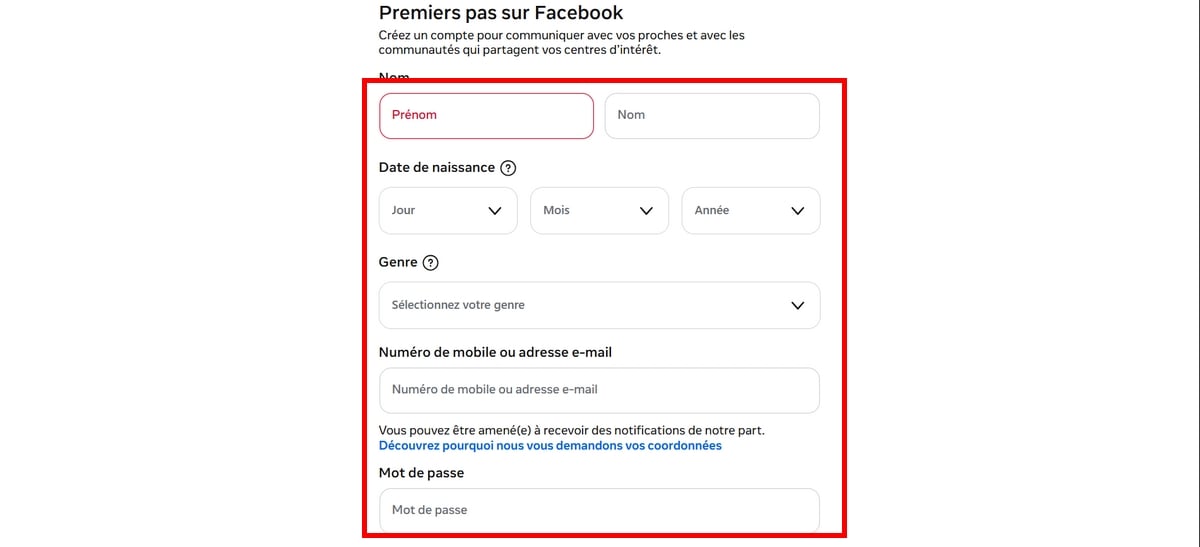
- Choose a strong password, then click «Sign Up» to create your profile Facebook.
- Facebook sends you a confirmation code. Enter it to verify your identity and log in to Facebook.

- Customize Next, your profile: add a profile picture, find your friends, and fill in your information.
Managing multiple profiles on mobile devices Facebook is even simpler. The app lets you add several accounts and of switch from one to the other without logging out. This feature has been rolled out across iOS and Android Starting in 2023.
To switch between profiles, open the app's settings Facebook and come down until the Management Section financial statements.
You can add a new profile and switch in a matter of seconds.Your accounts stay logged in at the same time, which is very convenient for everyday use.
Note that Messenger is linked to your account Facebook : Each profile has its own messaging system Messenger distinct.
Steps to Follow to Merge Your Accounts Before the Old One Is Deleted
Good news:
You can delete a profile Facebook at any time. It is still not possible to merge two profiles.
You can still download your data before deletion to keep your profile photos and information. If you've lost access to your profile, check out our guide to Recover an account Facebook without an email address.
Here is the step-by-step procedure from the app:
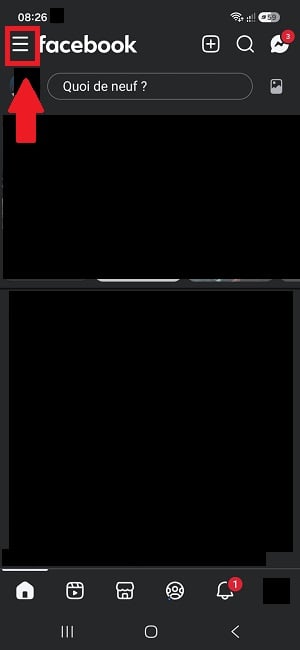
- Tap the button with three horizontal lines in the upper-right corner of your phone.
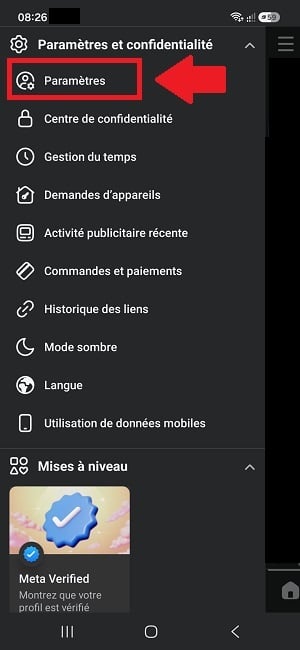
- Scroll down the menu, then select «Settings.».
- Go to the «Accounts» tab.

- Click «Manage Accounts.».
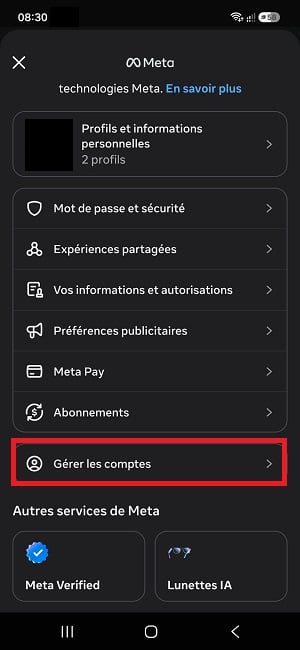
"Manage Accounts" option on Facebook. ©Antonin for Alucare.fr - Above your Facebook profile, click «Manage.».

- Next, select "Deactivate Profile" and follow the steps.
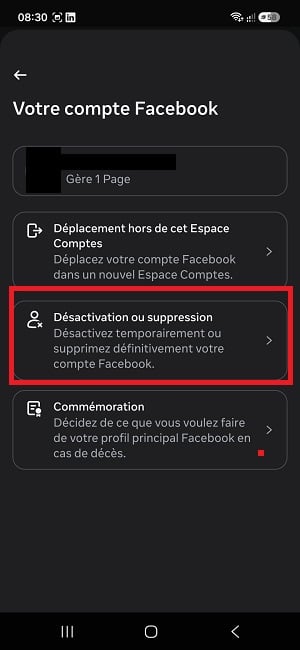
- Enter your password to confirm your identity, then click « Continue ".
Your profile Facebook It will then disappear permanently, along with your posts and your profile picture.
Be sure to back up your data before proceeding to this step. If you just want to manage two profiles without deleting anything, you can switch between your accounts directly from the app and stay connected both at the same time.









 English
Hello yes I understood your explanations, but my problem is that whatever I do Facebook sends me like whatever my account is blocked, what he does that I do not have ecce to be able juggling my ads to open an account, I tried everything, as soon as I got this ban within 178 days then 30 days then I don't know what, here's the word, they don't leave me any issue to be able to access the first questions so that I can change my coordinates a little and finally open an account. and I find myself in deep shit, because for my hard hard job without Facebook, and if there was a possibility of diverting all that in order to be able to open an account, I don't know what I would do, because in my work I have hundreds of thousands of subscribers and friends that I must at all costs find them, and I am not a bandit, I took these bans, without knowing that it was not necessary to send more n number of my Works to make people around the world discover, so yes I must have done a little too much, that's my crime. {{ I attach the same comments with 2nd mail address disputes in case, Greetings
Hello, yes, I understand your explanations, but my problem is that no matter what I do, Facebook sends me a message saying that my account is blocked, which means that I don't have access to my ads to open an account. I've tried everything, but as soon as I do, I get this 178-day ban, then a 30-day ban, and then I don't know what else. In short, they're not giving me any way to access the initial questionnaire so that I can change my details a little and finally open an account. And now I'm in deep trouble, because my job is really hard without Facebook, and if there was a way to get around all this so I could open an account, I don't know what I would do, because in my work I have hundreds of thousands of subscribers and friends that I have to find at all costs, and I'm not a crook. I took these prohibitions without knowing that I shouldn't send more than a certain number of my works to people around the world, so yes, I may have gone a little overboard, and that's my crime.