Create a Facebook account It takes five minutes. Doing it without compromising your privacy is another story.
Here are the registration steps and the privacy settings Enable this right from the start to protect your data.
The History of Facebook

Mark Zuckerberg had 19 years old when he launched Facebook in 2004.
College student Harvard, with a passion for psychology and programming, he co-founded the network February 4, 2004 with Eduardo Saverin.
Andrew McCollum, Chris Hughes and Dustin Moskovitz quickly join them.
It was an instant success. In 24 heures, near 1,200 Harvard students are signing up. Within a month, half of the university’s students have already created their profiles. Starting this spring 2004, the network expanded to other U.S. campuses, and then to the Canada.
In September 2006, Facebook is open to the general public. The minimum age is set at 13 years old. The name will permanently drop the «The.».
Over the years, the network has expanded its services and welcomed new businesses. In 2011, it became the world's largest online photo hosting service. In May 2012, the initial public offering was historic. That same year, Facebook reaches the milestone of 1 billion monthly active users.
The group then expanded through acquisitions. Instagram is acquired in April 2012 for about $1 billion. WhatsApp joins the group in February 2014 for nearly 19 billion dollars.
In october 2021, the parent company is renamed Meta, which now oversees Facebook, Instagram and WhatsApp.
Today, Facebook exceeds the 3 billion monthly active users, making it the world's leading social network.
In December 2023, Meta claims more than 3.1 billion daily active users across all platforms. The group's revenue exceeds 130 billion dollars annual.
Facebook It remains the leading platform, particularly outside Europe and the United States, where hundreds of millions of users sign up each year in Southeast Asia, Africa, and Latin America.
How to Safely Create a Facebook Account
Registration is free and quick, but Facebook preserves all the information you provide as long as you don't delete them yourself.
You might as well limit what you share right from the start.
Steps to Register
- Go to facebook.com, then click on Create a new account.

- Fill out the form by entering your name, your first name and other information, then click on Send.
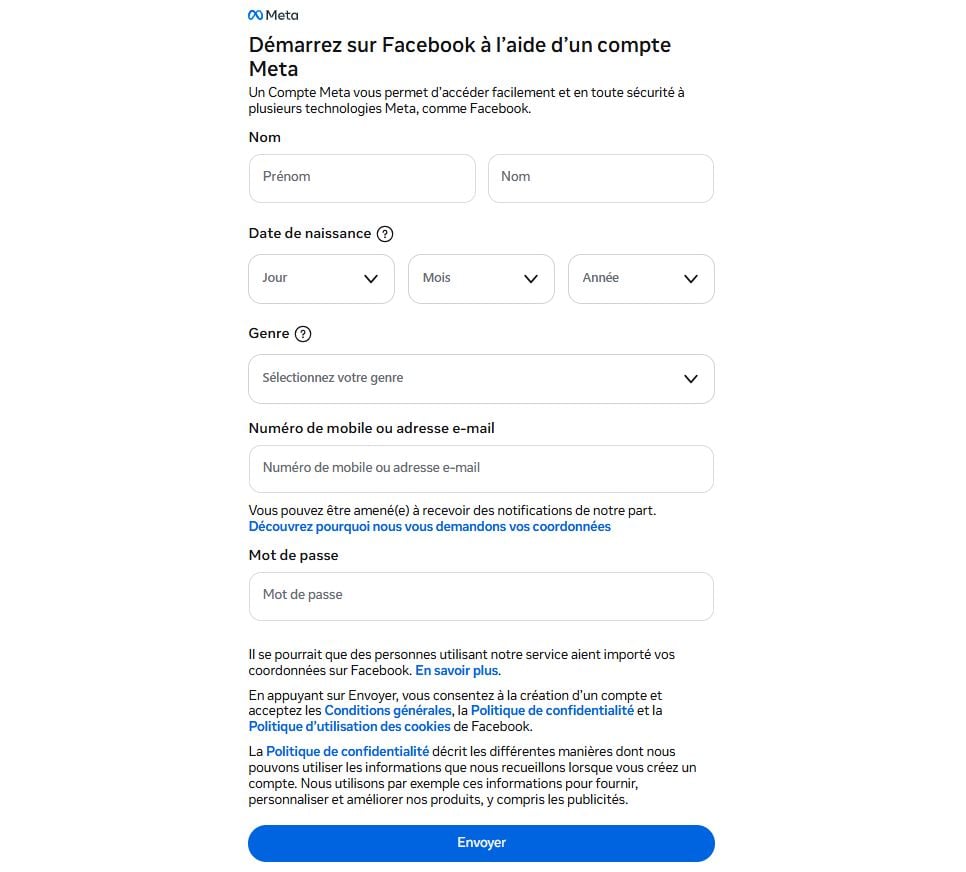
- Enter a mail address rather than a phone number, which is harder for others to track down.
- Creates a strong password, including numbers, capital letters, and symbols.
- Click the green button Register.
Facebook ...then sends you one confirmation code via text message or email. Enter this code to verify your account. Without this step, your profile will remain inactive.
Secure Your Account Right from the Start
Once your account has been verified, go to Settings and privacy. That's what needs to be changed immediately.
- Enable two-factor authentication. In Security and connection, this blocks access even if someone knows your password.
- Limit the visibility of your posts. Set the default setting to Audience at Friends in the Privacy section.
- Hide your phone number and city. Rule that can view your personal information on « Just me ".
- A check that can track you down. Prevents engines such as Google to link back to your profile.
- Disable unnecessary third-party apps. Every app linked to your account collects some of your data.
- Avoid providing information about your employer, school, and address unless it's necessary. The less you say, the better your privacy is protected.
If you want to take it a step further, you can also create a Facebook page to distinguish between your personal life and your public or professional life.
And if you manage multiple profiles, keep in mind that you can add a second Facebook account from the same app.
With these settings in place, you can enjoy everything the network has to offer—photos, groups, and friends—without leaving your information out in the open.








 FR
FR  RU
RU  EN
EN  ES
ES  IT
IT  DE
DE  ZH
ZH  PT
PT  ID
ID  JA
JA  DA
DA