iGram at the best price
In brief
Positives
- Free and unlimited use
- No connection required
- Anonymous use
Negative points
- Unable to select the resolution of the video to download
Have you seen a video on Instagram and would you like to download it so you can access it anytime on your device?
In this article, we will show you which methods to apply and what is the preferred tool.
To discover the tool:
iGram: the best tool for downloading videos from Instagram
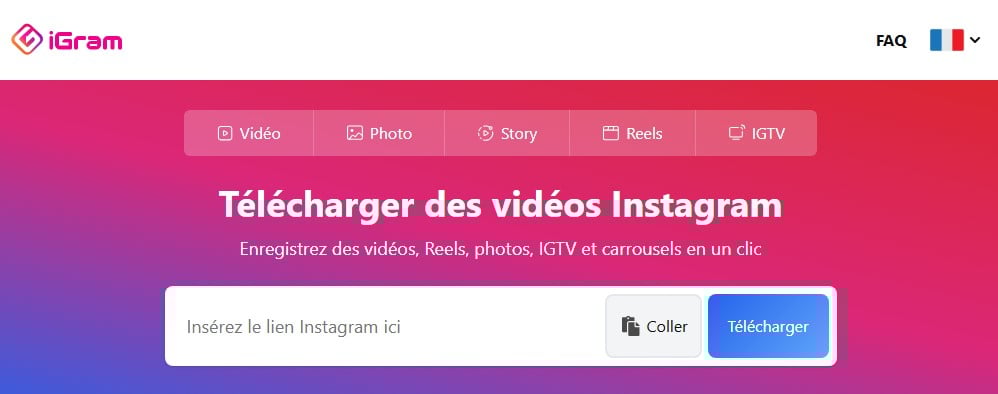
Although the Instagram app does not allow you to download videos, there are currently effective solutions that allow you to save them on your mobile device or computer.
Among the best tools on the market, we offer the Instagram downloader: iGram Downloader.
iGram is known as an effective tool that allows you to easily save various Instagram content. on your device. This online tool allows you to save videos, reels, etc. from Instagram.
- Thanks to its use, it is possible to watch the videos Instagram anytime, without having to use the Internet.
- This solution also allows you to have a backup of a video in case the owner deletes it.
Among the features of this Instagram video downloader, we can mention the following:
- Downloading videos You can use the Instagram video downloader iGram to quickly save individual videos or multiple videos from carousels in optimal quality.
- Downloading reels Using iGram allows you to save videos on your device so you can watch them later.
- IGTV download : the solution helps you watch long videos more comfortably by saving them to your device.
Still on Instagram, discover how to make a real Instagram à travers un autre article sur notre site.
Steps to download Insta videos with iGram
To download Instagram videos, iGram offers you a easy to use interface which allows you to save content.
The The method is very simple.Search for the video you want to download, then copy the URL and paste the link into iGram.
Here are a few details about these steps with corresponding images to help you better understand:
- Access iGram via the button below.
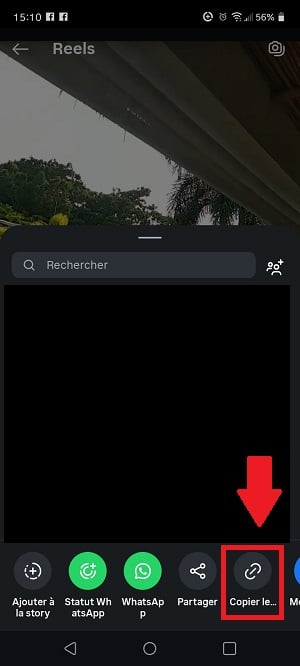
- Open Instagram on your phone or on the web, then find the video that you want to download. Tap the option that allows you to share the content to display the options.

- Copy the video URL Instagram.
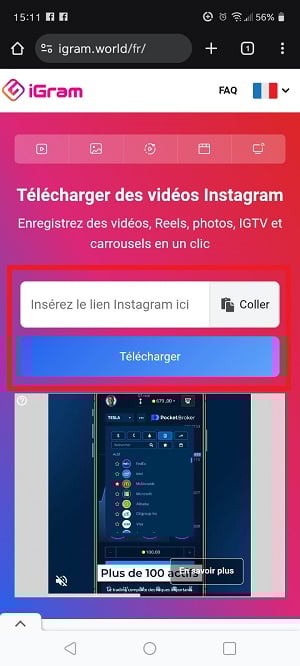
- Come back to iGram and paste the link into the field provided, then click the Download button to save the Instagram video to your device.
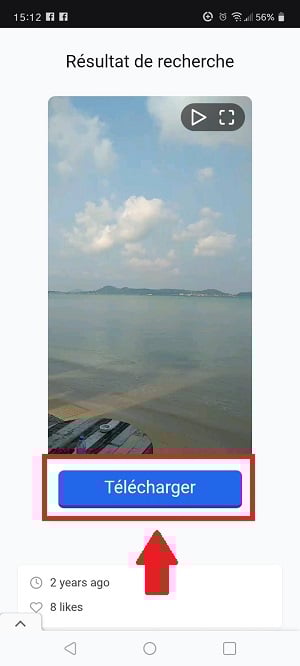
- The platform will ask you if the Instagram video displayed is the one you selected. If so, press the blue button to save the file.
Discover also how to enlarge photos on Instagram à travers un autre article sur notre site.
Reasons to choose iGram
Visit why choose The Instagram video downloader iGram:
- Simple download You can get your videos on Instagram in just a few clicks.
- Fast download : the platform's servers guarantee you maximum download speed.
- Compatibility everywhere Since the tool is accessible via a browser, you can access it regardless of the device you are using. You can also access it at any time.
- Video quality iGram guarantees the best possible resolution, currently limited to 720p for videos, in accordance with the technical limitations of the tool.
- Guaranteed safety iGram does not require you to log in to the platform or provide your Instagram credentials.
- Free use : iGram is completely free to use. This includes all download services offered by the platform, whether for Instagram videos or photos.
- Confidentiality assured You can remain anonymous when downloading an Instagram video or photo with iGram.
- Ability to download multiple videos Some posts contain more than one video; iGram allows you to download them all.
FAQs
We answer the most frequently asked questions about iGram through this section.
Can you download anything other than videos with iGram?
Yes, you can download other Instagram content using the iGram downloader. Not only do you have access to videos, but you can also download Instagram photos and stories with iGram.
- Downloading photos : You can save individual images or multiple photos in carousels with this tool.
- Downloading stories If you want to keep a story for more than 24 hours or access the content at any time, iGram is the ideal tool.
However, sources other than those cited here are not not supported by the platform.
Which devices are compatible with iGram?
Here's what you need to know about iGram :
- You can use iGram on all devices (Android and iOS smartphones, tablets, Macs, PCs, etc.).
- The tool can also be used regardless of your browser (Chrome, Firefox, Opera, Safari, etc.).
- The iGram app is available on all mobile devices.
Is there a download limit for iGram?
There is no no limit download on iGram. You can download unlimited Instagram content on the platform. What's more, using the Instagram downloader is always free.
Can you download content from any account on iGram?
Yes, it is entirely possible to download the contents of all accounts. audiencesOnly private content cannot be downloaded.
In fact, saving this type of content is not supported on iGram. for reasons of confidentiality.
What is the maximum download quality on iGram?
Since the iGram platform allows you to upload photos and videos, here are the maximum resolutions for these two types of files:
- Videos can be downloaded in High Definition (720p) on iGram.
- As for the photos, you can download them in 1080 x 1350 pixels, which is Instagram's limit.
To use iGram:
In conclusion :
- iGram is an effective tool that allows you to download files online from Instagram.
- Aside from videos, please note that you can also download photos and stories with iGram.
- This solution makes it possible to save Instagram Reels, IGTV content, photos, and stories.
- The platform allows you to download Instagram content from high quality, but the resolution is set by the system to be the best available (up to 720p).
- You don't have to worry about your safety with this tool, as it requires no installation, no Instagram account, and no login when you download videos.
- The main advantage of this photo and video downloader is that users can enjoy it. free and in a manner unlimited.
If you need other articles similar to this one, you can visit our page instagram. Feel free to ask any questions you may have in the comment area.







 English
I want to download free TV shows and movies.