It exists Two Ways to Get Instagram Verification, that famous blue badge that proves the authenticity of your account.
- The free request is reserved for well-known, publicly recognized accounts.
- Subscription Meta Verified, on the other hand, is available to almost anyone for a monthly fee.
Both of them strengthen your credibility and the trust of your community, but the criteria aren't the same.
Criteria for Instagram certification
If anyone could win a certified account Without conditions, the badge would quickly lose all its value. That's why Meta has established specific eligibility criteria, which vary depending on the path chosen.
Requirements for Free Certification
The free checkup is reserved for public figures and well-known brands. Instagram has defined six eligibility criteria to win this blue badge :
- Authenticity : You must prove your true identity. A identity document will be requested during the process.
- The majority : You must have at least 18 years old.
- The reputation : Your account needs to be well-known and sought after. A solid social media strategy and high-quality content help you build a stronger presence.
- A single account : Only one identity per person or per company.
- A public account : Your profile must be visible to everyone.
- A complete profile : Take care of your profile photo, your bio, and your information.
If your account meets these six conditions, you have a real chance of getting the Instagram certification free.
Requirements for Meta Verified (for a fee)
You don't have to be a celebrity to subscribe Meta Verified. The eligibility criteria are primarily technical:
- Have at least 18 years old.
- Provide a identity document an official document with your full name.
- Enable two-factor authentication on your account.
- Have an account that complies with terms of use Instagram.
This toll road relies on the’authenticity and on a protection against identity theft on your expertise, rather than on your reputation.
Steps to Follow to Get a Free Instagram Verification
If your account meets the eligibility criteria, you can try to get the blue badge without a subscription. Here are the step-by-step instructions, starting from the’mobile app :
- Access your settings since the application Instagram.
- Select Professional tools and controls.
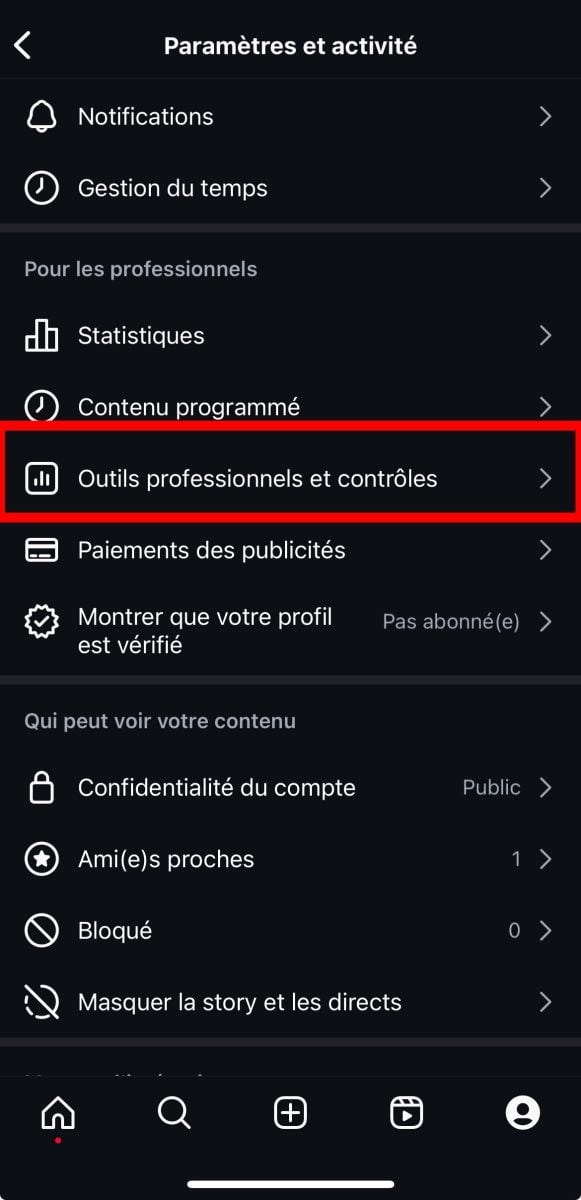
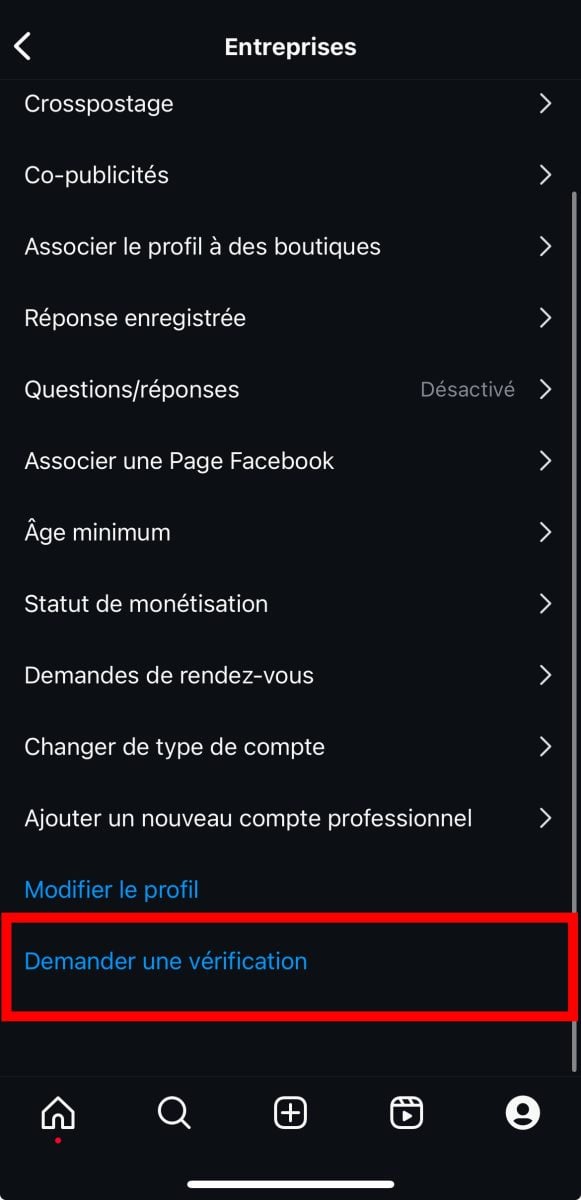
- At the bottom of the page, tap Request verification.
- Fill in your full name in the field provided.

- Provide a proof of identity. If you are an individual, for example, upload a photo of your passport. If you are representing a company, please attach an official identification document instead.
- Confirms the’public interest from your profile: select the business category If applicable, specify your region, then briefly describe your audience.
- Add if necessary all names under which you are known, for example, in different languages. This step is optional.
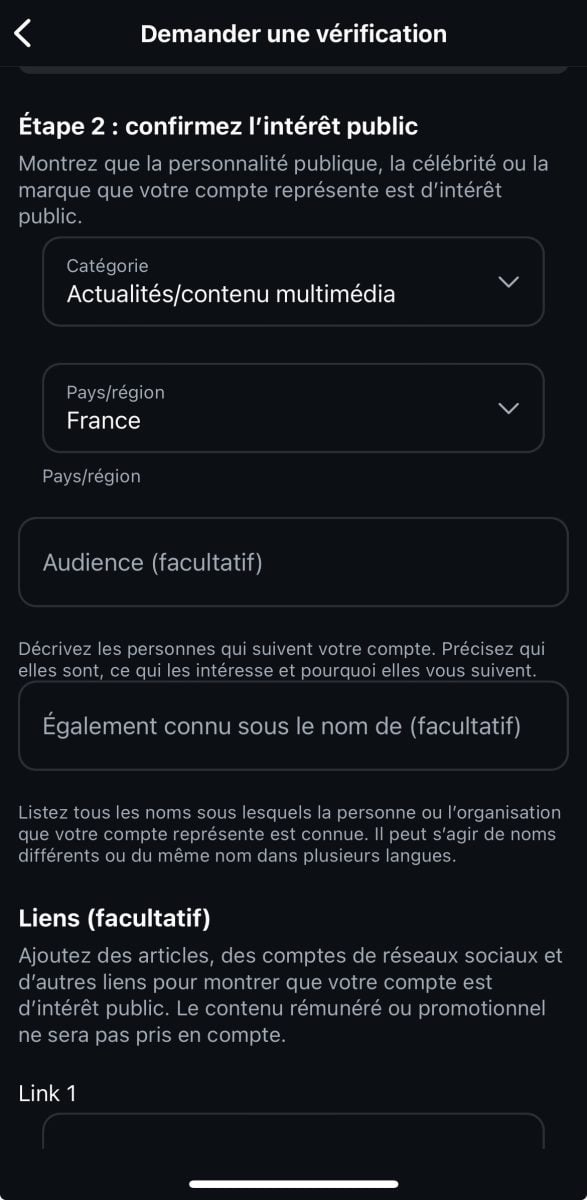
- Add some links (optional): other social media accounts you have, or posts that demonstrate your popularity.
- Send your verification request, then wait for a response from the team Instagram.
Once you've completed these steps, all you have to do is wait. Instagram does not specify a timeframe, but a response usually arrives within 30 days maximum. If your application is denied, you can submit a new one after that same period has elapsed.
While you wait, keep posting quality content and to connect with your community. It’s the best way to boost your visibility and increase your chances of getting the blue badge.
Subscription Meta Verified to earn the blue badge
You can also pay to get the blue badge thanks to the subscription Meta Verified. Unlike the free application, this subscription does not require applicants to have a certain level of recognition.
Once you meet the eligibility requirements (see above), follow these steps:
- Open the app Instagram from your cell phone, then go to Settings and activity.
- Scroll down and click on Show that your profile is verified, in the "For Professionals" section.
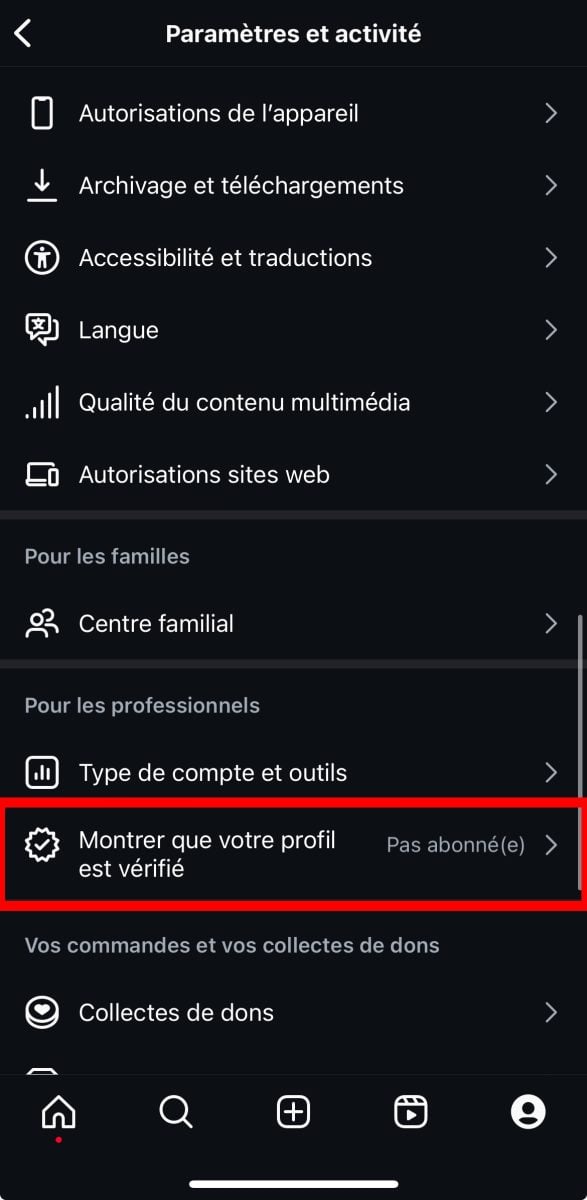
- The app invites you to connect with millions of profiles Meta Verified, click on Next.

- Select the profile to be certified, then click on Register.

- Then click on Continue.

- Complete the payment by clicking on Subscribe.
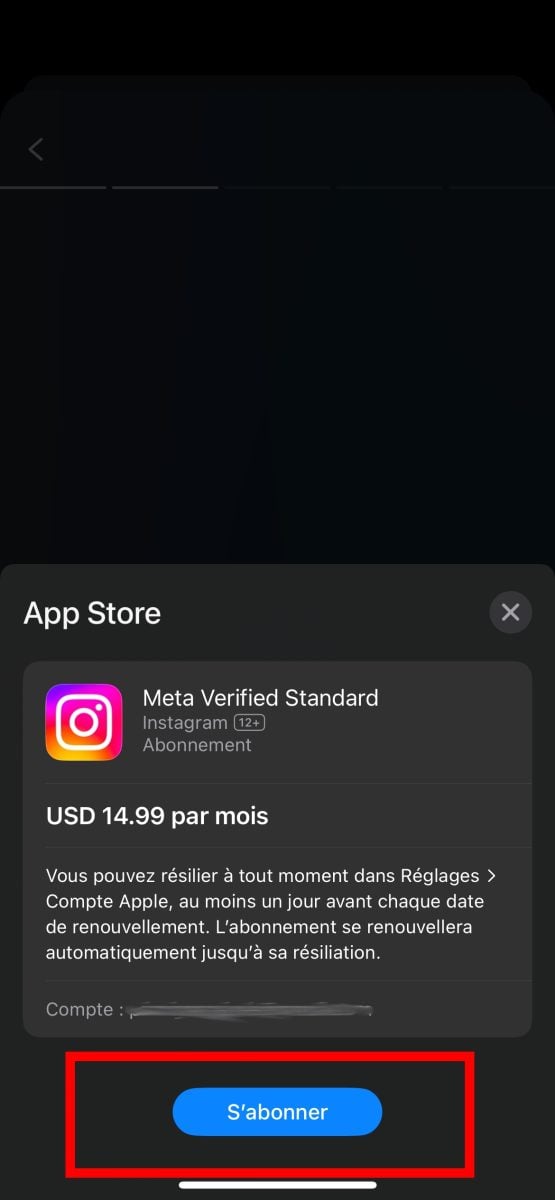
Instagram Certification Pricing
The subscription fee Meta Verified depends on where you sign up. Since the’mobile app (iOS or Android), the price is €14.99 per month. When using a web browser, the fee is lower because there is no commission charged by the app stores.
The subscription covers both your account Instagram and Facebook. Meta has designed this offer to make the audit available to a wider audience, without taking away their blue badge to those who have already obtained it for free.
The Benefits of the Instagram Blue Badge
the blue badge really changes the experience on the platform, whether you got it for free or through a subscription Meta Verified. Here's what you'll actually get:
- A verified badge : official proof of your profile's authenticity, confirmed by Meta. It's a true sign of trust from your community.
- A protection against identity theft : The platform actively monitors fake accounts that try to impersonate you.
- A dedicated support : You can speak with a real person to resolve your account issues.
- A enhanced visibility : Your profile is featured in the research, comments, and recommendations. A useful tool to complement the Instagram algorithm.
- Regarding the exclusive features : Depending on your country, you can take advantage of publishing options available only to subscribers Meta Verified.
For a brand or business profile, these benefits strengthen your social media strategy and build trust with your audience. The blue badge remains a strong sign of professionalism in the face of competition.
Tips if Your Instagram Certification Application Is Denied
A rejection isn't final. You can submit a New request after 30 days. Use this time to strengthen your profile and prove your authenticity. Here are three practical tips to improve your chances.
1. Increase the number of links to your Instagram profile
Promote your account on your other social media platforms, your website and in your email signature. These links strengthen your online presence in the eyes of Meta and help you gain followers. You can also check out our best tips for have more followers on Instagram easily.
2. Maintain a consistent identity
Use a same profile picture and the same username on all your social media accounts (page Facebook, account X, page LinkedIn, etc.). This consistency reinforces your identity and makes it easier to verify by Meta. A consistent profile also strengthens your personal brand and reassures the platform that your account is authentic—a key factor in combating’identity theft.
3. Take advantage of all promotional materials
Showcase your account Instagram on your business cards, your product packaging, and your advertising banners. Every offline medium adds credibility and brand awareness to your profile. The broader and more consistent your presence is, the more you prove to Meta that your identity deserves the blue badge.
Once you've optimized your profile, resubmit your request for Instagram verification after the required time period. If you haven't gained recognition yet, keep this option in mind Meta Verified by subscription, available to anyone regardless of fame.








 English