Phyllali is obtained by evolving a Evoli with 25 Evoli candies, using one of two methods: renaming (free, one-time) or the Moussu lure (for a fee, reusable as often as you like).
It is one of the eight Evolutions of Eevee, alongside Aquali, Voltali, Pyroli, Givrali, Mentali, Noctali and Nymphali.
Explanatory video in French by Alucare, ideal complement to the page. View video (you can use YouTube's automatic translation)

Method #1: Rename your Eevee
The quickest way is to Rename your Eevee with the nickname " Linnea » before upgrading it.
This name is a nod to Linnea, the plant-specialist Trainer from Pokémon Sun and Moon. The tip is free, but she works only once.
Here are the steps to follow:
- Go to the menu Pokemon and select the’Evoli that you want to improve. Choose one with good stats to limit the weaknesses of the Grass-type Pokémon you obtained.

- Click on the’pencil icon, right next to the name «Evolve.».

- Enter the nickname " Linnea » in the field provided for that purpose, then click "Submit.".

- Restart the application to make sure the nickname is properly saved on the server. Otherwise, the upgrade might not work.
You'll also need 25 Evoli candies to unlock the evolution. If you're short on them, check out our guide to find out how get candy in Pokémon GO.

Keep in mind that this the nickname technique Works only once per evolution. Each form of Eevee has its own unique nickname. The table below lists all the nicknames to use for each evolution.
Nicknames for all of Eevee's evolutions
Evoli is a Normal-type Pokémon that can evolve into 8 different shapes. Each form corresponds to a specific nickname that you must enter only once.
| Evolution | Kind | Nickname to use |
|---|---|---|
| Aquali | Water | Rainer |
| Voltali | Électrik | Sparky |
| Pyroli | Fire | Pyro |
| Noctali | Darkness | Tamao |
| Mentali | Psych | Sakura |
| Nymphali | Fairy | Kira |
| Phyllali | Plant | Linnea |
| Frostlily | Ice | Rea |
To Mentali and Noctali, a nickname alone isn't enough: you also have to walk 10 km with your Eevee as your Pokémon buddy and collect 2 pieces of candy during this walk, then evolve Eevee into day (Mentali) or the night (Noctali).
Method #2: Use a Moussu Lure
If you want to get several Phyllali, the Moussu lure is your best option. Unlike the nickname, this method is Reusable as many times as you want.
Here's how it works:
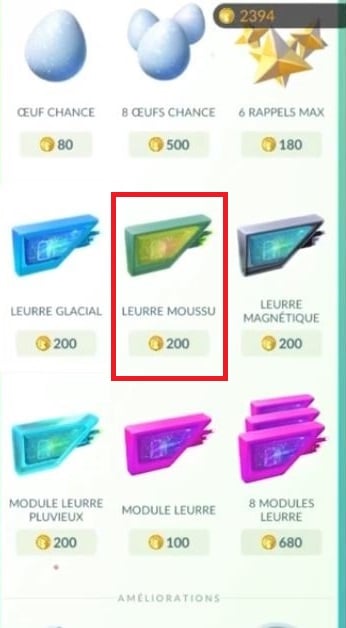
- Go to the store and buys a Moussu lure to 200 PokéCoins. The Pokémon GO promo codes They might also give you one for free, or give you PokéCoins if you don't have enough.
- Click on a PokéStop nearby to open its interface.

- Press the Moussu lure at the bottom of the screen to turn it on.
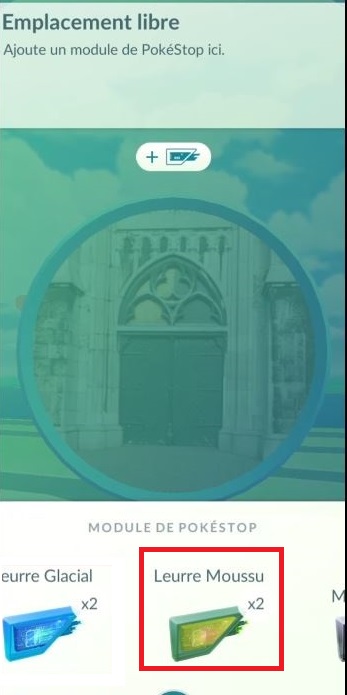
- Check that leaves are falling around the PokéStop: this confirms that the lure is indeed active.

Once the lure is active, stay in the PokéStop area and start the evolution from your Eevee's profile. You still need to 25 Evoli candies to complete the transaction.
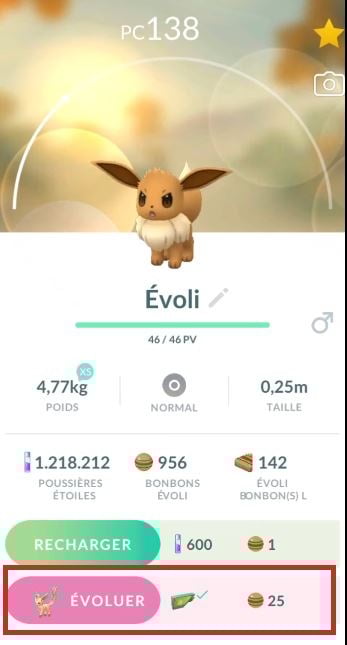
Warning: the Moussu lure remains active only 30 minutes. Start the evolution as soon as you see the leaves fall; otherwise, you'll have to use another one.
During events Community Day, the duration of the decoys' activation is extended to 3 hours : Now is the right time to implement several changes in quick succession.
Note that this logic also applies to Frostlily : The only difference is that you have to use a Glacial lure instead of the Moussu Lure for this [type] Pokémon Ice.
Phyllali in Battle: What You Need to Know
Phyllali is a Grass-type Pokémon with a Max CP of 2,969. His best attacks in battle are Grass Cutter (quick attack) and Eco-Sphere (charged attack). It is effective against Water, Ground, and Rock types, but remains Vulnerable to Fire, Ice, Poison, Flying, and Bug.
There is also a version Chromatic Phyllali (shiny), recognizable by its slightly different color. Its availability depends on current in-game events.









 English