Today, it's almost impossible to ignore Twitch. This streaming platform has become a must-have for millions of usersespecially among young people. Whether you're an avid gamer, a budding artist or simply a fan of entertainment, Twitch has something to offer you.
If you're one of the newcomers wondering how to get started on Twitch, then you've come to the right place! In this comprehensive guide, we'll share with you our tips for a successful launch on TwitchWe will also cover essential topics such as choosing your content, setting up your stream, moderating your community, and much more.
Getting ready to stream on Twitch
Getting started on Twitch may seem intimidating at first, but with a little preparation and planning, you can give yourself every chance of success. To help you get started on the right track, we'll guide you through the essential preparation steps.
Create a Twitch account and customize your profile

- Create a Twitch account: Naturally, the create your account is an essential step in the streamer's journey.
- Choose a catchy username: Your username is your identity on Twitch, so it should be easy to remember and pronounce. It should also be representative of your content and brand.
- Write an informative bio: Your bio is an opportunity to introduce your channel and tell people what they can find there. Be concise and specific, and use relevant keywords.
- Add an attractive profile picture and banner: Your profile photo and your Twitch banner are the first images people will see of your channel. It is therefore important that they are of good quality and reflect your style.
Choosing the right streamer equipment
To broadcast quality streams on Twitch, you need to important to have good equipmentThe essential elements of a streaming setup include:
- A sufficiently powerful computer to manage streaming software.
- A quality webcam to capture your image.
- A good microphone to make your voice clear and audible.
- Headphones to immerse yourself in the games.
- Streaming software like OBS Studio or Streamlabs OBS.
The choice of will depend on your budget and your needs.. Feel free to ask other streamers for advice or consult online guides to help you make your choice.
Define your content and target audience
Before you start streaming, it's important to define your content and target audience. What are you going to broadcast? Who are you addressing? These are questions you should ask yourself. to identify your niche and streaming style. In this way, you can better target your audience and create content that will appeal to them.
Here's how to find your niche a few tips to consider into account :
- Think about your passions and interestsWhat do you like to do? What do you like to talk about?
- Analyze current trends on Twitch. What are the most popular games and categories?
- Watch other streamersWhat do you like and dislike about their content?
As far as your audience is concerned some criteria to define :
- Set the age and the benefits of your viewer target.
- Create content that meets needs and expectations of your audience.
By following these steps, you will better prepared to launch your Twitch adventureBut don't forget that the most important thing is to have fun and share your passion with the world.
Broadcasting your first stream on Twitch
Now you're ready to broadcast your first stream, it's time to take action :
Choosing streaming software
The streaming software is the heart of your operation. It allows you to capture your video and audio, of encode them and broadcast them on Twitch. Popular software options for streaming on Twitch include :
- OBS Studio: Powerful, free open-source software offering great flexibility and numerous customization options.
- Streamlabs OBS: A simplified version of OBS Studio, with a more intuitive interface and built-in features for managing streams and audience interactions.
These software packages provide Free overlayswhich is perfect for beginners.
Stream settings
Once you've chosen your streaming software, it's time to set it up. These settings include :
- Video quality : Choose a video quality suited to your configuration and, above all, to your Internet connection.
- Audio bit rate : Make sure your voice is clear and audible by choosing an appropriate audio speed.
- Layering : Add graphic elements to your stream, such as your logo, webcam and donation alerts, to make it more professional and engaging.
Feel free to consult online tutorials and guides to help you configure your software and stream on Twitch in the best possible way.
Launch your first stream and interact with your audience
The big moment has arrived! Start your first stream and start sharing your content with the worldHere are some other tips to keep in mind when launching your first live stream:
- Prepare an introduction. Welcome your audience and briefly explain what they are about to see.
- Be enthusiastic and energetic. Your passion must be contagious!
- Interact with your cat by responding to comments and asking questions. This is the key to building a community and retaining your audience.
- Thank your audience. Express your gratitude for their presence.
By following these tips, you'll be on the right track. on the right track to your first stream on Twitch. Remember that the most important thing is to have fun and share your passion with your audience!
Developing your Twitch channel and community
Reaching a average of 3 viewers on Twitch is an important step towards becoming an affiliate streamer and starting to monetize your content. But how do you get there? Here are a few tips:
Create a regular streaming schedule

Consistency is the key to success on Twitch. By setting up a regular streaming schedule and sticking to it, you'll be able to get your future subscribers used to meeting you at specific timesThis increases the chances that they will be present during your streams.
It is not uncommon for streamers to start their live streams between 9 p.m. and 11 p.m., but we do not recommend choosing these time slots. You risk becoming indirect competitors to established streamers on the platform. As you are new to the world of streaming, we recommend that you instead choose a time slot suited to your target consumers. Here are a few examples:
- If you are targeting working people who come to Twitch after work to watch entertaining content, plan a live stream in late afternoon and early evening.
- If you offer ASMR or relaxing content, it is preferable to stream in late eveningThis content often attracts people who want to relax or are getting ready to go to bed.
But there's one thing you mustn't overlook: your availability. So make sure you choose the times and days that suit you best to start your stream. As we mentioned above, consistency is the key to success when launching your Twitch channel.
So choose times when you're sure to be available, instead of streaming seven days a week and then disappearing for two months. Ultimately, the best streaming schedule for you corresponds to your own availability and your lifestyle, as well asa time slot when your viewers are likely to be present.
Promoting your Twitch channel on social networks
Don't limit your presence to Twitch! Take advantage of the power of social networks to promote your channel and reach a wider audience. To increase the visibility of your Twitch channel on social networks, we recommend :
- Share your live streams on other platforms: Facebook, Instagram, Twitter, YouTube... publish excerpts from your streams, live announcements, and highlights to generate interest and attract new viewers.
- Creating engaging content for social networks: Share photos, short videos, memes and articles related to your Twitch content. Interact with your subscribers and reply to their comments.
- Use relevant hashtags: Hashtags allow your posts to be found by people interested in your content.
- Collaborate with other streamers: Carry out raidsYou can also take part in co-streams or collaborative events to reach a wider audience.
By advertising your channel sufficiently, you'll give yourself the best possible chance to become a popular streamer on Twitch.
Interact with your community and create special moments
Interaction is at the heart of the Twitch experience. Take the time to respond to your viewers' commentsto ask questions and create discussions.
Encourage interaction between your viewers by hosting games, polls and Q&As. You can also create Twitch moments by :
- Organizing special events: From contests and tournaments to question-and-answer sessions with guests, the possibilities are endless!
- Celebrating milestones : Reaching a certain number of followers, achieving an important victory, and much more—don't forget to share these moments with your community.
- Offering rewards and benefits to your viewers: With promo codes, exclusive content or early access, build loyalty among your audience by rewarding their support.
By interacting with your community in a regular and meaningful way, you create a sense of belonging and encourage your viewers to come back again.
Analyze your performance and adapt
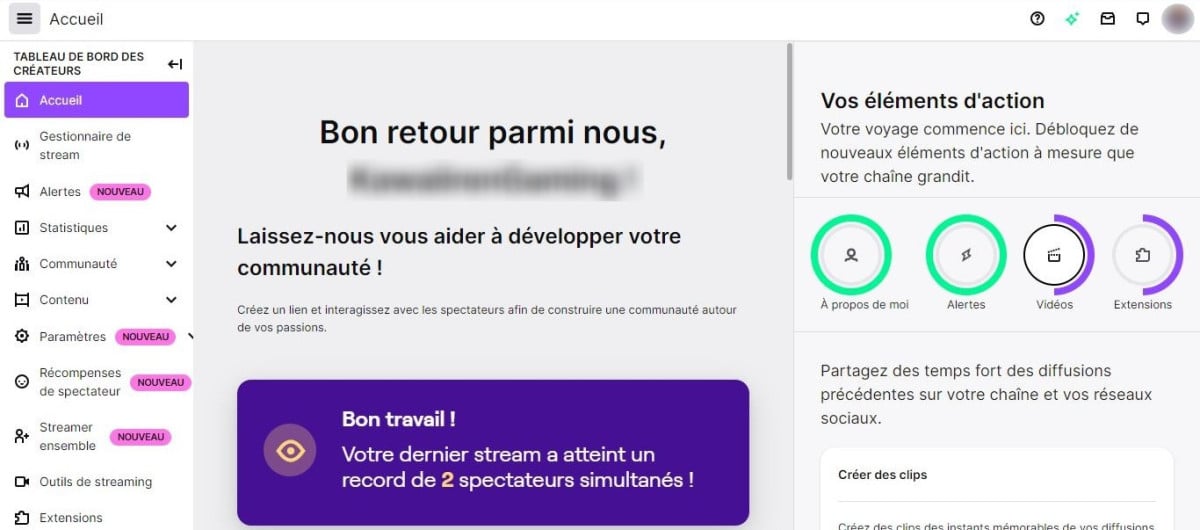
Twitch provides analytics tools that allow you to track your channel's performance. Use this data to identify your strengths, understand your audience and improve your content. To analyze your performance on Twitch, you can :
- Analyze your viewer statistics: Number of viewers, average viewing time or retention rate: these indicators enable you to understand how your audience interacts with your content.
- Identify your most popular content: Which streams attracted the most viewers? Which topics generate the most engagement?
- Adapt your strategy based on your analysis: Use the data collected to refine your streaming schedule, choose your games or discussion topics according to your audience's preferences, and test new content ideas.
By following these tips and regularly analyzing your performance, you'll be well on your way to develop your Twitch channelbuild community loyalty and reach your streaming objectives.
With this comprehensive guide, you'll be well on your way to successfully launching your Twitch channel. Don't be afraid—the hardest part is just getting started! This platform is accessible to everyone: everyone can share their passion and create their own community. With a little preparation, perseverance and a good dose of passion, you'll be able to make your mark on Twitch.









 English