To make your Snapchat profile public:
- Open your profile,
- Press " Create a public profile »,
- Read the’help screen,
- Then confirm by clicking « Create ".
💡 This feature is Suitable for ages 16 and up (with enhanced protections for 16- and 17-year-olds), provided that the account has been active for more than 24 hours and has at least one mutual friend.
Here is a step-by-step guide on how to edit your profile once it has been created, along with the concrete benefits of going public in 2026.
If you'd like to know first how to know if someone has a private Snap story, we explain this in another guide.
Snapchat public profile: conditions and procedures to follow

A public profile Snapchat is a open version from your account: your name, profile picture, bio, and Stories will be visible to everyone, not just your friends.
This feature is designed for creators who want to share their content more broadly and earn followers, whereas a standard profile remains private and limited to your contacts.
Who can have a public Snap profile?
Not all users have access to this feature. Here is what you need to know about the requirements for creating a public profile:
- To be’at least 16 years old (16- and 17-year-olds are afforded additional protections compared to adults), even though the minimum age to use Snapchat is 13 years old.
- Have an account that's been open long enough and a minimum number of friends or followers. You can't create a public profile on your first day. In fact, some users try to increase their number of followers on Snapchat to meet this requirement more quickly.
- Comply with the platform's public terms of use.
These criteria evolve regularly : If you have any questions, check Snapchat's official help page: https://support.snapchat.com for accurate and up-to-date information.
How do I create a public profile on Snap?
To set up your profile Snapchat In public, follow these steps:
- Open the app, then tap the icon Bitmoji in the upper-left corner of your screen to access your profile.
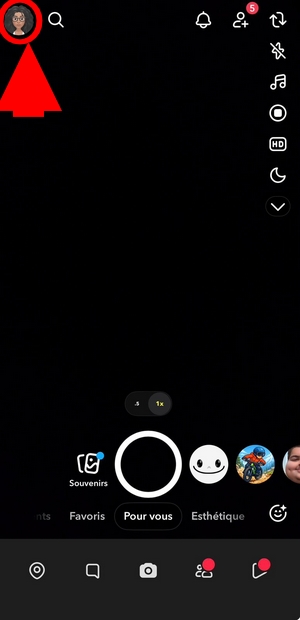
- Depending on your version of the app, the button "Create a public profile can be displayed directly on the profile page or in the section related to Spotlight and Snap Map.
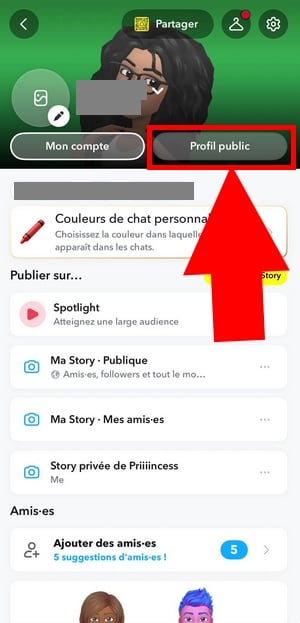
- Once the « Create a public profile »open,« press " Continue ".
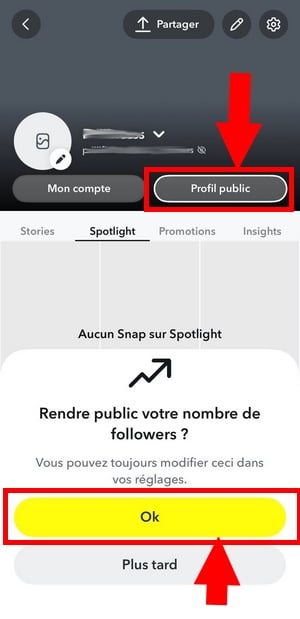
- Continue with « Start "then " Create ".
- Follow the on-screen instructions to complete your public profile.
If you want to turn off this feature, go back to Settings and then tap « Delete your public profile » and «Delete.».
How do I edit my public profile on Snapchat?
Once you've created your profile, you can edit your information at any time.
- From your public profile, tap the icon pencil-shaped
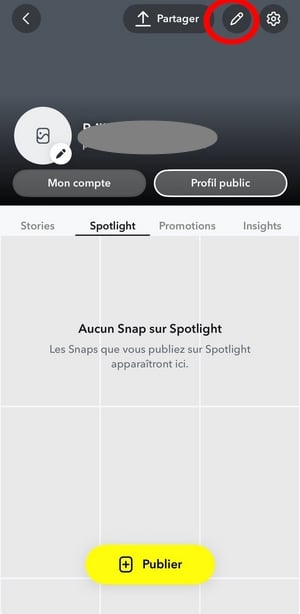
- You can change your display name, add or replace your profile picture, and write your bio.
This public information is the information that the new visitors will see your content first, so make sure to tailor it to create a personalized experience that makes people want to follow you.
Note that Best Friends on Snapchat remain a concept distinct from your public followers.
What are the advantages of putting your Snapchat profile in Public?
Set your profile to public on Snapchat is primarily used to reach an audience beyond your friends list.
Starting to use a public profile means creating a personalized experience to connect with new customers right from the start.
Your posts become visible to everyone, making it an excellent tool for raising your profile and promoting your products. That’s why many creators and influencers enable this feature.
Here's what you can actually do with a public profile:
- Develop your visibility : Your photos, story, and bio are visible to people who share your interests, which helps you gain new followers.
- Making advertising one public profile allows you to create a personalized experience to connect with new customers and showcase your business.
- Share your creativity : Whether it's dance, singing, art, or travel, Public Mode showcases your talents to a wider community.
Choosing a public profile therefore showcases the creativity of Snapchat users, while still giving you control over what you share.
You can customize your profile page with your profile picture, your Bitmoji and a well-written biography to make a good first impression.
To better understand how user proximity works, you can also check out our article on The Snapchat Planet System.
However, if you want to share intimate moments with a small group, you can always use the Snap private story, while maintaining a public profile to reach a wider audience.
On a related note, check out our Tips for Fixing Snapchat Glitches and our article on Unblock someone on Snapchat.
Frequently Asked Questions
Did creating a public profile solve my visibility problem?
In most cases, yes: as soon as your public profile is activated, your stories and public information become accessible to all users, even those who haven't added you yet.
Can we switch back to a private profile?
Yes, at any time. Go to your public profile settings and tap « Delete my public profile » to switch back to a standard account that's visible only to your contacts.








 English
Create a public profile