You're about to take the certification PIX and you came across a question about definition of an image in pixels Don't panic! We'll help you see things more clearly so you can answer correctly on the day of the exam.
You can also find all our PIX test solutions by clicking on this link.
Steps to find out the image definition in pixels on Pix
During this PIX testyou are faced with an image for which you must give the definition in pixels:

Please note that the answers vary from one test to another! The image displayed in the exercise does not show not always the same definition. In our case, here are the results:
To determine the definition of an image in pixels To use Pix and answer the question correctly, regardless of the image displayed, follow these steps:
- Download theproposed image in the exercise by right-clicking and then selecting "Save image as..."

- Once theuploaded imageright-click on it to display the drop-down menu
- Click on “Properties“

- A window will open: go to the "Details" tab.
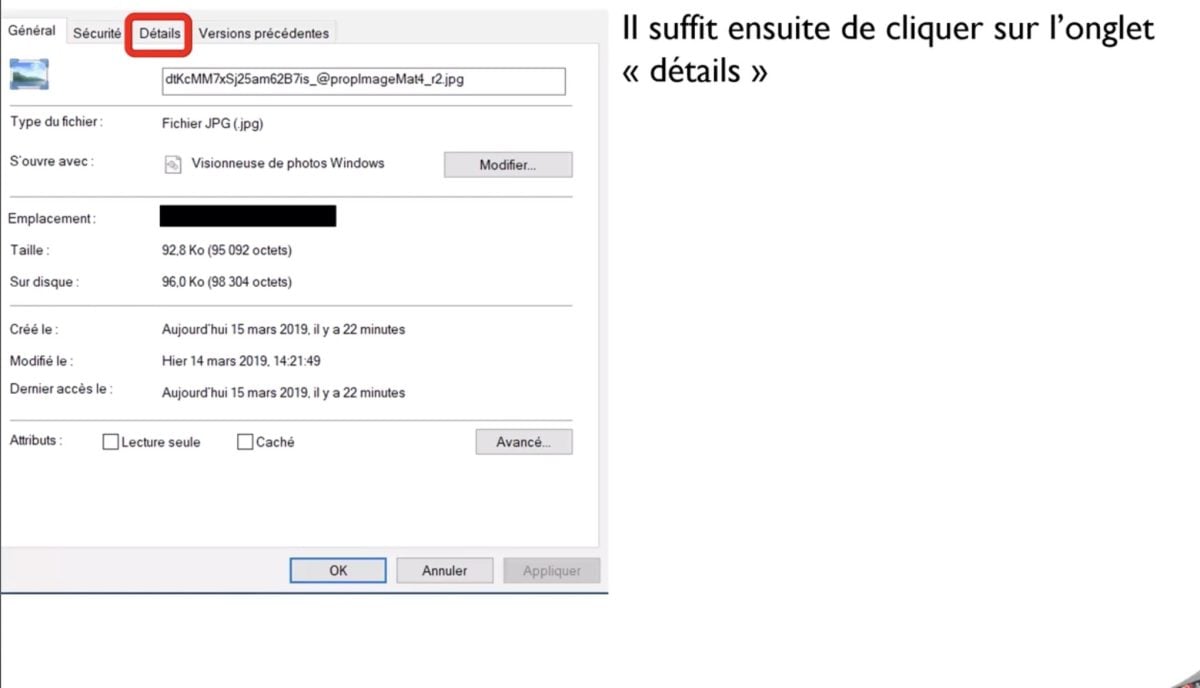
- In this tab, you will find the “Dimensions" of the image in pixels, with the width and height.
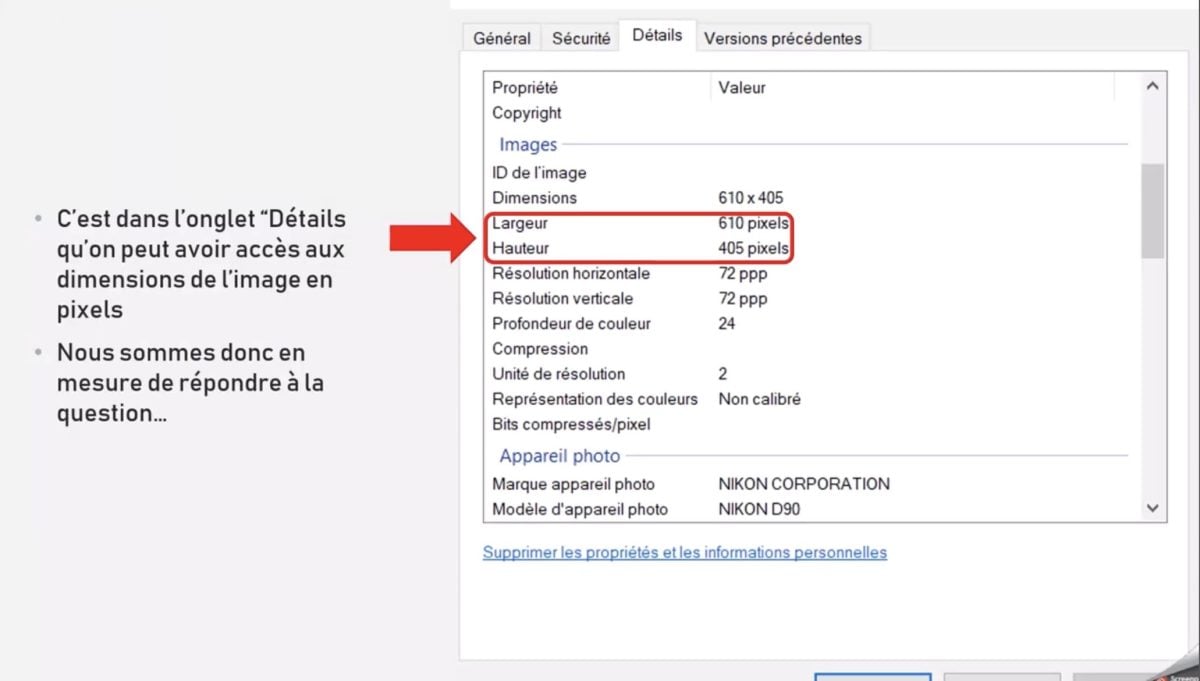
For example, in one of the Pix testsThe image is 610 pixels wide and 405 pixels high, so the image resolution is 610 x 405 pixels.

What is image definition in pixels?
The definition of an image refers to its size in pixels. It is generally expressed as width x height (example: 1920 x 1080 pixels). The more pixels an image has, the more detailed and better quality. To ensure good visual quality, especially when you want to enlarge an image without losing sharpness, it is advisable to use suitable tools.
What's a pixel?
The pixel is thebasic unit of a digital image a very small color square. Millions of juxtaposed pixels form the photo you see on the screen of your phone or camera. Visit photographyEach pixel captures light and color information.
What is Pix?
PIX is a online public platform for testing and developing digital skills. It is used in schools, universities, but also in certain companies and administrations.
Its main functions are :
- Digital skills assessment (security, information retrieval, content creation, etc.). It examines the understanding of concepts related to image manipulationto the resolution and at the photo and pixel management. It also enables you to learn how to use software such as Photoshop.
- Customized courses depending on the user's level.
- Official certifications recognized by the State.
How it works ?
The user answers a series of interactive questions. Depending on the answers, the test adapts to propose more complex challenges or explanations. This allows users to progress at their own pace.
FAQs
What's the difference between image resolution and definition?
The image resolution refers to the number of pixels per unit area, generally expressed in dpi, ppp Where ppi (pixels per inch)It plays an essential role in printing a photo, but less so inon-screen displayHowever, the definition of an image corresponds to its dimensions in pixels, i.e., the width and height of the image.
How do I know the image definition in pixels?
Under Windowsto find out the definition of an image:
- Right-click on the image,
- Click on "Properties."
- Go to the "Details" tab to get the width and height in pixels.

How do I find the definition of an image in pixels on a Mac?
Here's how it works on Mac :
- Right-click on the image
- Select "Get Info," where you can view the "Dimensions."

How do I get a quality image?
- Use images with a high definition
- Choose a good resolution image if it is to be printed in large format or in multiple copies inches
- Avoid excessive compression
- Use suitable formats (PNG for quality, JPEG for lightness). For example, a youtube-logo must meet precise size and format criteria. The same applies to a Youtube banner.
The definition of an image in pixels is an essential concept to understand, particularly when it comes to tests like those offered by Pix. It determines the number of pixels that make up an image, and therefore its precision. Remember that definition refers to the size of the image in pixels, and resolution to its density in print.
If you are currently taking the PIX test and are looking for other solutions, you can find our tutorials, particularly for the following questions:









 English