Lethal Company does not offer manual saving. The game automatically saves your progress when you take off for orbit after a mission.
So it's impossible to resume right in the middle of an expedition on the moons.

How do you back up your game in Lethal Company?
No manual backup in Lethal Company : The game handles the recording on its own, but only under certain specific conditions.
When does Lethal Company save your progress?
The automatic backup is triggered when you confirm the routing to a new destination via the Terminal and where the spacecraft leaves the moon to return to orbit.
At that exact moment, the game records:
- Your your overall successes and failures on each mission.
- Each dead, which advances the timer by’one day in the relevant backup file.
- All the passive information Character: rank, quota scrap metal, accumulated money.
A few important rules to keep in mind:
- If the entire crew dies, the’host can do Alt+F4 to log out and start the day over, provided the group hasn't taken off yet (the save occurs upon returning to orbit, not at the moment of death).
- You have to bring back the scrap metal, sell it, and then head out into orbit so that your the money is kept.
- You can create up to three profiles different ones, each with its own backup file. Change profiles in the Options menu, under the Joueur.
- If you try to go back to the main menu While on a mission, the game warns you that your location and progress will not be saved.
When does Lethal Company fail to save your session?
The game saves your overall progress, but never your physical location in the world. Here are the situations in which no backup takes place:
- After the’moon landing If it is selected, nothing is saved.
- Your physical position around the world is never preserved.
- You can't save partway through and pick up where you left off. The game considers your character to be dead and that a new day begins.
- The backup is automatic: you can't do not specify manually When to record.
To verify this in practice, we ran a test by searching for Blind Dogs, by letting them chase us, then leaving before we died. The result was no surprise: it was impossible to pick up right where we left off.
If you want to enhance the experience, find out how use mods to customize your game.
Where is the Backup file in Lethal Company?
You can access the file for the backup files in two ways: via the’file explorer Windows, or by typing %localappdata% in the search bar on the Start menu.
Here is the complete step-by-step guide using File Explorer.
- Open File Explorer, go to the C drive, then open the folder Users (labeled “Users” on some versions of Windows).

"Users" folder in File Explorer. ©Antonin for Alucare.fr - Click on Display in the top bar, then check the box Hidden files. The file AppData appears then.
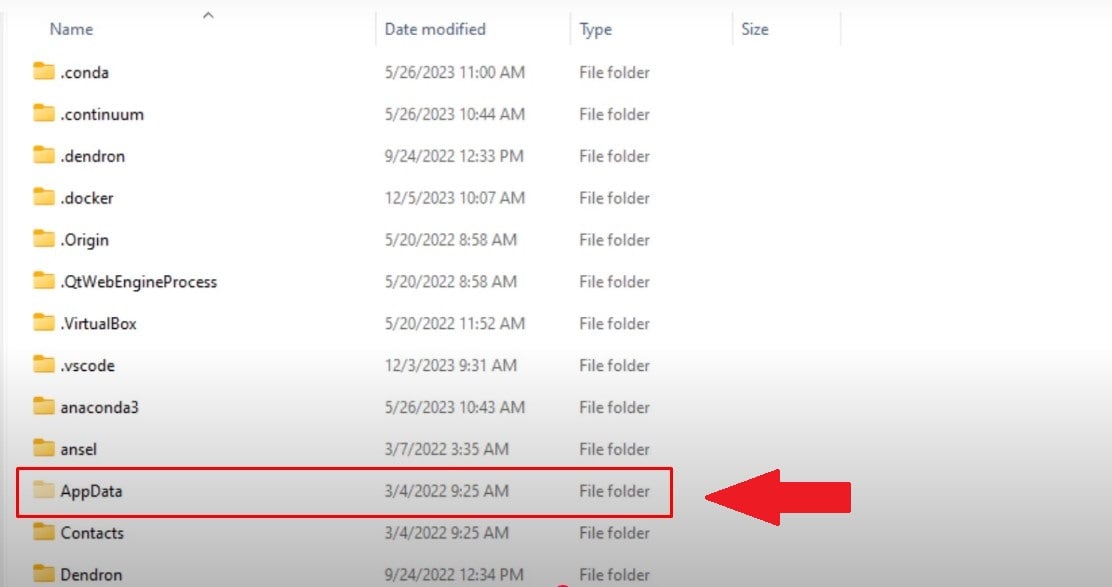
AppData folder in Windows File Explorer. ©Antonin for Alucare.fr - Go to AppData, then in LocalLow.
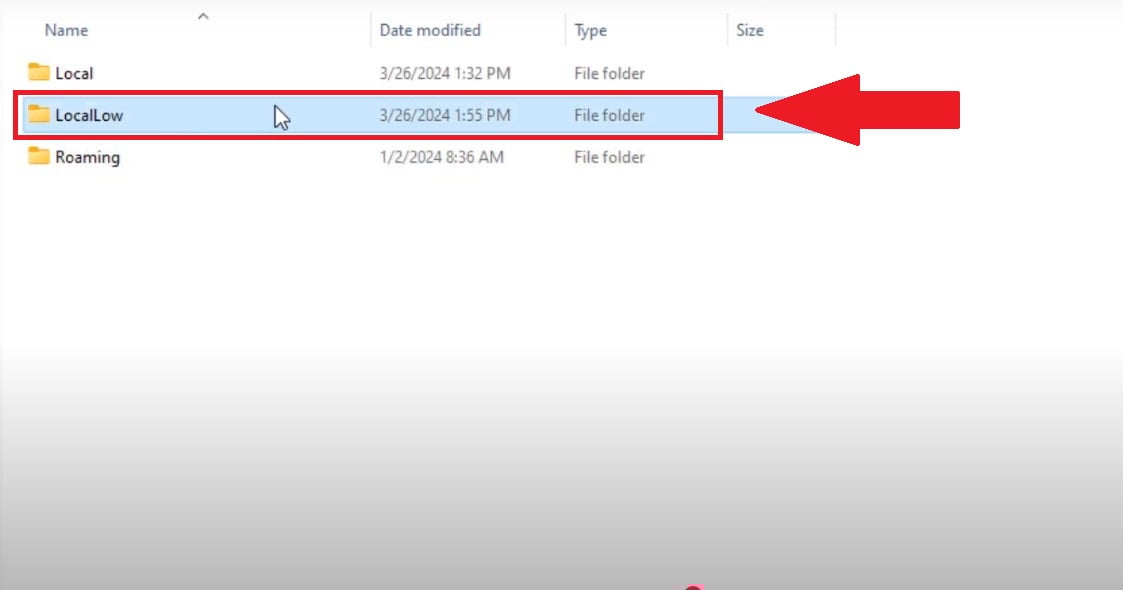
The LocalLow folder in Windows File Explorer. ©Antonin for Alucare.fr - Open the folder ZeekerssRBLX (the name of the studio, which got its start on Roblox—hence the "RBLX" suffix).

The ZeekerssRBLX folder in Windows File Explorer. ©Antonin for Alucare.fr - Inside, you'll find the report Lethal Company, which contains all the saved files from your game.

Backup folder for Lethal Company in File Explorer. ©Antonin for Alucare.fr
You can also paste this path directly into the address bar from the explorer:
- C:\Users\[PCNAME]\AppData\LocalLow\ZeekerssRBLX\Lethal Company (replaces [PCNAME] (by your username).
To secure your progress, simply copy this folder and paste it onto another storage device.
How do I delete a backup in Lethal Company?
You can Delete a backup directly from the main menu of Lethal Company. Only the game host manages the save files.
- Go to Host (Host) in the main menu. The saved files are displayed on the right.

"Host" menu in Lethal Company. ©Antonin for Alucare.fr - To the right of each file, there are red crosses allow you to delete the associated backup.
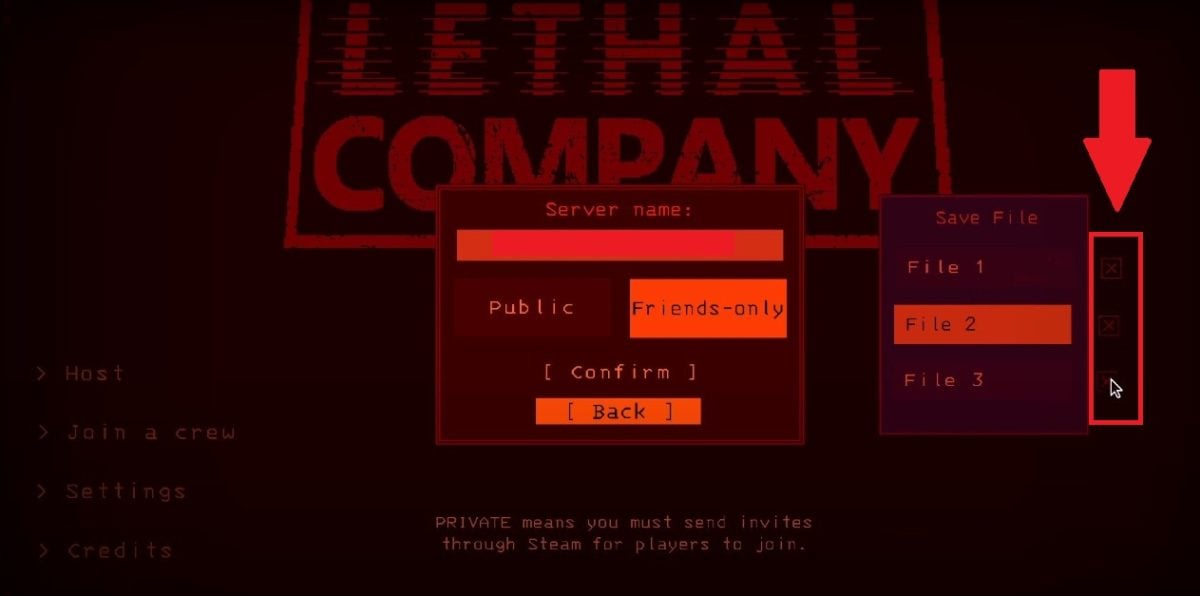
Cross icon used to delete a save file in Lethal Company. ©Antonin for Alucare.fr - A window asks you to confirm the transaction.

Confirm the deletion of a backup file in Lethal Company. ©Antonin for Alucare.fr
Delete a backup using File Explorer
You can also go directly through the’file explorer. Pave the way C:\Users\[PCNAME]\AppData\LocalLow\ZeekerssRBLX\Lethal Company.
Each part corresponds to a separate file : Delete the one you want to clear the corresponding progress.
Have a question about backups? Ask it in the comments.








 English