In brief
Positives
- 14-day free trial
- Available offline
- Comprehensive and effective features for productivity
Negative points
- Available in English only
RescueTime at the best price
- Solo (per month for an annual purchase) 6.5 $
- Solo (per month) 12 $
- Team (per member, per month for an annual purchase) 6 $
- Team (per member, per month) 9 $
RescueTime is a time management software that tracks your activity completely automatic. It tracks the time spent on each app and website, organizes your activities by category, and then generates a daily report with a productivity score.
Reviews, features, pricing—we'll tell you everything about RescueTime !
RescueTime features
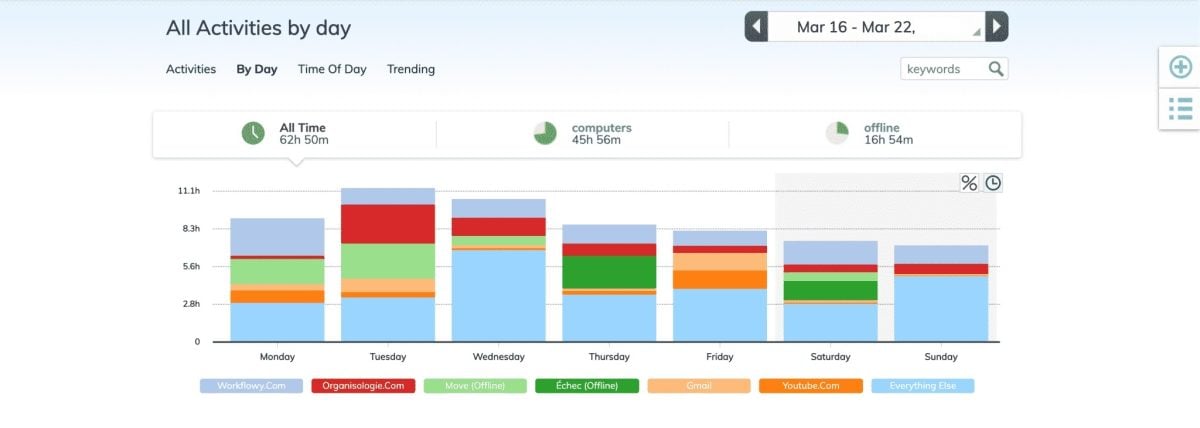
RescueTime is available on Android, Mac, Windows and Linux.
The features all revolve around a simple idea: track your time automatically, without any manual data entry. Here's what the software actually does.
Automatic Time Tracking
The basic feature tracks the time spent on each website and app in the background. You then receive a daily report with a productivity score.
Each activity is automatically categorized, starting with “very productive” at “very entertaining”. At a glance, you can see where your work hours are actually going, without having to enter any data.
Focus Sessions Mode
The other key option is the mode Focus Sessions. He blocks websites and apps that you've labeled as distractions during your work session.
Blocking social media depends on your own categorization, not on a predefined list. You can also enable an optional setting that blocks communication tools such as chat and email. However, it does not block the system notifications from your phone or computer.
RescueTime pricing
You can try it out RescueTime free for 14 days, without having to pay right away. This trial covers the plan Solo like the plan Team. Once the trial period ends, you'll need to switch to a paid subscription to keep the premium features.
Prices remain affordable, especially in annual invoicing. Here are the prices (verified in August 2026; they are subject to change):
| Plan Proposed by RescueTime | Rate | Explanation |
|---|---|---|
| Free version | 0 $ | A 14-day free trial, which applies to both the Solo and Team plans. |
| Solo | 6.50 $/month | Subscription Rate annual, or a one-time payment of 78 $ per year. |
| 12 $/month | Price if you'd rather pay per month, with no annual commitment. | |
| Team | 6 $ per member per month | Rate per member by subscription annual, that is 72 $ per person per year. |
| 9 $ per member per month | Rate per member as payment monthly. |
Subscription annual nearly cuts the monthly cost in half. If you plan to use the app over the long term, this is clearly the most cost-effective option. For a quick test, the 14-day free trial are more than enough to see if the tool is right for you.
User reviews
On Capterra, RescueTime displays a rating of about 4.1/5, with similar feedback on G2. The score remains solid for time-tracking software.
The most common theme in positive reviews is: the automatic tracking which helps prevent oversights and fosters a real awareness of one's habits. In practice, many users say they save 15 minutes a day simply by identifying their sources of distraction. Over the course of a year, those minutes add up to nearly 4 days recovered work hours.
Positive reviews
- Available on all systems : RescueTime runs on Mac, Windows, Android and iOS. You can track your time on both your computer and your phone.
- Free version available : It works on both mobile devices and computers and is all you need to try out the tool before paying.
- Affordable rates : Users appreciate being able to use a true productivity app at a low cost, whether on their own or as part of a team.
Negative reviews
The negative feedback mainly points to the dashboard readability. Some users find the reports unclear at first glance and are calling for a redesign of the interface.
Another recurring criticism: the project management role Sometimes it lacks finesse. It's hard to neatly organize all of your activities when you're juggling multiple tasks.
RescueTime Evolution
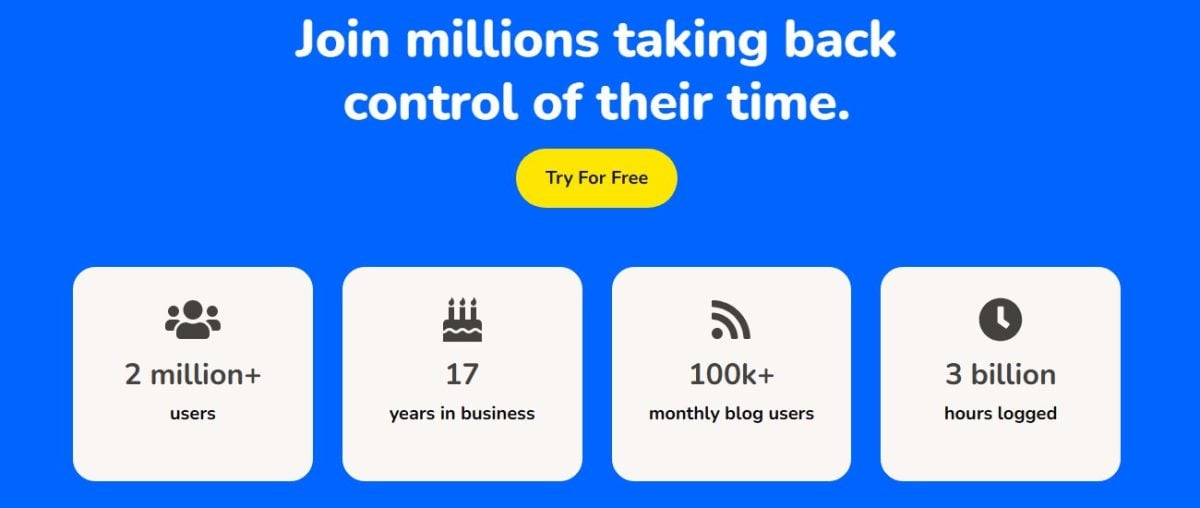
Launched in 2007, RescueTime started out as a simple time tracker and has grown into a real productivity tool. Today, he claims more than 2 million registered users.
This positioning explains its success: many have adopted it to measure their screen time and take back control of their days, without having to write anything down by hand.
How RescueTime Affects Your Daily Life
On a day-to-day basis, RescueTime above all, helps you take back control of your time. You can see in black and white exactly where your time is going, and you adjust your habits day by day. Falling behind on a project because of a lack of focus is exhausting.
That's where this tool makes all the difference! Here are the main impacts of RescueTime on your productivity:
| Impact of RescueTime | What this means for you |
|---|---|
| Best management of time |
|
| Motivation reinforced |
|
| Less time on the entertaining websites |
|
| More than results |
|
| Back to focus stress-free |
|
FAQs
Who is RescueTime for?
RescueTime is intended for anyone who wants to improve their organization and his productivity on a daily basis. Its primary target remains the individuals, freelancers, and small teams, not large companies.
Here are the profiles that benefit the most from this:
- Do you find yourself saying “I don’t have time” or “my days are too short” all day long? This software is for you.
- You don't really know how you spent your time Even with your organizational methods? Try the app.
- Do you already measure your screen time on your smartphone, but not the hours you spend in front of your computer? RescueTime fills this gap.
- Do you want to spend less time on certain things? social networks (Instagram, Facebook, YouTube)? This software blocks these distractions.
If you're going through a slow period at work, check out how to make time pass more quickly at work.
Why try RescueTime?
RescueTime play all systems : Windows, Mac, Linux, and Android. You can try it out free for 14 days before you pay—which is the best way to see if the tool fits your work habits.
Side data privacy, RescueTime claims to protect your personal information. This is reassuring if you share your activity reports with a team.
Similar monitoring and analysis tools such as Brand24, Brand Mentions or VidIQ apply the same approach to transparency regarding the data collected.
What are the disadvantages of RescueTime?
Here are the pitfalls you should be aware of before you get started:
- The interface is in English only, which is a problem for users who aren't comfortable with that language.
- the design It's a bit old-school, even if it's just a cosmetic detail.
- the automatic tracking sometimes lacks subtlety for freelancers who juggle several very different projects.
- the Focus Mode It doesn't block your phone's system notifications: it mainly targets websites and apps that are considered distracting.
Is time management really useful?
Managing your time well becomes a habit when you have self-discipline. But even with a good level of concentration, your attention will eventually wane. That's where RescueTime : It helps you stay focused so you can finish your work without having to work extra hours.
The idea isn't to cut out Facebook, Instagram, TikTok, or video games. Rather, the goal is to find a healthy balance between work and relaxation. Many people still organize themselves using a to-do list on paper or in a notebook. These techniques remain effective, but without any real concentration, they lose all their appeal.
Have a question about this tool? Ask it in the comments area.
You can also check out Our Top Picks for the Best Remote Work Monitoring Software for Businesses.








 English