Project Zomboid is a game of post-apocalyptic survival which offers play solo or in multiplayer via servers. These servers can be located locally or on the site of an external host. The latter will often offer a greater stability but you'll have to pay for the service. In this article we'll introduce you to a few guides:
- How host a part on a server
- How join friends on a server
- How to solve problems in the event of a bug
- Tips to make your multiplayer adventure more pleasant
Host a game on Project Zomboid to play with friends
Project Zomboid allows players to play in multiplayer mode, either in creating their own server hosted on their Internet connection, or through a host which will provide a server via its own connection, generally more stable. We will see how to be the host and start your server:
- Step one: Click on HÉBERGER in the game menu to create a server

- Step 2: Allocate minimum 2GB memory for the server, but we'll advises minimum 4GB (you can put more, of course)

- Step three: You can choose to make public your server or not and put a password to connect
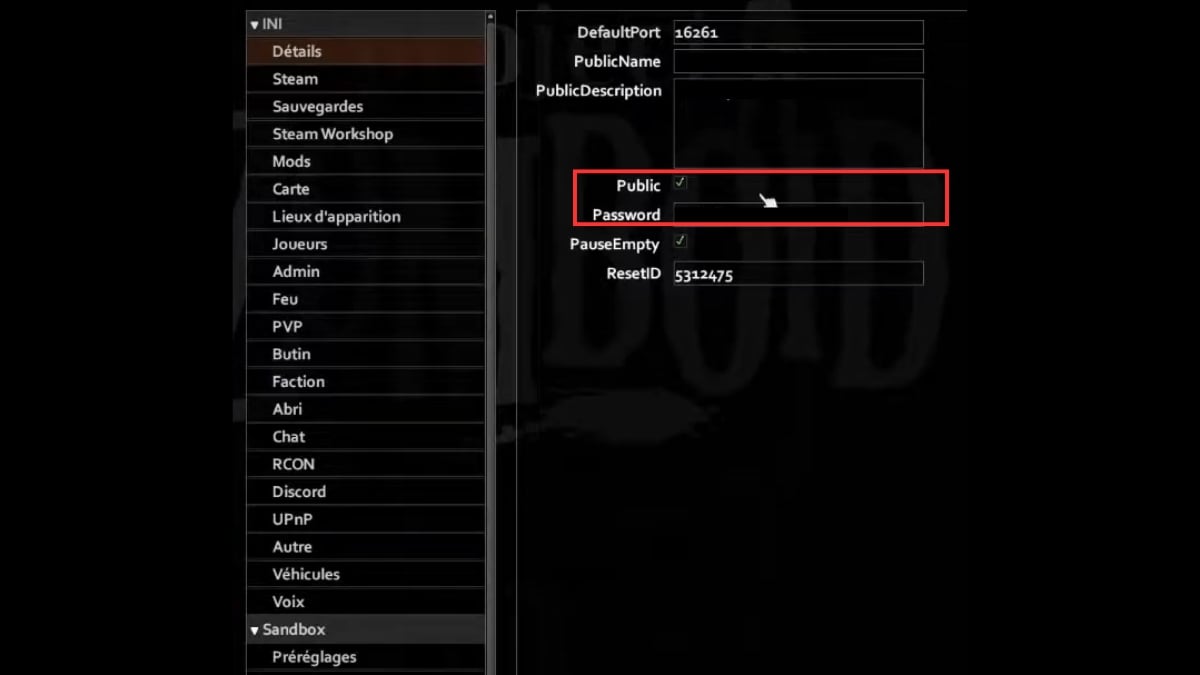
- Fourth step : The menu on the left allows you to change parameters the server and configure various aspects of the game
- Fifth step : /!\IMPORTANT/!\ Don't forget player consumption ! Everyone consumes 200 MB of RAM that needs to be added to the allocated memory to the server (so if there are 4 players: 200 * 4 = 800 MB + the 4GB you were planning to put in, you'll need to allow 6 GB for peace of mind)
- Sixth stage : You can activate or deactivate PVP

Feel free to browse through the menu tabs to customize every aspect of Project Zomboid to suit your tastes. The game is highly customizable, making your adventures unique!
Join a friend's server to play Project Zomboid in multiplayer mode
Project Zomboid servers allow you to multiplayer on the same game card. So you may find yourself having to face other survivors in addition to zombies, or that you have to creating alliances with other players. The cooperation makes survival easier in this dangerous, unforgiving world.
If you would like to join a server, follow these steps:
- Step one: Click on ONLINE to access the server list
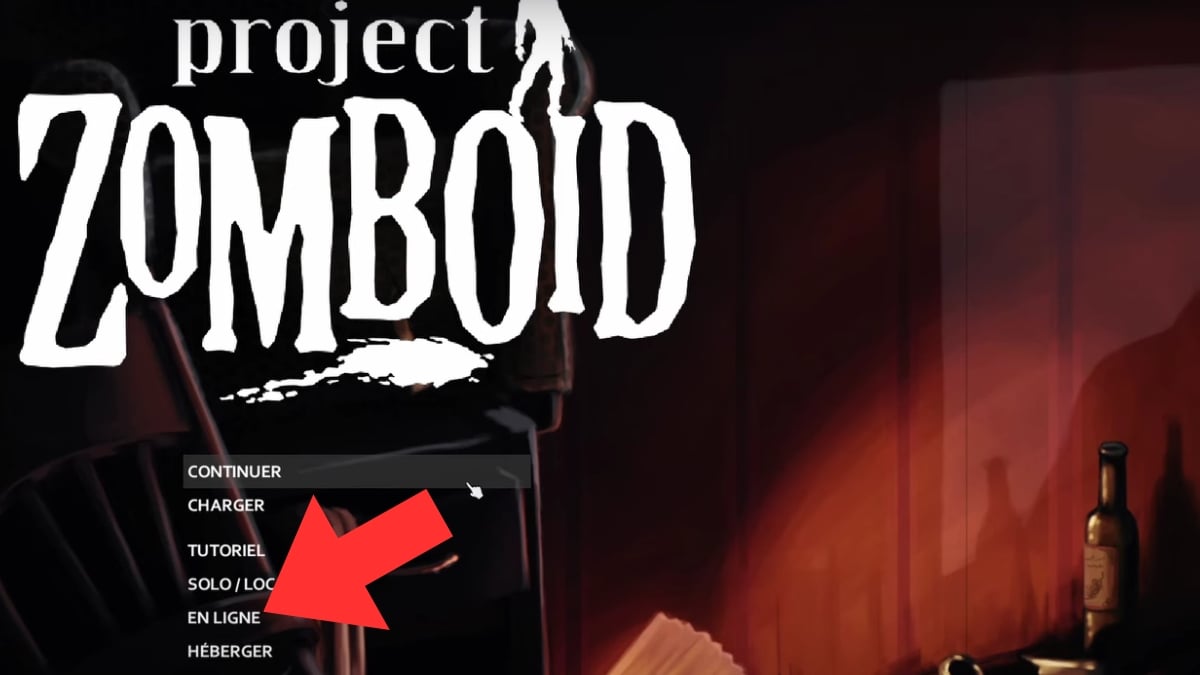
- Step 2: Enter the server name of your friend
- Step three: Enter the password if necessary
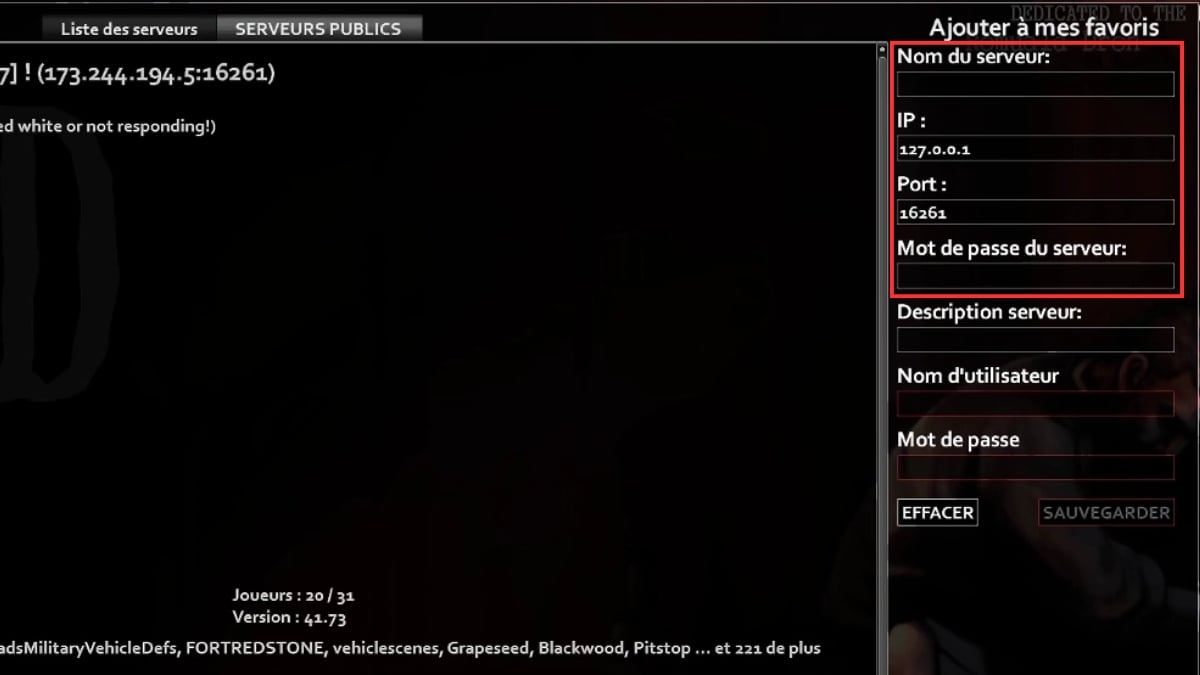
Now you can join your friend's server and play together!
How do I fix bugs or lags in Project Zomboid co-op?
In the course of your adventures, you may be confronted with the following bugs or lags. We'll explain the how to proceed to try to resolve them as best as possible. First of all, don't forget that the game is still in early accessThe developers are few and far between on the project, but do their utmost to make the game playable for everyone.
Bugs may appear from time to time. If they are unknown to the forums and the teams responsible for the game, then the best thing to do is to report them via the Steam platform.
If this should happen to you, the first reflexes to adopt are simple:
- Restart your server : you never know, the bug may be minor and can be fixed with a reboot
- Delete unnecessary files : By doing this, you ensure that your computer and server are as clean as possible. This will prevent any intrusive files from interfering with your server files.
- Consult the forums : Your case is certainly not unique, and others may have had the same problem. There are probably solutions available on player chat rooms.
- Request assistance from game support: If your problem persists or if no one has ever had it before, contact the technical support to let them know about the bug and see how they can fix it
Tips for multiplayer on Project Zomboid
To make your multiplayer adventure and fun as possible, here's how a few tips to share with your friends:
- The game offers a communication chat but it's rarely used. The best solution for communicate with your friends is to use a platform such as Discord.
- You can allocate roles with your friends: for example, one player can focus on gathering food, while another reads books to unlock interesting recipes for the group... Make your adventure more cooperative!
- Don't forget to share resources you find! This way, the group will be more homogenous, and each player will be able to fend for himself in any situation should you become separated. Share your knowledge of zombies and the environments you've visited, so that everyone can play in the best possible conditions.
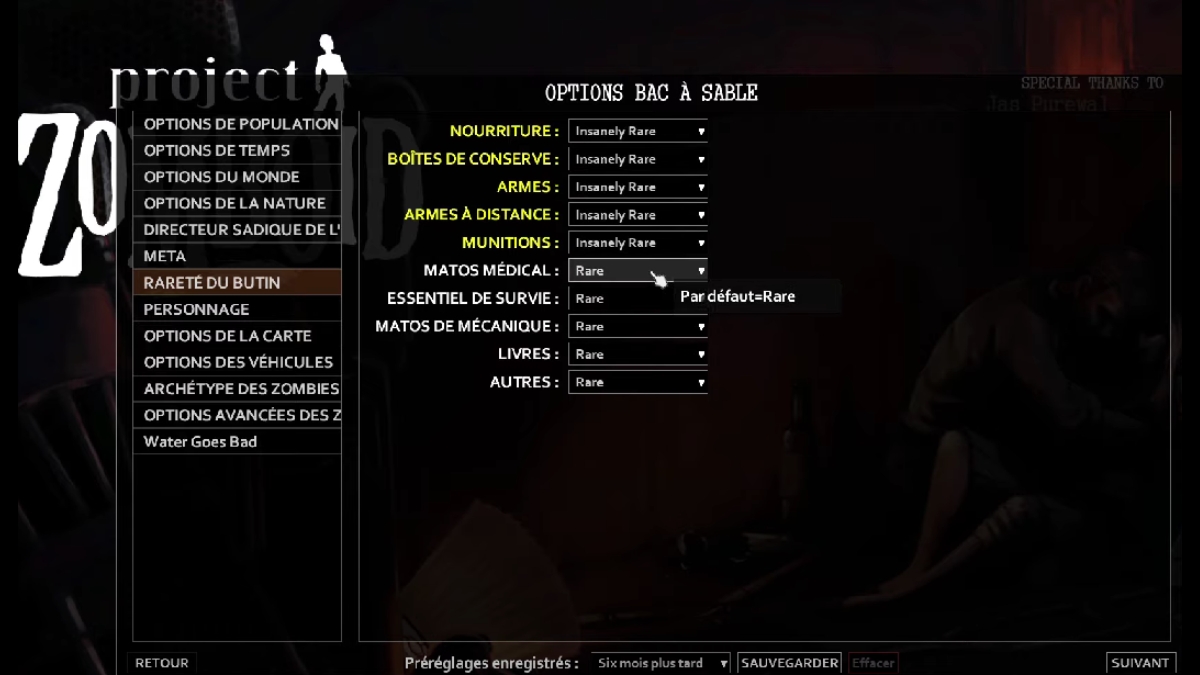
- You can change the game parameters to make the game as close as possible to your expectations and those of your friends. You can change the difficulty, the zombie spawn rate, the presence of’weapons in quantityparameters about food as well as many other aspects. The game offers you a wide range of options to personalize your adventure.
You can also find out more about how to add a mod to Project Zomboid or on What are the best Project Zomboid mods? by clicking on these links!
As you can read in this article, create a server to play with friends on Project Zomboid is not not complicated !
Playing multiplayer lets you discover a whole new world. more permissive side of the game, and you can move forward more serenely with your partners in this zombie apocalypse survival game.
And if you're interested in other information that can make your adventure easier, we can teach you how to create a barricade in Project Zomboid !









 English