To add a mod to Project Zomboid, you must first subscribe to the mod via the Steam Workshop, then enable it in the Mods menu of the game.
But before you get started, remember to save your game to avoid any bugs or compatibility issues.
Step 1: Find Project Zomboid mods via the Steam Workshop
the Steam Workshop is a community space where players share downloadable content Free. You can access it directly through the Workshop Project Zomboid on Steam, or from the client Steam by following these steps:
- Go to the’«COMMUNITY» tab» at the top of the page.

- Choose «Workshop» in the drop-down menu.

- Tape " Project Zomboid » in the search bar to filter the game's mods.
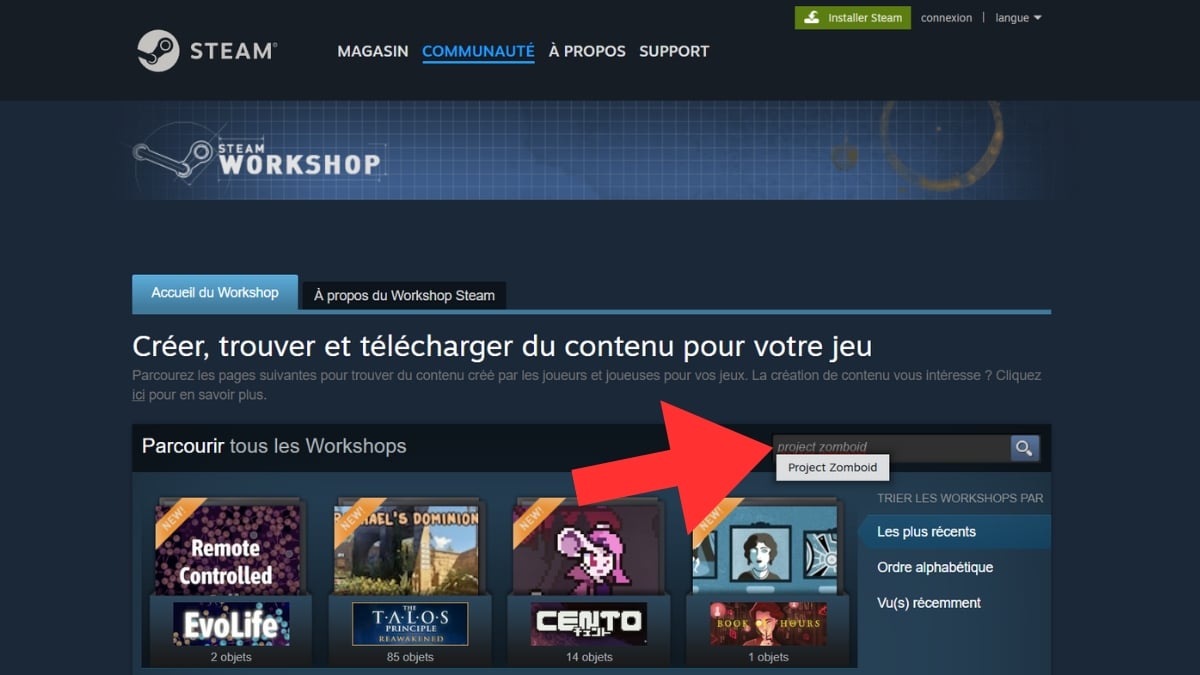
- Aligns with the various filters : the search bar (in red), sorting by popularity or publication date (in blue), or tags by topic (in green).

Want to know what to install first? Check out our selection of best mods for Project Zomboid.
Step 2: Installing a mod on Project Zomboid
Once you've made your selection on the Steam Workshop, the installation is done directly in the Mods menu of the game. Here are the complete instructions for Download and enable Your first mod.
- Start by choose a mod and click on it. Here, we'll use the example of Project Fallout: Rob-Co Pip-Boy 3000.

- On the mod page, click the button «Subscribe». The download will then begin automatically via Steam.

- Once the Download complete, says Project Zomboid and click on «MODS» from the main menu.

- Find the your mod's line in the list, then click on «Disabled» all the way to the right. The status changes to «Enabled» in green : The mod will be applied to any future games you create.

FAQs
How do I add a Project Zomboid mod to an existing game?
Already have a game in progress and want to add a mod you just downloaded? Here's how.
- Check that the mod isn't not already activated on your turn.

- Go to «MORE …» to add the mod.

- Click on «Choose Mods» to access your list.

- Select the mod you want and click «Disabled» : it goes to «Enabled» in green.

- Click on «PLAY» to start your game with the mod installed.

How do I add a Project Zomboid co-op mod?
Do you want your friends to enjoy your mods too? Here's how to set up your server to multiplayer to include your mods right from the start.
- Click on «HOST» to create a server.

- Click on «Configure...» on the right.
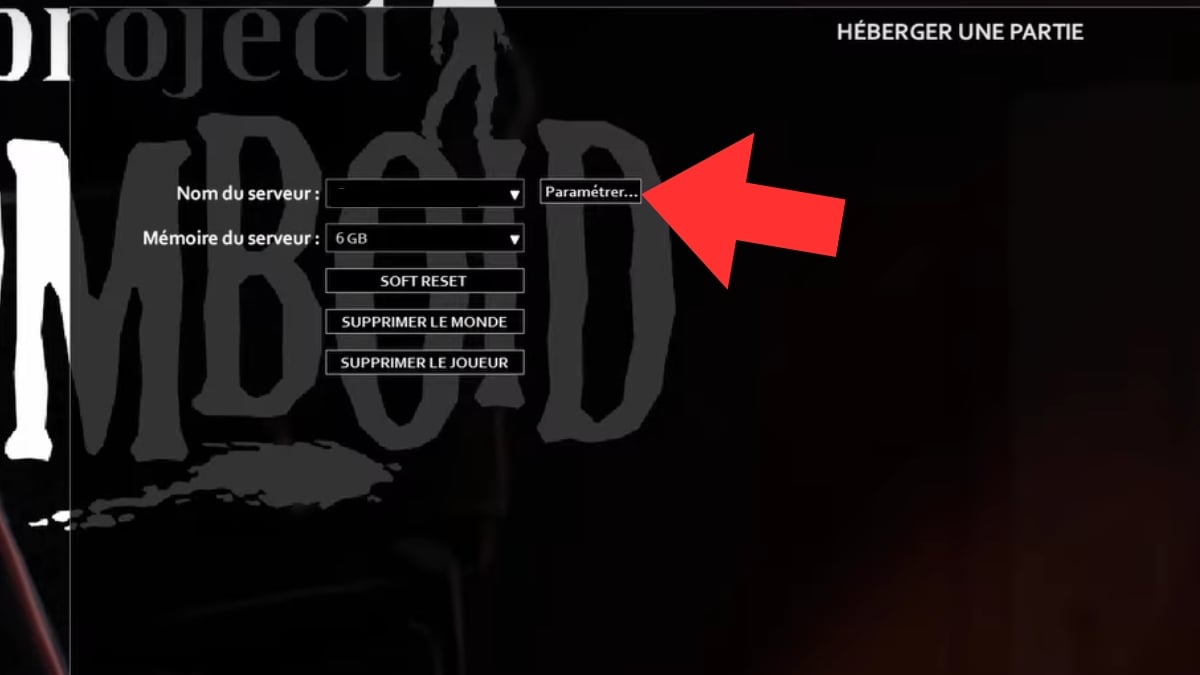
- Go to «Create new settings».

- Give it to him a name so you can find it easily, then click on «Next» at the bottom of the page.

- Choose «Add an installed mod to the list».

- Choose one mod among those whom you have.

- Go to " Steam Workshop » to add mod to list. This allows your friends to download and use it.

- Click on «SAVE» at the bottom of the page Save your additions.
You can now start a co-op game with your mods enabled.
How do I add a mod to a Project Zomboid server?
If you use an external hosting provider (VPS or sample panel Nitrado), you must edit the files on the server. Important : The server must be off before adding mods.
You need two usernames for each mod:
- the Workshop ID : the numbers after id= in the URL of the mod's page on the Workshop
- the Mod ID : as indicated in the page description Workshop of the mod (some mods have more than one)
- Go to the mod page in the Steam Workshop of Project Zomboid.
- Retrieve the two IDs from the Description from the mod.
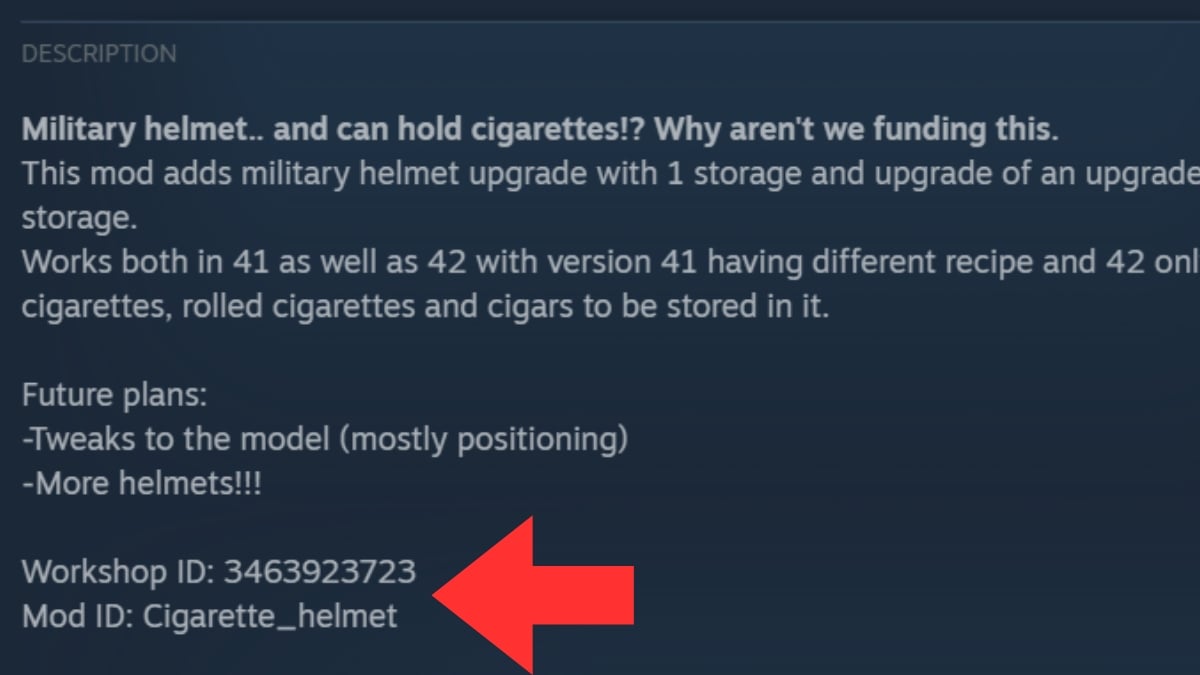
Next, open the file servertest.ini using a text editor. This file is located in Local Disk > Users > your username > Zomboid > Server. Fill in these two lines:
- WorkshopItems= : paste the Workshop ID, in the same order as the mods.
- Mods= : paste the Mod ID, in the same order.
Save, then restart the server to apply the changes. If you're using an admin panel, these fields are often accessible directly from the interface, without having to edit the file manually.
You can now start your server and enjoy your mods!
And if you'd also like to know how to install a mod on Minecraft, feel free to click the link to check out our comprehensive guide.









 FR
FR  RU
RU  EN
EN  ES
ES  IT
IT  DE
DE  ZH
ZH  PT
PT  ID
ID  JA
JA  DA
DA