How to change your Twitch username to 2026 ?
You want to to change of pseudo because it no longer suits you? On twitch it is possible to change his nickname all the 2 months !
If you have just created your account, you must wait 2 months after creating the account.
Other info: If you want to have the Prime subscription for free: CLICK HERE
How do I change my Twitch username?
To change your twitch nickname I invite you to go to Profile. First you have to go to Settings.
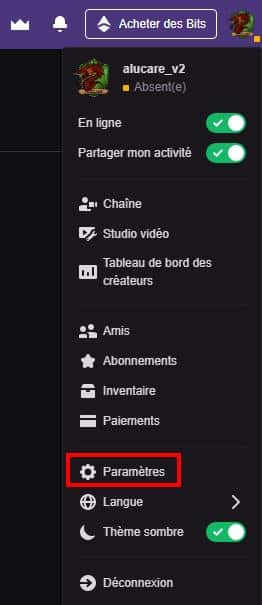
Then to go in profile (this will usually get you there).
You then see where to change your ID (nickname.
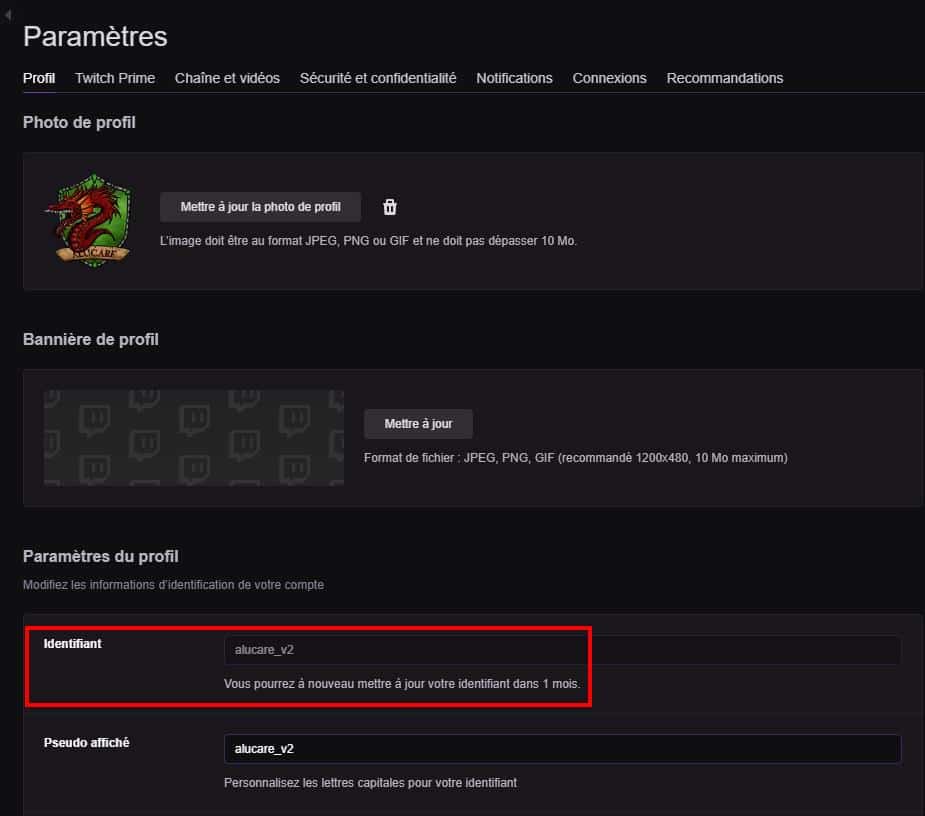
Click on the small icon change all to the right of IDENTIFIER. Note that your Twitch ID can only be modified after 60 days2 months.
If you want to go directly to where you need to change your username Click here
Please note that you will receive a verification code, don't put it in place of your nickname otherwise it will become your new nickname :).
If you found the tutorial helpful, please feel free to leave a comment :).
List of tutorials on twitch:
- All tutorials on Twitch
- If you have any questions :









 English
And so, for me, it's impossible to change my username twitch at the moment.
You have to wait a little while, as mentioned in the article 🙂
Hello, I have his two messages:
– "You can only change the case of your username."
– “You cannot change your username, only the use of capital letters.”
Currently, you can only change the MAJS. For example, if your username is ALUCARE, you can change it to alucare or AlUcArE, for example 🙂
Hello,
Now it's 2 months that you have to wait to change your nickname.
Hi, yes that's what I marked 🙂
I'm a fan of croutons