You've lost access to your account Snapchat ? Whether you have Forgot your password?, your login credentials, or that your account was hacked Whether it is enabled or disabled, there is an official procedure for each situation.
Here's how to regain control, step by step.
I forgot my Snapchat password
You can Reset your password in just a few minutes, either through the app or a web browser. It's the easiest way to access your account Snapchat.
Reset your password from the Snapchat app
- Open the’application Snapchat on your device (iPhone Where Android), press Loginthen on Password forgotten.

- Choose your recovery method: by e-mail address or by phone number.
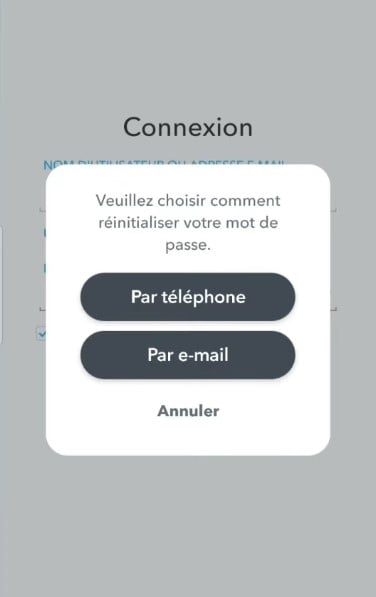
- By e-mail : Enter your email address, then press Send, then click the reset link Check your email inbox and create a new password.
- By phone number : Enter your number, then choose to receive a code via text message or phone call, between the verification code, then set your new password.
- Once you've changed your password, you can once again log in to your account Snapchat and log in as usual.
Reset your password on the website
Don't have the app handy? You can also follow these steps using a browser on the website official.
- Go to the Official Reset Page Snapchat : https://accounts.snapchat.com/accounts/password_reset_request
- Select your username or thee-mail address associated with the account.
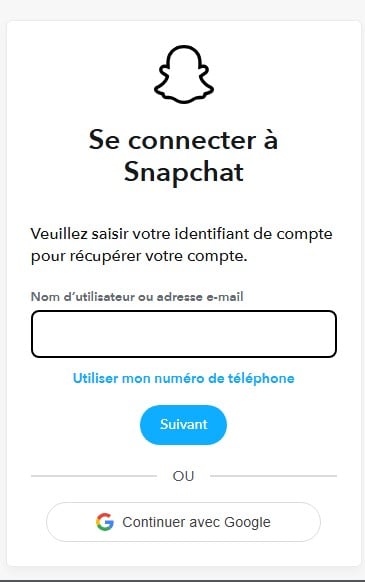
- Choose to receive the link via e-mail or the code by SMS.
- Follow the instructions to set your new password and log in to your account Snapchat.
If you also have Forgot the email address and phone number associated with the account, this method no longer works. In this case, you must contact the’assistance Snapchat (see the section below). If you encounter any other technical issues, our guide on bugs Snapchat might also help you.
I forgot my Snapchat login information
You haven't used Snapchat for a long time, and you don't remember your username ? You can regain access to your account through your e-mail address, then reset your password.
- Sort through all your email addresses : You might have several of them, and you can't remember which one you used to create the account Snapchat.
- Start the process Password forgotten in theapplication Snapchat.
- Try your addresses one by one. As long as you see the error message «The email address is invalid», that's not the right one.
- When this message disappears, the email address you entered is correct : You can then reset your password to access your account.
If none of your email addresses work, try resetting it via the phone number associated with the account. Snapchat ...then sends you one SMS code to verify your identity.
Recover a Snapchat account without an email address or phone number
This is the most difficult case. If you no longer have access to the email address or to the phone number associated with your account Snapchat, the usual reset methods no longer work. You have two options left.
- First of all, Check your old email addresses. You might have an old account Gmail Where Hotmail that you forgot.
- Try logging in to these accounts to find the confirmation email sent by Snapchat at the time of creation.
- Next, if you can't find any information, the only option is to contact the’assistance Snapchat directly (see the section below).
Support may ask you to prove your identity via the account username and other additional information related to your profile.
If recovery is not possible, it may be helpful to create a new account Snapchat and notify your contacts. This time, be sure to provide a valid email address and phone number when you create your account.
My Snapchat account is blocked or deactivated
An account Snapchat maybe temporarily blocked Where disabled for several reasons: violation of the terms of use, suspicious activity, or a request you made yourself.
The procedure depends on the situation.
Snapchat account temporarily blocked
If your account Snapchat is temporarily blocked, the app will let you know when you log in.
If your account is temporarily locked, you can try logging back in through the accounts.snapchat.com portal by selecting «Unlock.».
This type of block is often related to suspicious activity detected by Snapchat.
Reactivate a Deactivated Snapchat Account
If you have deactivated your account yourself, you have until 30 days to reactivate it. Log in with your username (not your email address or phone number) and your usual password.
After this period of 30 days, the account is permanently deleted and it can no longer be recovered. All your data has been permanently deleted.
If your account has been disabled by Snapchat If you have violated the terms of use, contact support through the official help page to appeal the decision and try to reactivate a deactivated account.
Note:
- Only the account owner can reactivate a deactivated account; Snapchat support cannot do this for you.
Deleted Snapchat Account: Is It Still Possible to Recover It?
If your account Snapchat been permanently deleted for more than 30 days, recovery is no longer possible.
Your data has been permanently deleted from the servers. The only option is to create a new account. Snapchat.
However, if the account was deactivated or deleted less than 30 days, log in with your username and your usual password.
If you'd like to reactivate your account, Snapchat will offer you the option right away. It's as simple as that.
My Snapchat account was hacked
This is the most delicate situation. The pirate often changes the password, I'e-mail address and sometimes the phone number, which blocks all the usual ways to access your account Snapchat. Here's how to respond depending on what has been changed.
- If your login data have been leaked into a database (you can check this on online platforms), immediately change your password for a strong, unique password.
- If the hacker has already changed your password but not your email address—follow the procedure Password forgotten with your email address to regain access.
- Whether the email address AND the phone number Both have been changed, so you can no longer reset them on your own: the only option is to contact the’assistance Snapchat.
Contact Snapchat Support to recover your account
Go to the official help page: help.snapchat.com. Look for the article «My account has been compromised» and fill out the recovery form. Using this direct link helps you avoid fraudulent pages that impersonate customer support Snapchat.
Before submitting your request, please have the following information ready prove your identity :
- l'e-mail address used when creating the account; ;
- the account username hacked.
Support Response Time Snapchat varies depending on the situation. Check your email regularly after you submit your request. If you haven't received a response within 48 to 72 hours, you can submit a new request, specifying that it is a follow-up.
When Recovery Is Impossible
In some cases, even assistance Snapchat cannot help you reactivate or recover your account. This is especially true if:
- The account has been permanently deleted for more than 30 days; ;
- You cannot provide any data that would allow us to verify your identity ;
- The account has been permanently disabled following a serious violation of the terms of use.
In these situations, the only option is to create a new account Snapchat. It's hard to accept, but there's no magic solution for getting around these restrictions.
Enable two-factor authentication to secure your account
Once you've regained access, immediately secure your account to prevent another hack. The double authentication adds an extra layer of security to every time you log in to your account Snapchat.
In the app: opens the Settings (⚙️ icon), then the section «My Account» and select Two-factor authentication. Then select verification via SMS or through an authentication app.
Here are a few habits to adopt to keep your account secure:
- keeps a e-mail address and one phone number up to date to facilitate any future account recovery Snapchat ;
- creates a emergency code if you have a problem with two-factor authentication; ;
- uses a different password on each application.
If you encounter the same problem on other networks, check out our articles to recover a account Facebook or one account WhatsApp. And if you'd rather Delete your account Snapchat We also have a dedicated article on this topic. To manage your contacts, check out our article on block someone on Snapchat explains everything to you.







 FR
FR  RU
RU  EN
EN  ES
ES  IT
IT  DE
DE  ZH
ZH  PT
PT  ID
ID  JA
JA  DA
DA
I wish to cancel my account
I have been hacked
Forget password