You want protecting your childor one of your loved ones by tracking their location in real time? Don't panic! Many apps, such as Google Maps, have been designed to help you!
Find out how locate a phone number with Google Maps for free and best alternatives to the application !
Discover the best alternative to Google Maps :
How can I geolocate a phone for free?

To determine the free phone geolocationyou can use Google Maps!
This is a Google application for locating a person by phone number, whether Android or iPhone. How do I use this application?
1. Preparing the phone to be located with Google Maps
Please note that before you can locate a cell phone with Google Mapsthe following instructions are essential:
- Download the Google Maps app on the phone to be located and your own, and ensure that the device is connected to a Google account,
- Ensure that the person to be located agrees to be located on his phone,
- Activate the location service on both devices (yours and the person's).
To do this, here are the steps you need to follow depending on your device:
- On android See you in the Settings ⇒ Location and verify that this option is enabled for the Google Maps application.
- On iPhone : Go to Settings ⇒ Privacy and security ⇒ Then check that location services are enabled for the Google app.
Once you have fulfilled all these conditions, we can move on to the next step!
2. Enable location sharing on Google Maps
Here's how to locate someone for free with Google Maps :
- Open the application Google Maps and log in to the Google account connected to the target device,
- Then press the profile photo top right of the small circular screen,
- Once in this section, click on Position sharing,
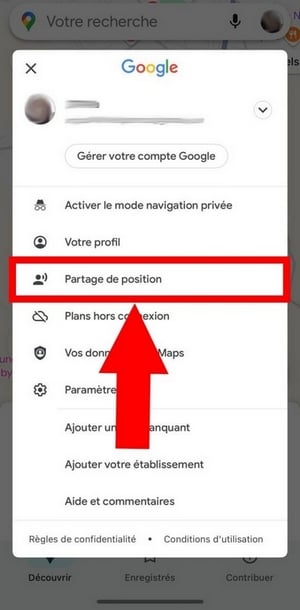
- Then confirm this action by clicking on Share my position,

3. Share position
- Now you can find your name or contact from the available options to send the location sharing link. Feel free to scroll right to see all the available options.
- In this section, you can also define the duration where the actual position from the target phone will be shared with you (between one hour and until deactivation),
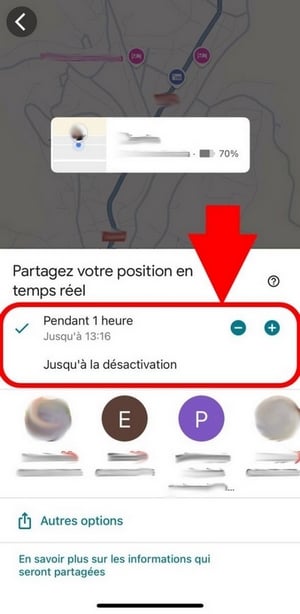
- Now, all you have to do is click on To share and the position will be sent to the contact selected earlier.
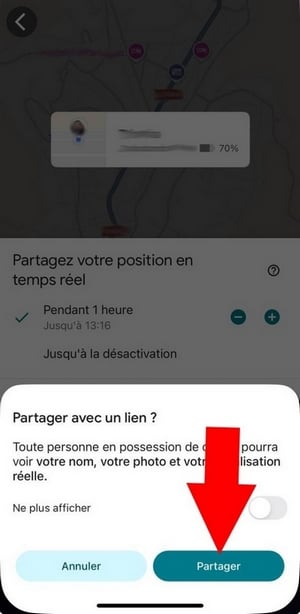
- Finally, open your SMS Where online messaging or your e-mail (depending on the option selected) to start tracking the location data of the target device.
Remark :
Whether you use a iPhone or one androidthe steps and requirements for locating a phone with Google Maps remain the same.
What are the advantages and disadvantages of Google Maps?
Before locating someone with Google Mapsyou're wondering what more and the game's less of this app?
| 👍 Benefits | 👎 Disadvantages |
|
|
Do you have the number of the phone to be located?
Locate a smartphone using its phone number 👀
Alternative to Google Maps for locating a device online
Think Google Maps isn't right for you? Good news—there are other apps that can help you find thelocation a free phone and to lower cost available on the market!
1. Google Find My Device or Find My
Google Find My Device (Android) and Find My (iPhone) are among the best apps for easy phone location!
Generally, the application is already installed by default on your device, as it is a functionality already integrated to this one. These are two equally useful solutions for finding the exact location of a lost or stolen device.
Do you Google Find My Device is free ? Feel free to click on this article to find out more.
2. GEOFinder.mobi
Likewise, GEOfinder is an excellent alternative to Google Maps.
Unlike Google Maps, GEOFinder does not require any data from the Google or iCloud account of the device to be located. All you need with GEOfinder.mobi is the phone number.
However, it should be noted that GEOFinder is not free, but is less expensive and also offers a trial version at 1.$ for one day.
To all types of smartphone and no installation requiredHere are the steps to use GEOfinder.mobi to locate any device at a low cost!
- Visit the GEOfinder website,
- Then insert the phone number to be located in the appropriate field;
- Choose the message to send to the target phone ;
- Once the owner clicks on the link SMSYou'll find information on your target's location in the user area.
3. Parental control software
Offering more comprehensive functionalities Parental control software can also be used to determine the location of a device.
In addition to providing the location data of the target device, monitoring applications such as EyeZy or mSpy offer the ability to set a zone called "safe" and "dangerous" on the target device.
Therefore, parents will be alerted if they frequent places dangerous to protect their children as best they can. In fact, it's not just parents who use mSpy and EyeZy services!
Would you like to try out these two applications?
FAQs
Is it legal to locate a phone with Google Maps?
Locating a phone using this Google app is not illegal, provided that the person consents to being located. That is why it is recommended to communicate with it in advance in order to obtain their authorization.
What should I do if the data does not appear on Google Maps?
If the Google Maps is not precise enough:
- Refresh page or refresh, using the Refresh page button at the top of the page;
- Wait for a few minutes, while the phone updates itself.
- In addition, if the phone to be located is switched off or out of battery, the last position will be displayed on the map. This information is always useful for limiting search areas.
- Update the Google Maps app.
- Check your Internet connection.
Do you need a number to locate a phone with Google Maps?
No. However, you must connect to the associated Google account to the device you want to locate so you can activate location sharing on Google Maps!
This method is mainly used by those who have lost their cell phone or those trying to reach a loved one who may have gone to an unsafe location.
Can Google Maps localization work without an Internet connection?
The application displays the last location from the cell phone if it is not connected to the Internet.
Is Google Maps location sharing up to date?
In general, the position sharing Google Maps is updated in real time, even every few minutes if the device to be located is connected to a stable Wi-Fi network.
However, if you notice the mention " Location updated one hour ago ", this means that the user has disabled location sharing or that the target device is not connected to the Internet.
How reliable is Google Maps?
In general, Google Maps is a reliable application. It is also rated 4,7/5 by users on review platforms such as Capterra.
However, if Google Maps does not suit your needs, you can also use other alternative applications to locate devices in real time, such as mSpy Where EyeZy !
Is it possible to locate a number without the person's consent?
Yes, it is possible to locate an unauthorized phone.
However, it is preferable to request authorization of the person if it is not your phone in order to respect their privacy.
What's the best alternative to Google Maps?
The best alternative to Google Maps is undoubtedly GEOfinder.mobiAt a low cost, the application allows you to geolocate a cell phone or (multiple mobile devices) using its phone number.
This is one of the best techniques for locate a person using their phone number. If you want to discover a full review of GEOfinder.mobi, don't hesitate to click on this article!
In summary, here is some information you should know about locating a device for free with Google Maps. Did you find the tips mentioned here useful?
Feel free to tell us what you think about Google Maps in the comments!








 English