To modder Undertale, it all depends on the mod's format. If the file is in .xdelta, you'll need Delta Patcher. Otherwise, just replace the file directly data.win from the game to the mod.
Before you begin, keep a copy of the data.win original: This lets you uninstall the mod or revert to the base game without having to reinstall anything.
You can also put Undertale in French if you'd like.
1. Install Delta Patcher
A mod allows modify the dialogue, gameplay, or textures of a game. In the case of’Undertale, some mods use the extension .xdelta and require a specific tool: Delta Patcher.
It is the most widely used software for applying a patch .xdelta, whether you're playing on computer via Steam or with the version itch.io.
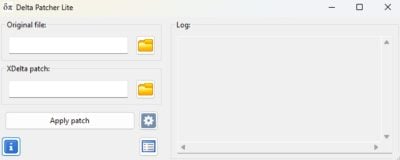
It's easy to use. Just specify two files:
- the original file (the data.win ofUndertale),
- the file .xdelta provided by the mod.
Next, click on Apply patch And that's it.
Some mods already include Delta Patcher in their repository. For the others, you'll have to install it yourself.
2. Installing a mod for Undertale
There are two methods, depending on the mod's format. If it's a file .xdelta, you go through Delta Patcher. If it's a raw data file, you replace the data.win from the game to the mod.
To apply a mod with Delta Patcher, follow these steps:
- Locate the data.win file via Steam :
- Open your Steam Library.
- Make a right-click on Undertale.
- Click on To manage then Browse local files.
- Locate the file data.win and keep the window open.

- Lance Delta Patcher.
- In the Original File, Select your data.win file.
- In the xDelta patch, Select the .xdelta file from the mod.
- Click on Apply patch to get started with modding.
If the antivirus blocks the installation, temporarily disable it while the installation is in progress, then re-enable it immediately afterward.
To be on the safe side, download only from a well-known website as GameBanana and check the community comments before installing anything.
3. Find mods for Undertale

GameBanana is the most comprehensive website for downloading mods Undertale. The packs are ranked by popularity, with reviews and ratings visible before download.
To safely install a mod, choose the ones that have the most recent comments, ofpositive reviews and of downloads.
Also check the author's profile and avoid files .exe unknowns that do not simply replace the data.win.
Is there a multiplayer mod for Undertale?
Yes, you absolutely can Multiplayer on Undertale. The best-known mod for this is called Undertale Together and lets you play as a couple.
It only works if you own the game on computer Where Xbox, and installation is still done manually.
Here's how set up Undertale Together on PC :
- Download Undertale Together.
- Once the file has been extracted, run a double-click on SpaghettiInstaller.exe.

- Let the installation run its course. If your antivirus software blocks the installer, temporarily disable it, then re-enable it as soon as the installation is complete. This type of installer sometimes triggers false alerts: always download from a site recognized as GameBanana to minimize risks.

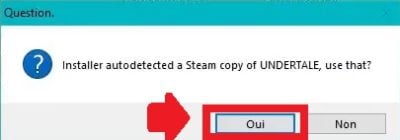
- When selecting the installation folder, the application automatically detects Undertale on Steam.
- Start the game to verify that the multiplayer mod is working properly.

Now you know how to install a mod on Undertale, whether through Delta Patcher, as a direct replacement for the data.win, or with the multiplayer mod Undertale Together.
If you need help making progress in the game, check out our complete guide to boss.









 FR
FR  RU
RU  EN
EN  ES
ES  IT
IT  DE
DE  ZH
ZH  PT
PT  ID
ID  JA
JA  DA
DA