Keypoints
- The night vision potion lets you see as if in broad daylight at night, lasting 3 or 8 minutes depending on the preparation.
- To make this potion, you'll need vials, a still, a nether wart, a golden carrot, and blaze powder as fuel.
- To extend the potion's duration to 8 minutes, simply add redstone powder, and to make it disposable, gunpowder is required.
In the captivating world of Minecraft, them potions play a crucial role in optimizing gameplay. Whether it's to increase effects or to obtain a temporary advantage, each potion has its own impact. Visit effects potions may vary depending on the level the player's skills, and they can reduce the player's damage or increase the chances of survival in difficult conditions.
Each player of Minecraft has its own version potions, adjusting the effects according to their needs. Let's discover the usefulness and manufacture of the night vision potion.
1) Purpose of the night vision potion: to have a night vision effect
In Minecraft, the night vision potion, obtained by combining a Nether wart and a golden carrot, provides a valuable effect that allows each player to see clearly in the dark and underwater, a crucial advantage for exploring the depths and dark corners of the game world.
This potion allows you, once you have drunk it, to see as if it were daylight. (It's very convenient when it's dark.)
You can make a night vision potion to be usable for either 3 minutes or 8 minutes. (we will see later how to do it.)
2) How do you make the night vision potion?
First of all, you will need vials.
Item needed to make them : 3 glasses (use a workbench)
Here's how to arrange them to obtain them: 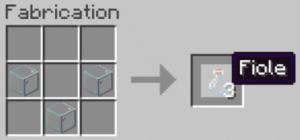
Well, now that you have your vials, you're also going to need a still. This item allows you to make all the potions you want! Without this still, you cannot make your potions on your own.
Items needed to make it : 3 stones and 1 blaze stick (to get a blaze stick, you need to kill blazes.)
Here's how to arrange the items to get it.
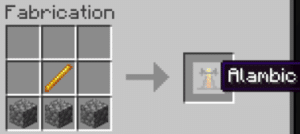
Now you can put your still in your base. Right-click to open the still interface. It is in this interface that you will create your potion(s). Because yes, it is possible to create up to 3 potions at the same time! Don't forget to fill your vials with water.
Now let's get to creating your 3-minute night vision potion:
Items required : 1 nether wart and 1 golden carrot (excluding potion: 1 blaze powder)
Everything happens in the interface of the still!
You'll need fuel, which is the famous blaze powder, to fuel your still. Place it as shown in the image below:
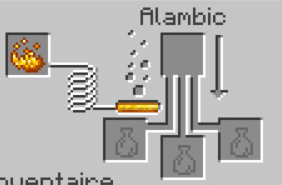
Great! Now all you need to do is follow these simple steps:
- Put the empty vial in the corresponding space as well as the nether wart. Wait until the arrow is completely white. Which will give you a strange potion.
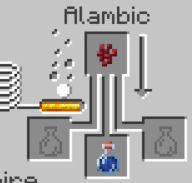 Leave the strange potion where it is, and add the golden carrot.
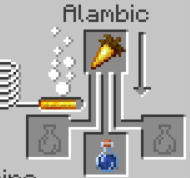
You now have a night vision potion lasting 3 minutes!
If you want your potion to be 8 minutes long, just add some redstone powder. Also, if you want to throw your potion and not drink it, just add some gunpowder.
You are now ready for your nighttime adventures in Minecraft! You should always have the’object and ingredients needed to concoct the ideal potion, making for a more rewarding and strategic gaming experience.
See the rest of the guides on Minecraft:








 English