Several streaming sites are now available to follow your favorite films, series and TV shows, and Amazon Prime Video is one of them. Are you a subscriber to this streaming platform and want to change your language? You can do so (switch to French, for example) directly from the settings. Here's a tutorial to help you.
How to change the language on Prime Video
Before logging into your Amazon account, make sure that your primary membership is still active and validYou can access it directly on the official Amazon Prime website or use the app on your connected devices, game consoles, or tablets.
A subscription to Amazon Prime Video costs 6.99 per month69.99 per year. Now that everything is clear on this streaming platform, it's time to move on to the steps involved in changing the language on Amazon Prime Video. Find out more on the video award in the guide we've prepared especially for you.
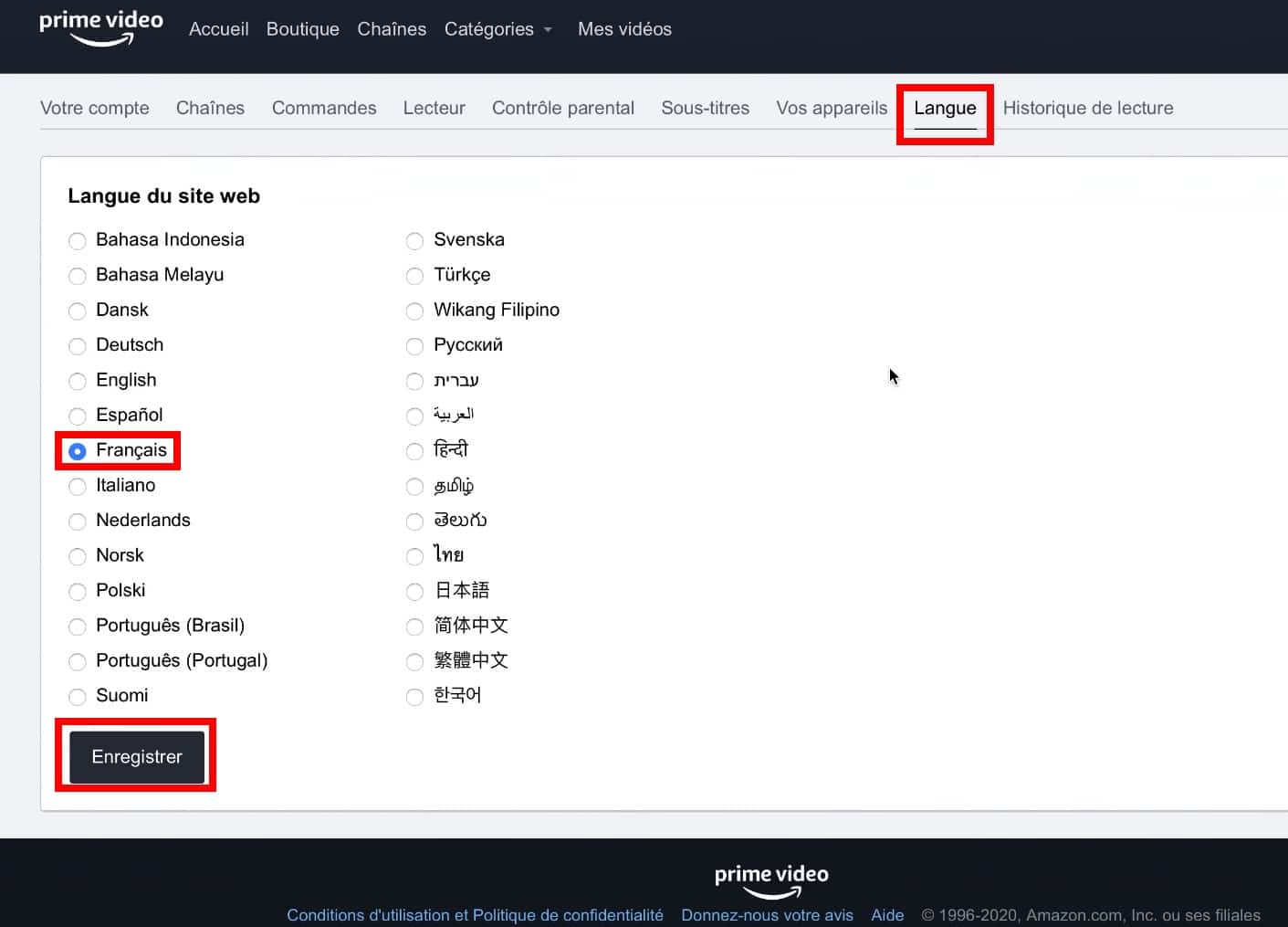
How do I change the language on the Prime Video website? (choose French)
- Go to the Account & Settings page.
- Click on the tab Language.
- Search for French, then select it.
How do I change the language on Prime Video mobile applications?
- Open the Prime Video app.
- Click on My space, then tap the gear icon.
- Press on Language and select the language of your choice.
How do I change the language on Smart TVs and other compatible devices?
- Open the Prime Video app.
- From the Menu, access Prime Video settings.
- Under Languageto select the desired language.
How do I activate French subtitles on Prime Video?
If you would like to watch a film or a series by activating the under-titlingHere are the steps to follow:
- Before playing the video, go to the menu. Then select French or the language in which you want the subtitles to appear.
- When playing a title compatible with subtitles, still in the menu, select the "subtitles" icon (symbolized by a double C);
- If you are using a remote control, press the "Enter" button. If, on the other hand, you are using your game console controller, press the equivalent button.
Please note that the steps required to activate subtitles may vary depending on the device you are using. If you are using Apple TV to access Amazon Prime Video, you must swipe down or click the bottom button on your remote control while playing your movie to access the subtitles menu. Then select your preferred language..
You can also set the size and the text color used for subtitles. To do this, go to the "Subtitle Settings" menu and choose the options that suit you best.
After reading this article, we are sure that you will be able to easily change the language on Amazon Prime Video. Do you have any other questions? Feel free to ask them. Discover also the liste series available on Amazon Prime to help you choose which ones to watch this weekend.









 English
I would like the films in French
hello I would like the movies in french