Let's remember:
- This article offers a detailed guide to integrating school vacations into Google Calendar, starting with determining your school zone (A, B or C).
- Il explique comment importer les calendriers scolaires spécifiques à votre zone via des fichiers ICS, en fournissant des étapes claires pour l’ajout sur Google Agenda à partir d’un ordinateur.
- Il donne des instructions pour consulter ces calendriers sur mobile, ainsi que des conseils pour ajouter des jours de congé et personnaliser l’affichage de votre Google Agenda.
If you're a regular Google Calendar user and school vacations are a key time for you, you've come to the right place.
In this article, we'll give you some practical tips on how to fit school vacations into your diary without hassle, step by step.
How do I set school vacations on Google Calendar?
Here are all the steps you need to follow to put school vacations on Google Calendar.
Step 1: Define your school vacation zone
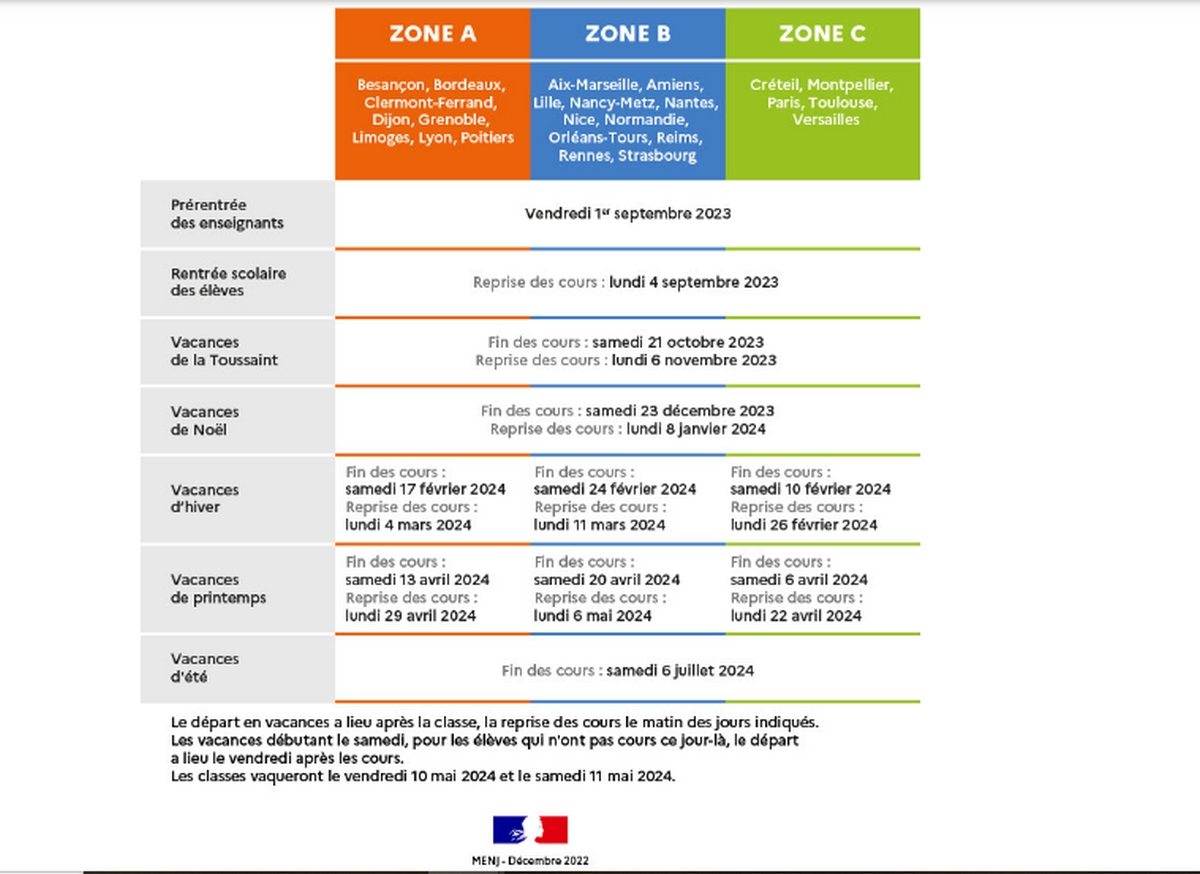
First of all, it's important to note that adding a school calendar to Google Calendar must be done on a computer, as this is not possible via the Android application.
- Open a Web browser and type on the search bar "School calendar in France;
- You're sure to come across the school calendar on the Ministry of Education website You'll find a link to "education.gouv.fr" with School Calendar underneath, click on it ;
- Find the information you need as well as your school vacation zone (A, B or C depending on the académies), as summarized in the table below:
| Zones | Zone A | Zone B | Zone C |
| Academies |
|
|
|
Have you figured out which zone you're in? Let's move on to the next step.
Step 2: Create a school vacation schedule for your zone
Sur son site Internet, le ministère de l’Éducation nationale offre des digital calendars in ICS format, representing each school zone in France. You can easily import these calendars into ICS-compatible applications such as Google Calendar.
Here are the steps you need to follow to display your school vacation calendar on Google Calendar :
1) Open Google Calendar
Go to the Google Calendar site by copying this link into a new google tab: https://calendar.google.com/calendar
Having an e-mail address in nom@gmail.com format means you don't have to create a Google account, car vous en avez déjà. Cette adresse sert d’identifiant, et le mot de passe associé à votre messagerie est également celui de votre compte Google.
If this is not the case, you must create an e-mail address to take advantage of all the features, including Google Calendar, Google Drive, Google Photos and more.
2) Copy the address of your zone's school calendar link
To import your zone's calendar into Google Calendar, press right-click on itthen opt for "copy link address":
- For zone A : School calendar Zone A 2023-2024-2025-2026
- For zone B : School calendar Zone B 2023-2024-2025-2026
- For zone C : School calendar Zone C 2023-2024-2025-2026
Once you have copied the link, go to Google Calendar, then :
3) Click on the small + next to "Other diaries".
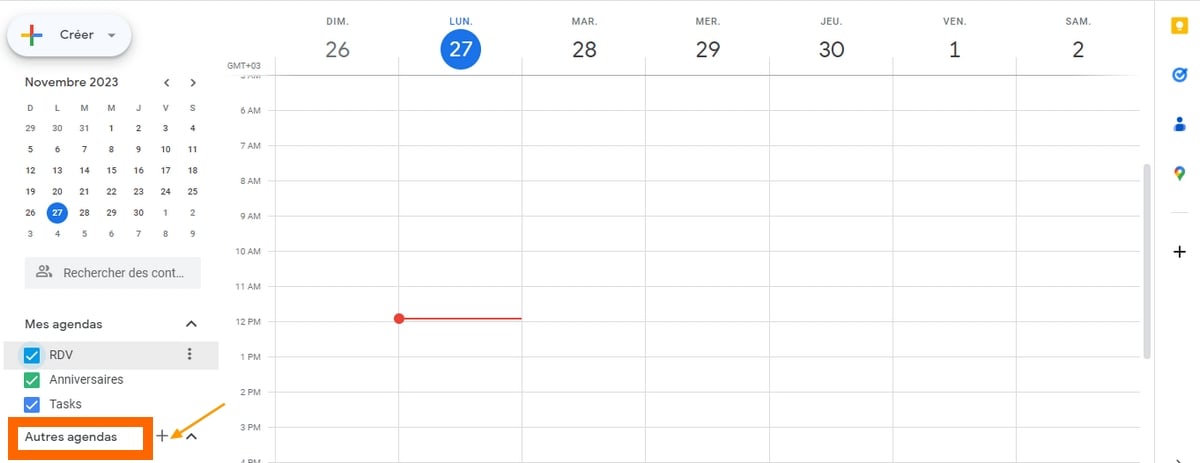
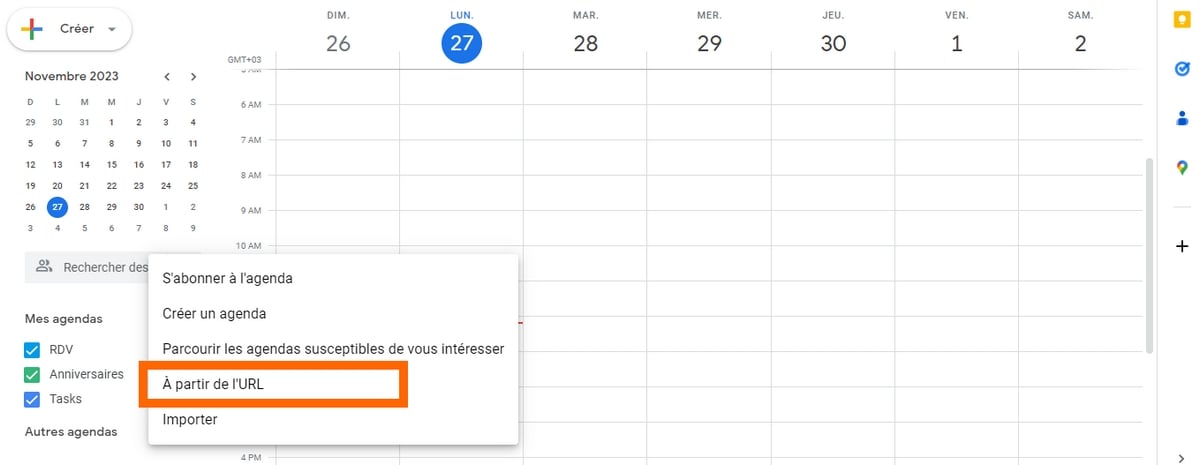
After clicking on it, a pop-up window will appear:
4) Select "From URL".
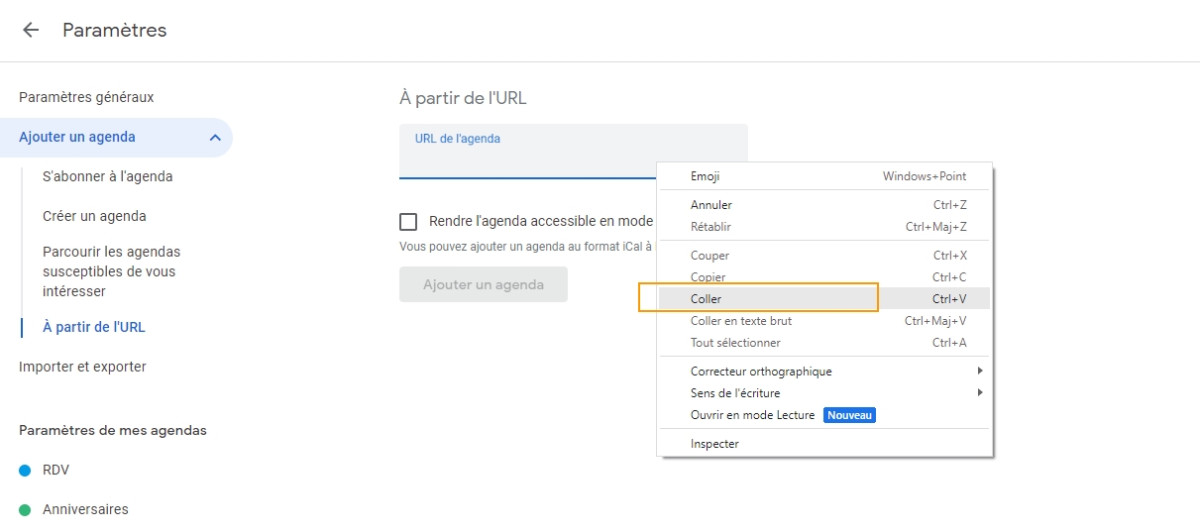
5) Paste URL
Just "Ctrl+V" the "Agenda URL" box, or right-click and choose "paste".
6) Click on "Add a calendar
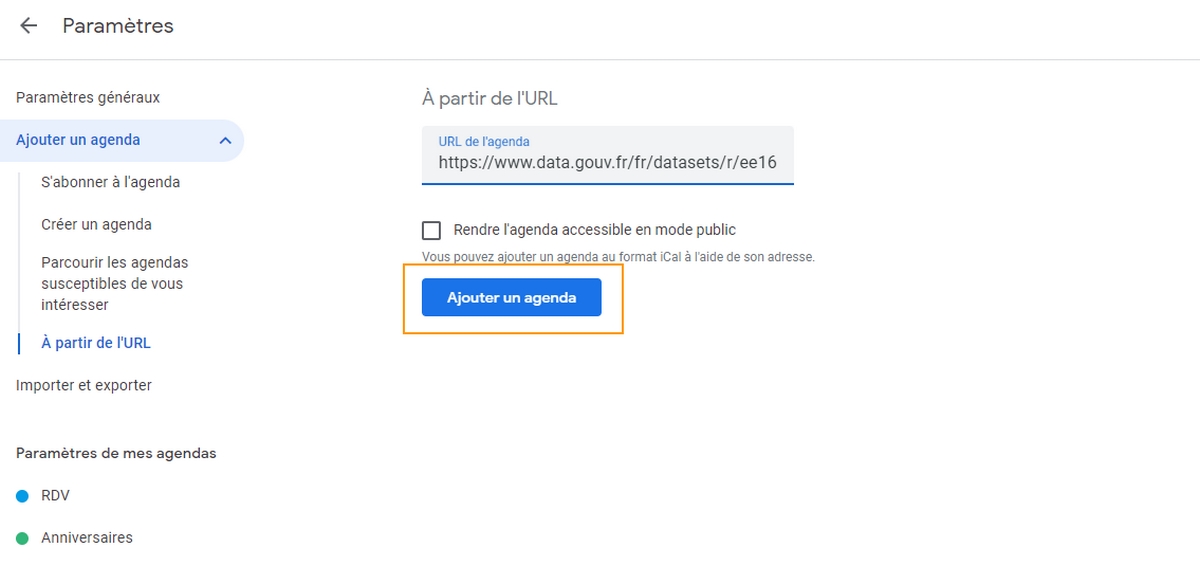
In just a few moments, a quick message indicating "Added agenda should appear.
7) School vacation calendar added to Google Calendar
You need to return to the Google Calendar home page to see if the calendar has been added. To do this, simply click on the back arrow next to "Settings" in the top left-hand corner, then refresh if necessary.
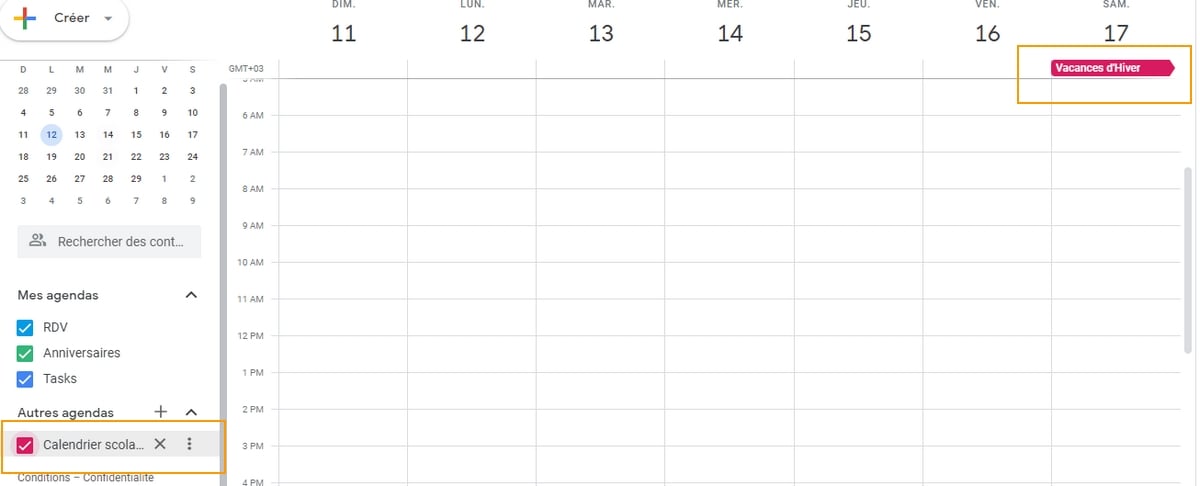
L’agenda sera répertorié à gauche.
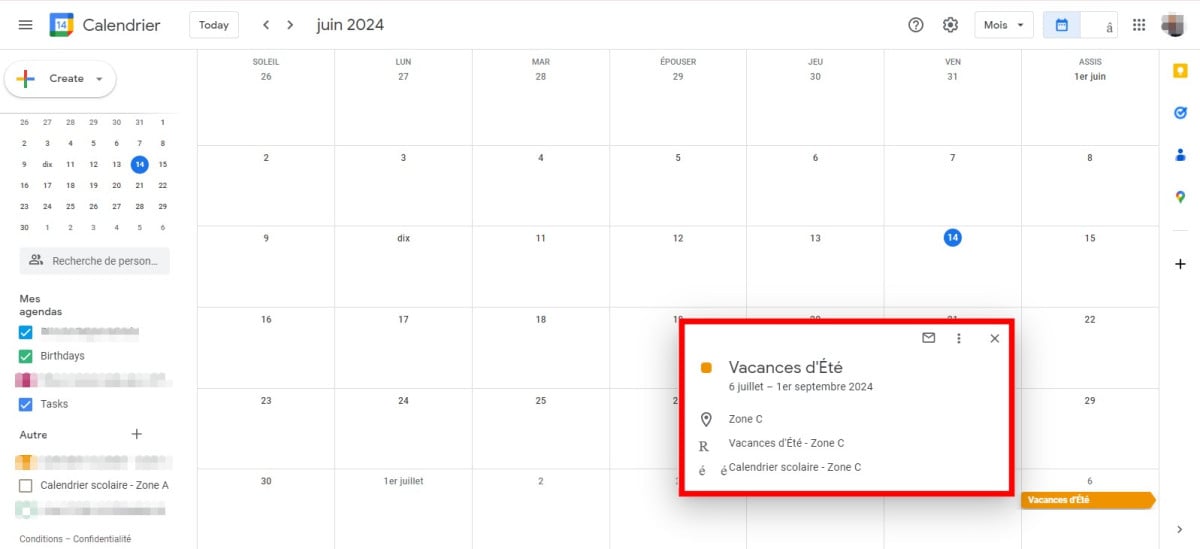
Here, we've used the link for the Zone A calendar, and you can see that the name is automatically displayed, indicating that school vacations will start on Saturday July 06 (end of classes) and end on September 1, 2024 for zone A academies.
You will then have something that looks like this:
How do I add school vacation calendars to my cell phone?
On iPhone
To view the school calendar on your iPhone, simply click on this link (depending on your zone):
- For zone A : School calendar Zone A 2023-2024-2025-2026
- For zone B : School calendar Zone B 2023-2024-2025-2026
- For zone C : School calendar Zone C 2023-2024-2025-2026
You may receive an alert indicating that the website is trying to present you with a calendar invitation.
- After clicking on To allow to accept, press Add everything lorsque le nombre d’événements du calendrier apparaît.
- Par la suite, sélectionnez le calendrier dans lequel vous souhaitez que les différentes dates soient ajoutées sous la forme d’événements.
- Then confirm by clicking on OK.
On Android
Cette technique est également facile à organiser, permettra de mettre en place un événement pour chaque période de vacances scolaires, dans l’un de vos calendriers déjà en place sur Android. Afin de supprimer ce calendrier, il faudra supprimer manuellement chaque événement lié à une période de vacances.
Pour l’ouvrir avec votre navigateur, cliquez sur le lien ci-dessous et puis télécharger le fichier :
- For zone A : School calendar Zone A 2023-2024-2025-2026
- For zone B : School calendar Zone B 2023-2024-2025-2026
- For zone C : School calendar Zone C 2023-2024-2025-2026
Next:
- Explore the file que vous venez de télécharger, que ce soit dans le menu Téléchargements de Google Chrome ou dans le menu de notifications d’Android.
- Une liste des différentes vacances scolaires, présentées sous la forme d’événements va apparaître.
- Push the button “Tout ajouter” and select an existing agenda.
- By clicking on Add all, you can confirm create events in your usual calendar.
How do I set my vacations on Google Calendar?
When you report your absence from the office, Agenda automatically rejects all meetings scheduled during this short period. Here's how it works:
- Ouvrez l’application Google Agenda.
- At the bottom right, click on Createthen on Add, then Absent from the office.
- Choose the vacation dates du bureau. Il est également possible d’indiquer une heure.
- To schedule repeated absences, on the days and at the times you have chosen, select Once, then the frequency you prefer.
- It is possible to change parameters and the refusal message.
- Push the button "Save" button to confirm changes.
Some customizations on Google Calendar :
How do I view the week on Google Calendar?
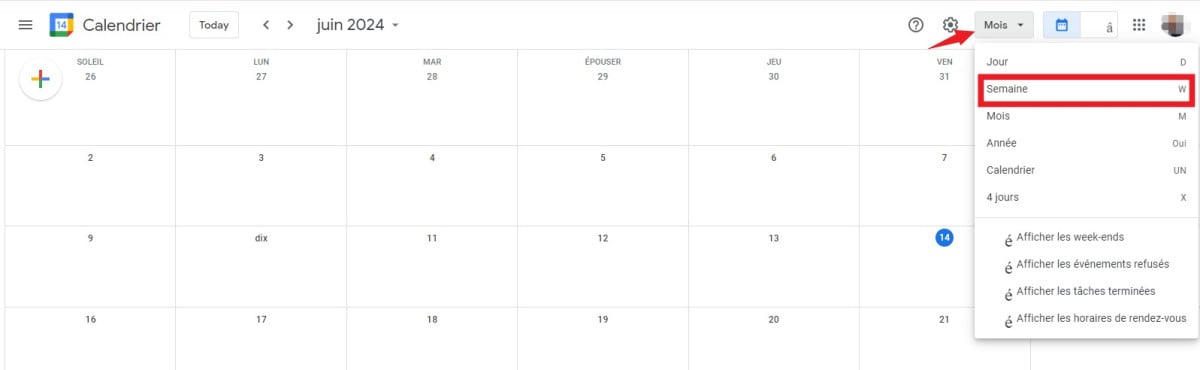
To make the week visible on Google Calendar :
- Sur votre ordinateur, accédez à l’agenda Google.
- At the top right, select the perspective: Week.
Effectivement vous pouvez également choisir d’afficher le Jour, Semaine, Mois, Année, Calendrier ou 4 jours.
How do I customize Google Calendar?
Sur votre ordinateur, accédez à l’agenda Google.
- At the top right, select Settings.
- Make the changes you want.
- All changes are automatically saved.
That's it, we hope this guide is clear to you, and that after reading it, you'll know how to display your children's school vacation calendar on Google Calendar.









 English
Bagaimana cara mengimpor kalender dalam format ICS dari Kementerian Pendidikan Prancis ke dalam aplikasi seperti Google Kalender?