Do you have to pay to use Google Meet ? If you want to use Google Meet For personal or professional purposes, you are probably wondering if there are any budgets to plan for to benefit from all its features!
You'll find everything you need to know in this article! Let's go !
Can I use Google Meet without paying?
Here's the short answer to that question: Google Meet offers users :
- A free version with basic services,
- Several pay versionswhich include a subscription to Google Workspace (formerly G suite) or Google One.

1. A free version
Google Meet is free for all users with a Google account (Gmail). This means you will benefit from all its basic features, namely:
| 🆓 Meet basic features | 👉 Details |
|---|---|
| Meetings and calls |
|
| Participation in the meeting |
|
| Features |
|
| In case of problems |
|
| Access to administrator commands |
|
These functions are available free of charge on Meet. All you need to do is :
- From one Google account, a stable internet connection,
- From a browser or compatible device (iOS and Android) to install the Meet app for free !
But don't worry! If you don't have a Google accountyou can still join a Meet meeting provided that the meeting organizer authorizes you to do so. However, please note that you will not be able to create any!
2. Paid version :
Google Meet also offers users a paid version, enabling them to take advantage of all its premium services, including record a Meet meetingto bring together more than 100 people, etc.
To do this, you need to subscribe to one of the packages following :
- Google Workspace or Google One Premium.

⚠️ Important note:
Before proceeding, please note that not all Google Workspace or Google One Premium offers allow you to unlock Meet's paid features.
If you want to benefit from all pay services, choose one of the following subscriptions:
- " Business Standard/More Where Enterprise Standard/More »,
- Or "Google Workspace for Teaching & Learning/Education Plus ".
Here is everything you need to know about each subscription and the possibilities on Meet :
| 💰 Premium features with Google Workspace/Google One | ℹ️ Details |
|---|---|
| Meetings and calls |
|
| Collaboration functions |
|
| Audio or video quality |
|
| Broadcast |
|
|
Available storage |
|
Now, let's focus on the following question: Which subscription gives you access to all of them? payable services from Meet?
Google Meet rates: How much does it cost?
As mentioned earlier, all Google Workspace or Google One do not necessarily to use all of Meet's premium services.
Here are the subscriptions with Meet's paid features included:
Google Workspace for home users :
- Google Workspace Individual and Essentials : Provides access to most of Google Meet's paid services.
- Essentials Starter Although it is part of the Google Workspace subscription, which is designed for (small) businesses, with this plan, you will only benefit from the free services offered by Meet.
| ➕ Premium features | ▶️ Workspace Individual at €8.99/month*. | ▶️ Essentials starter at €0/month*. | ▶️ Essentials at €6.80/month*. |
|---|---|---|---|
| Record a meeting | ✅ | ❌ | ✅ |
| Question/answer | ❌ | ❌ | ✅ |
| Broadcast Meet calls on YouTube | ✅ | ❌ | ❌ |
| 1080p video | ✅ | ❌ | ❌ |
| Anonymous participation | ✅ | ❌ | ✅ |
| Transcription | ✅ | ❌ | ❌ |
| Longer group calls | ✅ | ✅ | ✅ |
| Subtitle translation | ❌ | ❌ | ❌ |
| Multiple co-organizers | ❌ | ❌ | ❌ |
| Participation monitoring | ❌ | ❌ | ✅ |
| Live broadcast | ❌ | ❌ | ❌ |
| Portrait retouching | ✅ | ❌ | ❌ |
| Small-group sessions | ✅ | ❌ | ✅ |
| Noise suppression | ✅ | ❌ | ❌ |
*Prices may vary by country.
Business and Enterprise offer :
Here's a preview of everything you can do on Meet with Google Workspace for Business :
- Business Starter Basic Meet features,
- Business Standard Access to certain premium Google Meet services,
- Business Plus : Most of Meet's paid services,
- Business Enterprise : All of them, without exception.
| ➕ Premium features available for Meet | ▶️ Business Starter 6.80*/month |
▶️ Business Standard 13.60*€/month |
▶️ Business Plus 21.10*€/month |
▶️ Business Enterprise Made to measure |
|---|---|---|---|---|
| Number of participants | 100 | 150 and over | 500 and over | 1000 |
| Maximum duration of meetings | 24 heures | 24 heures | 24 heures | 24 heures |
| Live broadcast on YouTube | ❌ | ❌ | ✅ | ✅ |
| Live polls or questions and answers | ❌ | ✅ | ✅ | ✅ |
| Small group sessions | ❌ | ✅ | ✅ | ✅ |
| Participation monitoring | ❌ | ❌ | ✅ | ✅ |
| Moderation commands | ❌ | ✅ | ✅ | ✅ |
| Record meetings stored in Drive | ❌ | ✅ | ✅ | ✅ |
| Adaptive audio | ❌ | ✅ | ✅ | ✅ |
| Telephone access (USA only) | ✅ | ✅ | ✅ | ✅ |
*For an annual subscription
Google Workspace for Education :
Here are just a few of the Meet services you can access when you sign up for an offer Google Workspace for Education :
| ➕ Premium features available for Meet | ▶️ Education Fundamentals 0 € |
▶️ Education Standard 2.75/month |
▶️ Teaching & Learning 3.75/month |
▶️ Education Plus 4.25/month |
|---|---|---|---|---|
| Number of participants | 100 | 100 | 250 + | 500 + |
| Call transcription | ❌ | ❌ | ✅ | ✅ |
| Live broadcast on YouTube | ❌ | ❌ | ✅ | ✅ |
| Polls or Q&A during the call |
❌ | ❌ | ✅ | ✅ |
| Small group sessions | ❌ | ❌ | ✅ | ✅ |
| Participation monitoring | ❌ | ❌ | ✅ | ✅ |
| Noise suppression | ❌ | ❌ | ✅ | ✅ |
| Saving to Drive | ❌ | ❌ | ✅ | ✅ |
| Subtitles activated by participants | ✅ | ✅ | ✅ | ✅ |
| Telephone access (USA) | ✅ | ✅ | ✅ | ✅ |
Google One:
Not all Google One Premium plans provide access to Meet premium services. Only the subscription that includes 2 TB of storage space or more allows access to it.
Here again, you will not have all Meet! features

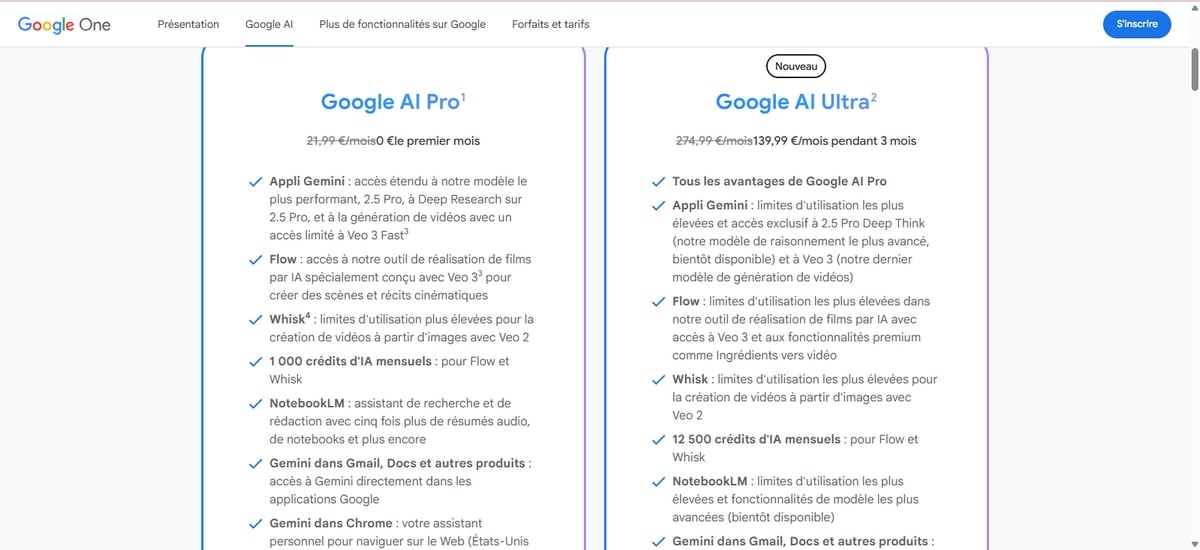
So, depending on your subscription, here are the features which you can access :
| ➕ Features | ▶️ Google One 2Tb for €2.49/month |
|
|---|---|---|
| Noise suppression | ✅ | ✅ |
| Recording the meeting | ✅ | ✅ |
| Longer group calls | ✅ | ✅ |
| Portrait retouching | ✅ | ✅ |
| Broadcasting calls on YouTube | ✅ | ✅ |
| 1080p video quality | ✅ | ✅ |
| Generate a background | ❌ | ✅ |
| Studio lighting | ❌ | ✅ |
| His studio | ❌ | ✅ |
| Anonymous participation | ❌ | ❌ |
| Participate via telephone | ❌ | ❌ |
| Add numerous co-organizers | ❌ | ❌ |
| Live broadcast | ❌ | ❌ |
| Taking notes for me | ❌ | ❌ |
For more information, please visit this Google help page.
FAQs
Is Google Meet free?
Google Meet can be used free of charge. Of course, to access its premium services, a Google Workspace or Google One subscription is required.
How can I use Google Meet for free?
All you need is a Google account, a stable internet connection, and a compatible device or web browser.
How many people are on Google Meet?
- For a free account, the number of participants in a Meet video conference is limited to 100 people.
- However, if you want to add more people, up to 1,000 or more, subscribe to a Google Workspace/Google One package compatible.
Is Google Meet unlimited?
If you are using Google Meet for free, please note that a meeting with two people cannot last longer than more than 24 hoursHowever, if more participants join, the meeting will automatically end after 60 minutes.








 English