Google Meet is free with a simple Google account. You can host meetings for up to 100 participants for 60 minutes without paying a penny.
For more information (recording, video in 1080p, more participants), we need to switch to a subscription Google Workspace Where Google One.
You can use Google Meet from a browser, the mobile app, or your computer—whether on a tablet, for personal use, or for business.
It is a tool for videoconferencing suitable for both individuals and professional teams, with integrations native to Google Agenda and Google Drive to facilitate the collaboration and the productivity. Meet also includes settings for security and of data privacy to protect trade.
Can I use Google Meet without paying?
Yes. Google Meet is free for everyone with a simple Google account. Specifically, there are two levels of use:
- A free version with basic features.
- Several paid versions, through a subscription to Google Workspace (formerly G Suite) or to Google One.

1. A free version
With a Google account (Gmail), you can directly access the basic features of this tool for videoconferencing, without spending a single euro:
| Basic Features of Meet | Details |
|---|---|
| Meetings and calls |
|
| Attendance at the meeting |
|
| Features |
|
| If you have a problem |
|
| Administrator Commands |
|
To enjoy all of this, all you need to do is:
- A Google account and a stable internet connection.
- A compatible browser or device (iOS, Android) for install the Meet app for free, available on smartphones and tablets.
2. A paid version
Google Meet also offers premium services to take things a step further: record a meeting, exceed the 100 participants, get the video in 1080p, etc. To do that, you need to subscribe to Google Workspace Where Google One Premium.

Please note: all offers Google Workspace Where Google One Premium do not unlock all of Meet's paid features. To get full access, choose one of these subscription plans:
- Business Standard, Business Plus, Enterprise Standard Where Enterprise Plus.
- Or Google Workspace for Teaching & Learning / Education Plus.
Here's what these subscriptions unlock on Meet:
| Premium features with Google Workspace / Google One | Details |
|---|---|
| Meetings and calls |
|
| Collaboration |
|
| Audio and Video Quality |
|
| Broadcast |
|
| Available storage |
|
Google Meet pricing: How much does it cost?
The price depends on the plan you choose and the features you need. Here are the details of the subscription plans that include the paid features of Google Meet.
Google Workspace for Individuals
- Google Workspace Individual and Essentials : You can access most of Meet's paid services.
- Essentials Starter : This plan is designed for small businesses, but only provides access to Meet's free services.
| Premium Features | Workspace Individual for €8.99/month* | Essentials Starter for 0€/month* | Essentials for €6.80/month* |
|---|---|---|---|
| Record a meeting | Yes | Nope | Yes |
| Questions and Answers | Nope | Nope | Yes |
| Broadcast Meet calls on YouTube | Yes | Nope | Nope |
| 1080p video | Yes | Nope | Nope |
| Anonymous participation | Yes | Nope | Yes |
| Transcription | Yes | Nope | Nope |
| Longer group calls | Yes | Yes | Yes |
| Subtitle translation | Nope | Nope | Nope |
| Multiple co-organizers | Nope | Nope | Nope |
| Participation monitoring | Nope | Nope | Yes |
| Live broadcast | Nope | Nope | Nope |
| Portrait retouching | Yes | Nope | Nope |
| Small-group sessions | Yes | Nope | Yes |
| Noise suppression | Yes | Nope | Nope |
*Rates as of July 2026; subject to change depending on the country.
Business and Enterprise Plans
Offers Google Workspace Business are designed for businesses and teamwork. Here's what each level unlocks on Meet:
- Business Starter : Meet's basic features.
- Business Standard : Access to certain premium services on Meet.
- Business Plus : most paid services.
- Enterprise : all features, without exception.
| Premium Features for Meet | Business Starter, €6.80*/month | Business Standard, €13.60*/month | Business Plus, €21.10*/month | Enterprise, Custom-Made |
|---|---|---|---|---|
| Number of participants | 100 | 150 and over | 500 and over | 1000 |
| Maximum duration of meetings | 24 heures | 24 heures | 24 heures | 24 heures |
| Live broadcast on YouTube | Nope | Nope | Yes | Yes |
| Polls and Live Q&A Sessions | Nope | Yes | Yes | Yes |
| Small group sessions | Nope | Yes | Yes | Yes |
| Participation monitoring | Nope | Nope | Yes | Yes |
| Moderation commands | Nope | Yes | Yes | Yes |
| Recording Meetings in Drive | Nope | Yes | Yes | Yes |
| Adaptive Audio | Nope | Yes | Yes | Yes |
| Access by Phone (U.S. only) | Yes | Yes | Yes | Yes |
*For an annual subscription, rates as of July 2026.
Google Workspace for Education
With an offer Google Workspace for Education, here are the links to Meet based on the selected level:
| Premium Features for Meet | Education Fundamentals, €0 | Standard Education Plan, €2.75/month | Teaching & Learning, €3.75/month | Education Plus, €4.25/month |
|---|---|---|---|---|
| Number of participants | 100 | 100 | 250 + | 500 + |
| Call Transcripts | Nope | Nope | Yes | Yes |
| Live broadcast on YouTube | Nope | Nope | Yes | Yes |
| Polls and Q&A during the call | Nope | Nope | Yes | Yes |
| Small group sessions | Nope | Nope | Yes | Yes |
| Participation monitoring | Nope | Nope | Yes | Yes |
| Noise suppression | Nope | Nope | Yes | Yes |
| Saving to Drive | Nope | Nope | Yes | Yes |
| Subtitles activated by participants | Yes | Yes | Yes | Yes |
| Access by Phone (U.S.) | Yes | Yes | Yes | Yes |
Google One
All Plans Google One do not provide access to Meet's premium services. Only a subscription starting at 2 TB of storage unlocks additional features—though not all of them.

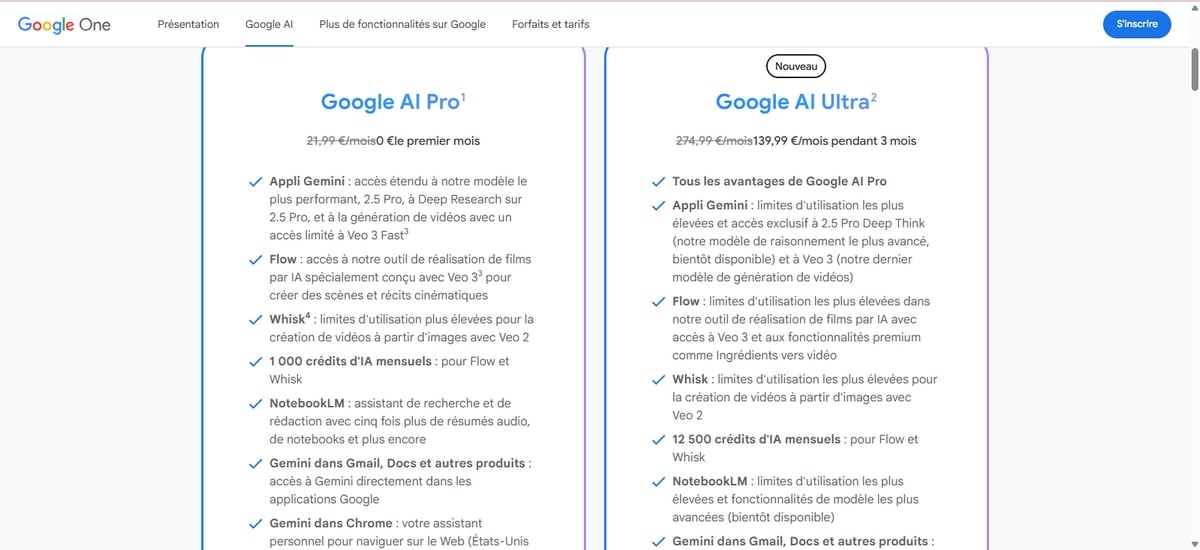
Here are the details based on your subscription Google One :
| Features | Google One 2 TB, €2.49/month | Google One AI Pro (€21.99/month) and AI Ultra (€139.99 for 3 months, then €274.99/month) |
|---|---|---|
| Noise suppression | Yes | Yes |
| Recording the meeting | Yes | Yes |
| Longer group calls | Yes | Yes |
| Portrait retouching | Yes | Yes |
| Broadcasting calls on YouTube | Yes | Yes |
| 1080p video | Nope | Yes |
| Generate a background | Nope | Yes |
| Studio lighting | Nope | Yes |
| His studio | Nope | Yes |
| Anonymous participation | Nope | Nope |
| Participate via telephone | Nope | Nope |
| Add numerous co-organizers | Nope | Nope |
| Live broadcast | Nope | Nope |
| Take notes automatically | Nope | Nope |
For more information about these offers, you can visit Google's help page.
FAQs
Can you join a Google Meet meeting without a Google account?
Yes. For contact To join a meeting, you don't necessarily need a Google account. All you have to do is open the invitation link in your browser, then enter your name. However, for create To host a meeting and invite participants, you must have an account.
How can I use Google Meet for free?
You need a Gmail address and a stable internet connection. Next, log in from a computer using your browser, or from the’mobile app on smartphones and tablets. No activation code is required: contact Where create A meeting can be set up in just a few seconds. No complex installation is required on your computer.
How many people can participate in a Google Meet meeting?
- With a free account, a meeting can host up to 100 participants.
- To bring more people together (up to 500, even 1000 (live stream), a subscription is required Google Workspace adapted.
Is there a time limit on Google Meet?
In the free version, a one-on-one call can last up to 24 hours. As soon as the meeting begins 3 or more participants, it stops automatically after 60 minutes. A package Google Workspace breaks through that limit.
Which features are available only with paid plans?
L'registration meetings, video in 1080p and phone access (U.S. only) are available only to subscribers. Google Workspace provides access to all of these tools, while Google One For its part, it unlocks a few additional features for individual users, such as recording and background noise reduction.









 English