Need to monitor prices or analyze Amazon reviews? Le website scraping is the solution.
In this article, we explain how to web scrap on Amazon in 2025.

The different methods for scraping on Amazon
the web scraping is a fast and efficient way to collect data online. Whatever the website (including Amazon), the technique consists of use a script or tool For :
- ✅ Browse the pages of a website
- ✅ Extract information (prices, reviews, images...)
- ✅ Store everything in a database
For the scraping on Amazonyou can choose between two methods:
1. Use web scraping tools
Web scraping tools are ready-to-use solutions that simplify automatic online data collection. Thanks to their advanced featuresyou'll be able to extract information from Amazon quickly and easily, without no technical skills.
We selected 3 web scraping tools depending on your projects and needs:
- 🚀 Bright Data
- 🐙 Octoparse
- 🍯 ScrapingBee
Bright Data
Bright Data is a powerful platform designed for large-scale scraping.
It offers advanced tools that are perfect for complex projects which require the collection of large data volumes on sites like Amazon.
- 🚀 Integrated proxy network (residential, mobile, datacenter)
- 🚀 Large-scale scraping automation
- 🚀 Code-free visual scraping tools (Web Scraper IDE)
- 🚀 Creating custom scraping scenarios
- 🚀 Automatic captcha and block management
- 🚀 Ready-to-use scraping APIs (Amazon, Google...)
- 🚀 Data export in JSON, CSV, Excel formats
Discover our full review of Bright Data by clicking on the link!
Octoparse

Octoparse is a no-code tool available, ideal for users who have no programming skills. With Octoparse, you can scrape in just a few clicks!
Thanks to its user-friendly interface and his automated functionsYou can easily extract data from almost any website, including Amazon.
- 🐙 Drag-and-drop visual interface
- 🐙 Real-time or scheduled data extraction
- 🐙 Support for dynamic sites (JavaScript)
- 🐙 Easy data export (Excel, CSV, databases, API)
- 🐙 Cloud function for online tasks
You can consult our full review of Octoparse to find out more!
ScrapingBee

ScrapingBee is a simple tool for fully automate scraping with a integrated management of technical obstacles.
This is the ideal solution for developers who want to quickly integrate a data collection service in their projects. A good example is extracting information from e-commerce sites such as Amazon.
- 🍯 JavaScript (JS) rendering to scrape dynamic sites
- 🍯 Proxy management, without manual configuration
- 🍯 Automatic bypass of captchas and blocks
- 🍯 Formatted data extraction (JSON)
- 🍯 Support for headers personalized
- 🍯 Automatic page cleaning (no unnecessary scripts and ads)
- 🍯 Multi-language support for web pages
Read our full review of ScrapingBee for a complete overview!
Whether you're a programming beginner or an expert, there are a number of web scraping tools to suit all profiles and needs!
2. Create your own scraper for Amazon with Python
If you have technical skills, particularly in Python, you can create your own Amazon scraper. This is a more advanced method, but it's ideal for personalizing your data collection.
Here's how to create your own custom scraper with Python :
Before you start
- Install Python 3.8+ on your machine
- Create a project folder and, ideally, a virtual environment
- Install the necessary libraries: requests, beautifulsoup4 and selectorlib
Step 1 - Sending the request
Send an HTTP request with requests.get, simulating a real browser with headers
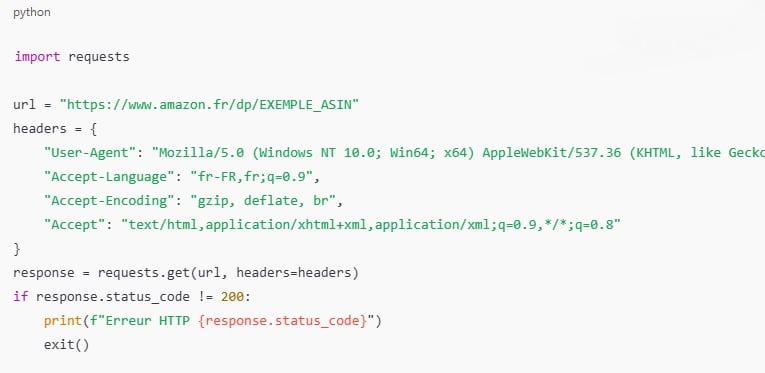
🛑 Inserting headers Complete (User-Agent, etc.) is essential to prevent Amazon from detecting an automated script and thus to avoid site blockages (captchas, etc.).
Step 2 - Parsing HTML content
- Use BeautifulSoup to transform raw HTML into a usable object
- You can then navigate through tags, classes or identifiers, and easily extract content.

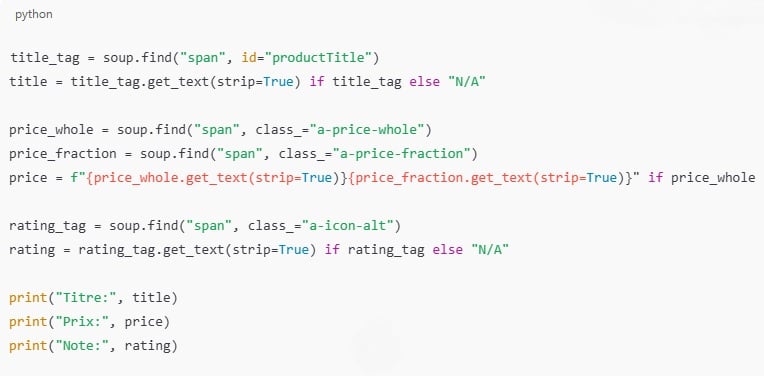
Step 3 - Inspect and extract data
Use your browser's "Inspect Element" tool (right-click → Inspect) to find the right CSS selectors or identifiers for the following elements:
- 👉 The product title: often in
<span id="productTitle"> - 👉 Price: generally in
<span class="a-price-whole">with the fraction in
<span class="a-price-fraction"> - 👉 Grading / evaluation: often in
<span class="a-icon-alt">or similar
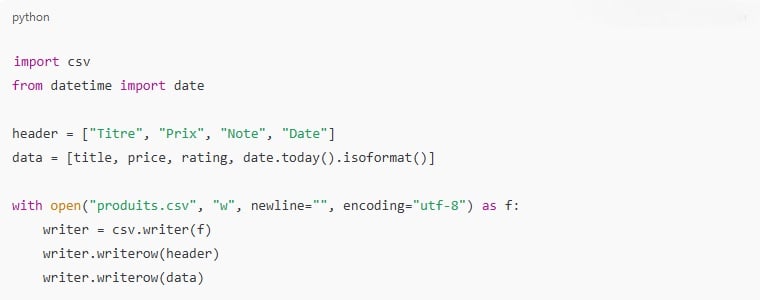
Step 4 - Save data in CSV format
Once the data has been extracted, you can save it as a CSV file using the csv library.
🛑 Throughout the process, remember to use timeouts (e.g. time.sleep) to simulate human behavior.
Why web scrap on Amazon?
Making web scraping on Amazon can be very useful in many contexts. You can use web scraping to :
- 📊 Analyze prices (promotions, trends...)
- 💼 Study the competition
- 🛍️ Track specific products (availability, price or stock)
- ⭐ Analyze customer reviews
- 📦 Create Amazon product databases
- 🔍 Market/product watch (new products, best sellers...)
- 📈 Optimizing product listings (Amazon SEO)
- 🤖 Automate the search for bargains
FAQs
Web scraping tool VS build my own scraper for Amazon: which one to choose?
It all depends on your needs and skills:
- 👉 Don't know how to code? Scraping tools are ready to use and easy to learn.
- 👉 If you know how to code, custom scrapers offer more control and flexibility.
What is the most interesting data to extract from Amazon?
Amazon is the ideal platform for large-scale collection key information on products, customer reviews or market trends. Among the most interesting data to retrieve are :
- 🏷️ Amazon product names and descriptions
- 💰 Prices and technical specifications
- 🌟 Customer reviews
- ✍️ Customer review content
- 🏆 Best seller ranking
- 📦 Product availability/stock
- 🖼️ Images of Amazon products...
I don't know how to code. Are there any tools to scrape Amazon easily?
Yes, it's not the no-code or low-code tools for scrap Amazon easily that are missing.
These include Bright Data which offers turnkey solutions, but also Octoparse and its drag-and-drop interface. Both also offer tools and templates preconfigured for Amazon.
Can Amazon block me? And if so, how?
Yes, Amazon can block scrapers by displaying captchas or some error pages. The site also blocks IP addresses after too many requests. These measures are usually triggered when Amazon detects a non-human behavior.
Fortunately, certain platforms and techniques make it possible to reduce the risk of blockages :
- 🔄 Use proxies
- 🕓 Limit query frequency
- 🧭 Simulate a real navigator
- 💤 Add random delays between requests
Is it legal to web scrap on Amazon?
Amazon's terms of use prohibit unauthorized scraping.
However, it is still possible to scrape certain public information, such as prices or product titles, provided that not to infringe copyright or privacy.
To limit risks, it's best to restrict access to public pages of the site and respect technical and legal limits, particularly in terms of intellectual property.
Whether you're a complete programming novice or an experienced developer, it's possible to web scraping on Amazon.
So, which method do you plan to use? Were you already familiar with any of the platforms mentioned in this article?
Feel free to share your feedback! And if you have any questions about web scraping, ask them in the comments!









 English