PHP isn't just for creating dynamic websites. With libraries like Guzzle and Goutte, you can build a functional scraper and automatically extract data from any web page.
Companies use it to monitor prices, analyze social media, or gather information about their competitors.
Prerequisites for scraping with PHP
the web scraping involves automatically extracting data from web pages. A program scans the HTML from a website, extracts relevant information, and then saves it to a file or database. In PHP, just a few libraries are all you need to build a functional web scraper, but before you get started, make sure you meet these requirements:
- To have Basics of PHP Programming, because you're going to write code to control the extraction.
- Master a few basic knowledge of HTML and CSS, to precisely target the elements to be extracted from the page.
- Knowing how to use Dial, the tool that manages PHP dependencies and installs libraries such as Guzzle, Symfony DomCrawler, or Goutte.
- Have a local web server To run your program: XAMPP, WAMP Where MAMP work just fine.
- Install a code editor to write and organize your PHP scripts.
Once you have these tools, you're ready to collect and analyze the data you're interested in. If you're looking for free tools If you want to get started without spending any money, there are several options that are suitable for beginners.
What tools are essential for web scraping with PHP?
PHP alone isn't enough to do web scraping effectively. It's the libraries installed via Composer that make extraction fast and reliable. Here are the tools you need to know about.
1. Guzzle: the HTTP client
Guzzle is here most frequently used library to send HTTP requests. It's the tool that retrieves the source code of a web page. To install it, open your terminal, navigate to your project folder, and then type:
composer require guzzlehttp/guzzleComposer Download the library and use it directly in your code. You can check out the official Guzzle documentation to learn more.
Here is a simple example of retrieve URL content :
request('GET', $url);

    // Retrieve HTTP code
    $statusCode = $response->getStatusCode();

    // Retrieve page content
    $content = $response->getBody()->getContents();

    echo "HTTP Code : " . $statusCode . PHP_EOL;
    echo "Page content:" . PHP_EOL;
    echo $content;

} catch (\Exception $e) {
    echo "Error: " . $e->getMessage();
}
2. Symfony DomCrawler and Goutte: Data Extraction
Once the HTML has been retrieved, it must be parsed to extract the relevant data. Two libraries are very useful for this:
- Symfony DomCrawler : It allows you to navigate through HTML using CSS selectors and to highlight specific elements (title, price, link, etc.).
- Goutte : It's a wrapper for Guzzle and DomCrawler that greatly simplifies the scraping process.
To note : the package Goutte is today Deprecated and archived since 2022. For a new project, prefer Symfony BrowserKit with DomCrawler, Where Symfony Panther if you need to handle content loaded via JavaScript. You can also check out the approach using Laravel, which provides a structured framework for this type of project.
Example with Symfony DomCrawler :
request('GET', 'https://exemple.com');

$html = $response->getBody()->getContents();
$crawler = new Crawler($html);

// Selection by class
$crawler->filter('.ma-class')->each(function ($node) {
    echo $node->text() . PHP_EOL;
});

// Selection by ID
$crawler->filter('#mon-id')->each(function ($node) {
    echo $node->text() . PHP_EOL;
});

// Selection by tag
$crawler->filter('h1')->each(function ($node) {
    echo $node->text() . PHP_EOL;
});
Example using Goutte:
request('GET', 'https://exemple.com');

// Selection by class
$crawler->filter('.ma-class')->each(function ($node) {
    echo $node->text() . PHP_EOL;
});

// Selection by ID
$crawler->filter('#mon-id')->each(function ($node) {
    echo $node->text() . PHP_EOL;
});

// Selection by tag
$crawler->filter('p')->each(function ($node) {
    echo $node->text() . PHP_EOL;
});
3. Other libraries and tools
To take things a step further, there are other tools available that can be tailored to your needs depending on the volume of data you need to collect.
- PHP Scraper : a library that makes it easier to extract information by handling the complexities of HTML and selectors. Its actual package is not Goutte.
# Installation with Composer
composer require spekulatius/phpscraper
go('https://example.com');
echo "Page title: " . $web->title;
- Bright Data : a professional platform for large-scale data collection, with built-in proxies to prevent IP blocking.

- ScraperAPI : a cloud-based web scraping service, accessible via a API. You simply send a request specifying the URL to scrape, and the service handles the proxies on its own.
How to create a simple web scraper in PHP?
Here's how to build a Functional scraper in PHP with Goutte, step by step: installing a library, retrieving the HTML, extracting the data, and then exporting it.
Step 1: Installing dependencies
Use Dial to install Goutte with this command:
composer require fabpot/goutte
Step 2: Retrieve page content
Make a HTTP GET request to retrieve the HTML content of the page. Here is the basic code:
request('GET', $url);

// Retrieve raw HTML if required
$html = $crawler->html();
echo substr($html, 0, 500) . '...'; // preview
Step 3: Extract data
Once you've retrieved the HTML, you target specific elements using a CSS selector (Where XPath). Here is an example for scrape the titles of a blog post. The selector 'article h2' targets the tags <h2> inside the beacons :
<?php
require 'vendor/autoload.php';

use Goutte\Client;

$client = new Client();
$url = 'https://exemple.com/blog'; // Remplace par l'URL de ta page cible

// Faire une requête GET pour récupérer la page
$crawler = $client->request('GET', $url);

// Sélectionner les éléments <h2> dans <article> avec le sélecteur CSS
$titres = [];

$crawler->filter('article h2')->each(function ($node) use (&$titres) {
    // Récupérer le texte du titre
    $titres[] = trim($node->text());
});

// Afficher les titres extraits
print_r($titres);
?>
What this code does:
- The selector
'article h2'targets the text within the tags<h2>. - The Method
text()retrieves the text of each title. - Each title is added to the table
$itles, and then displayed withprint_r().
CSS selectors are also used to extract attributes HTML elements. If each heading is a link within a D tag <a>, you retrieve the attribute href To get the article's URL:
<?php
require 'vendor/autoload.php';

use Goutte\Client;

$client = new Client();
$url = 'https://exemple.com/blog'; // Remplace par l'URL de ta page cible

// Faire une requête GET pour récupérer la page
$crawler = $client->request('GET', $url);

// Sélectionner les liens dans les titres
$titres = [];

$crawler->filter('article h2 a')->each(function ($node) use (&$titres) {
    $titre = trim($node->text());
    $lien = $node->attr('href'); // Extraire l'attribut href

    // Ajouter le titre et l'URL au tableau
    $titres[] = [
        'title' => $titre,
        'url'   => $lien,
    ];
});

// Afficher les résultats
print_r($titres);
?>
The picture $itles then contains, for each item, both the title and its link :
Array
(
    [0] => Array
        (
            [title] => Article 1 title
            [url] => /article1
        )

    [1] => Array
        (
            [title] => Article 2 title
            [url] => /article2
        )
)
Each entry is an associative array with two keys: title for the title and url for the page's URL. You get a clean structure, ready to be analyzed or stored.
Step 4: Structuring and storing data
Once the data has been extracted into the table $data, you can export in a structured format. The two most useful formats are the JSON and the CSV.
the JSON is useful for feeding data to an API or a web application:
<?php
// Exporter les données en JSON
file_put_contents('export.json', json_encode($data, JSON_PRETTY_PRINT|JSON_UNESCAPED_UNICODE));

echo "Les données ont été exportées en JSON dans 'export.json'.";
?>
The file export.json will look like this:
[
    {
        "title": "Article 1 title",
        "url": "/article1"
    },
    {
        "title": "Article 2 title",
        "url": "/article2"
    }
]
If you prefer a chart CSV, use fputcsv To write each line to a file:
<?php
// Exporter les données en CSV
$fp = fopen('export.csv', 'w');

// Ajouter l'en-tête (titres des colonnes)
fputcsv($fp, ['title', 'url']);

// Ajouter chaque ligne de données
foreach ($data as $row) {
    fputcsv($fp, [$row['title'], $row['url']]);
}

// Fermer le fichier
fclose($fp);

echo "Les données ont été exportées en CSV dans 'export.csv'.";
?>
The file export.csv will look like this:
title,url
Article title 1,/article1
Article title 2,/article2
For large amounts of data, be sure to write to the file as we go along rather than loading everything into memory. You can also save the result directly to a database, which in turn makes it easier to analyze and update the collected information.
How to deal with common web scraping problems in PHP?
Web scraping in PHP doesn't always go as planned. A server that doesn't respond, a malformed page, an IP block—these problems can arise quickly. Here's how to handle the most common ones to make your scraping program more reliable.
1. Error management
- Connection errors
Sometimes, the request doesn't even reach the server. You might run into "No network, "Invalid URL Where "Server unreachable. In that case, include a block try/catch to prevent your script from crashing.
Here is a concrete example using Guzzle :
<?php
require 'vendor/autoload.php';

use GuzzleHttp\Client;
use GuzzleHttp\Exception\RequestException;

function make_request_with_guzzle() {
    $client = new Client();

    try {
        $response = $client->request('GET', 'https://example.com/api/data');

        if ($response->getStatusCode() === 200) {
            $body = $response->getBody();
            echo "Données reçues : " . $body;
        }

    } catch (RequestException $e) {
        if ($e->hasResponse()) {
            echo "Erreur de la requête : " . $e->getResponse()->getStatusCode();
        } else {
            echo "Erreur de connexion : " . $e->getMessage();
        }
    }
}

make_request_with_guzzle();
?>
- HTTP status codes
Even when the connection is working, the server may return an error: 404 = page not found, 500 = internal server error. You can test the returned code using getStatusCode() :
<?php
require 'vendor/autoload.php';

use GuzzleHttp\Client;
use GuzzleHttp\Exception\RequestException;

function make_request_with_guzzle() {
    $client = new Client();

    try {
        $response = $client->request('GET', 'https://example.com/api/data');
        $status_code = $response->getStatusCode();

        if ($status_code === 200) {
            $body = $response->getBody();
            echo "Réponse réussie avec le code : " . $status_code . "
";
            echo "Données reçues : " . $body;
        } elseif ($status_code === 404) {
            echo "Erreur 404 : Page non trouvée
";
        } elseif ($status_code === 500) {
            echo "Erreur 500 : Erreur interne du serveur
";
        } else {
            echo "Code de statut : " . $status_code . "
";
        }

    } catch (RequestException $e) {
        if ($e->hasResponse()) {
            echo "Erreur HTTP : " . $e->getResponse()->getStatusCode() . "
";
        } else {
            echo "Erreur de connexion : " . $e->getMessage();
        }
    }
}

make_request_with_guzzle();
?>
- Parsing errors
Parsing is the’HTML analysis by your scraper. If the page is malformed, DomCrawler Where Goutte may crash or return nothing. Always check that the content exists before trying to retrieve it, using conditions such as count() Where filter(), then wrap the parsing in a try/catch :
<?php
require 'vendor/autoload.php';

use Goutte\Client;
use Symfony\Component\DomCrawler\Crawler;

function scrape_website() {
    $client = new Client();

    try {
        $crawler = $client->request('GET', 'https://example.com');
        $elements = $crawler->filter('div.target-element');

        if ($elements->count() > 0) {
            $content = $elements->first()->text();
            echo "Contenu extrait : " . $content;
        } else {
            echo "L'élément cible n'a pas été trouvé sur la page.";
        }

    } catch (Exception $e) {
        echo "Erreur lors du parsing de la page : " . $e->getMessage();
    }
}

scrape_website();
?>
2. Bypass anti-scraping restrictions and safeguards
Many websites implement safeguards to make web scraping more difficult. Here are the main obstacles and how to handle them properly:
- IP Blocking : If you send too many requests, the site may ban your IP address. The solution is to use rotating proxies, such as those from Bright Data, to distribute your requests across multiple addresses.
- Request Interval : Space out your calls over time to stay under the radar and avoid overloading the target server.
- JavaScript Content by default, PHP cannot run JavaScript. To scrape a page with dynamically loaded content, you need a headless browser (headless browser). Tools such as Puppeteer Where Selenium render the page like a real browser before extraction.
- robots.txt file : Before running your scraper, check this file in the site's root directory. It specifies what the site does and does not allow robots to do—a key step in acting responsibly.
FAQs
Is web scraping legal?
The legality of web scraping depends on the data you collect and how you use it. In France, scraping public and non-personal data is generally tolerated, but it's not an automatic green light.
Three legal restrictions can make data extraction illegal, even on public pages:
- the RGPD : When personal data is involved, «public» does not mean free to use.
- The Website Terms of Use : If you use an account to access content, you have agreed to terms that often prohibit scraping.
- the sui generis right Regarding databases: In Europe, a database is subject to specific protection.
In practice, each case is evaluated individually. Always refer to the file robots.txt and the site's terms of use before starting your program.
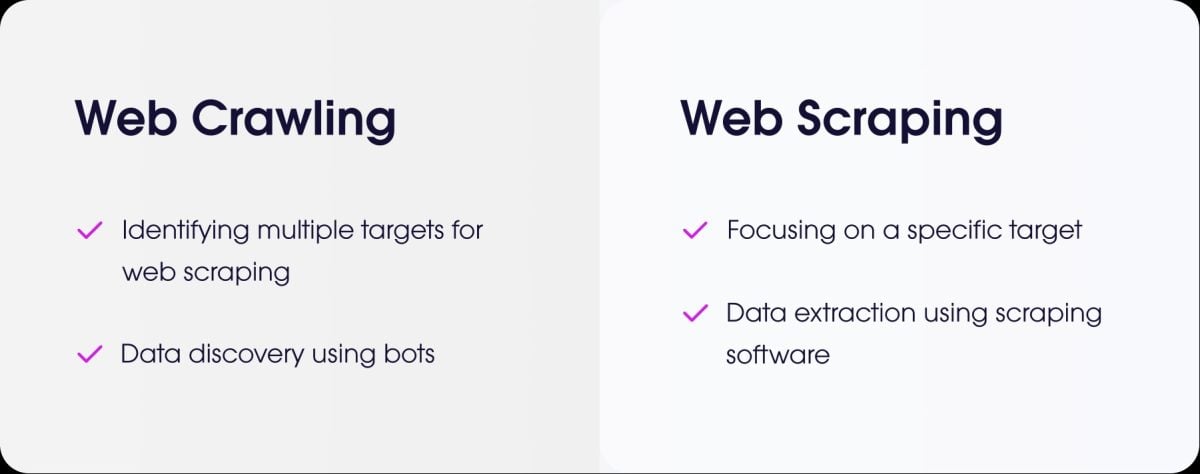
What's the difference between web scraping and web crawling?
- the web scraping is to extract accurate data on a website.
- the web crawling is to crawl pages to index them, just like a search engine bot does.
How do I scrape a site that requires login?
To scrape a website that requires a login, you need to simulate authentication. With PHP, the most common solution is still Guzzle. You send your credentials via a request POST, then keep the session open to retrieve the protected pages.
How do you manage scraping of sites with dynamic AJAX-loaded pages?
PHP cannot execute client-side JavaScript code. The content loaded into AJAX so it eludes a conventional scraper.
One possible solution is to use BrowserShot, a library that relies on an actual browser running in the background (Headless Chrome) to load the page and run the JavaScript.
You can also Integrate PHP with tools based on Node.js, as Puppeteer Where Selenium, to generate the rendered HTML and then retrieve the data from your script.
Are there any alternatives to PHP for web scraping?
Yes, several programming languages are very popular for web scraping:
- Python, with its powerful libraries such as BeautifulSoup and Scrapy.
- Node.js, which is very effective for dynamic websites, using libraries such as Puppeteer Where Cheerio.

How can you program a web scraper in an ethical and responsible way?
To scrape responsibly, there are a few simple rules to follow:
- Check the robots.txt file on the website to learn about the access rules.
- Limit the frequency of your requests so as not to overload the server.
- Comply with the Terms of Use of the site.
- Does not collect personal data without authorization.
Web scraping is a powerful tool—as long as you use it methodically and with common sense. Have you ever created a PHP scraper Or with another language? Share your experience with us in the comments!









 EN
EN