To create a Google account (and your address Gmail), go to accounts.google.com and click «Create an account.» The whole process takes less than 5 minutes.
A single account gives you free access to Gmail, Google Drive with its free storage space, Google Maps, Google Meet, Google Agenda, YouTube to watch videos and many other services.
Your data, bookmarks, and history stay synced across devices.
How do I create a Google account on a PC?
On a PC, you have two options to create your Google account. You can either create a new Gmail address, or you can use a adresgo to email existing (Orange, Outlook, Yahoo…). In either case, you get full access to all Google services.
Create a Gmail account to have your Google account
This method creates a new Gmail address at the same time as your Google account. This gives you access to your email and all Google products.
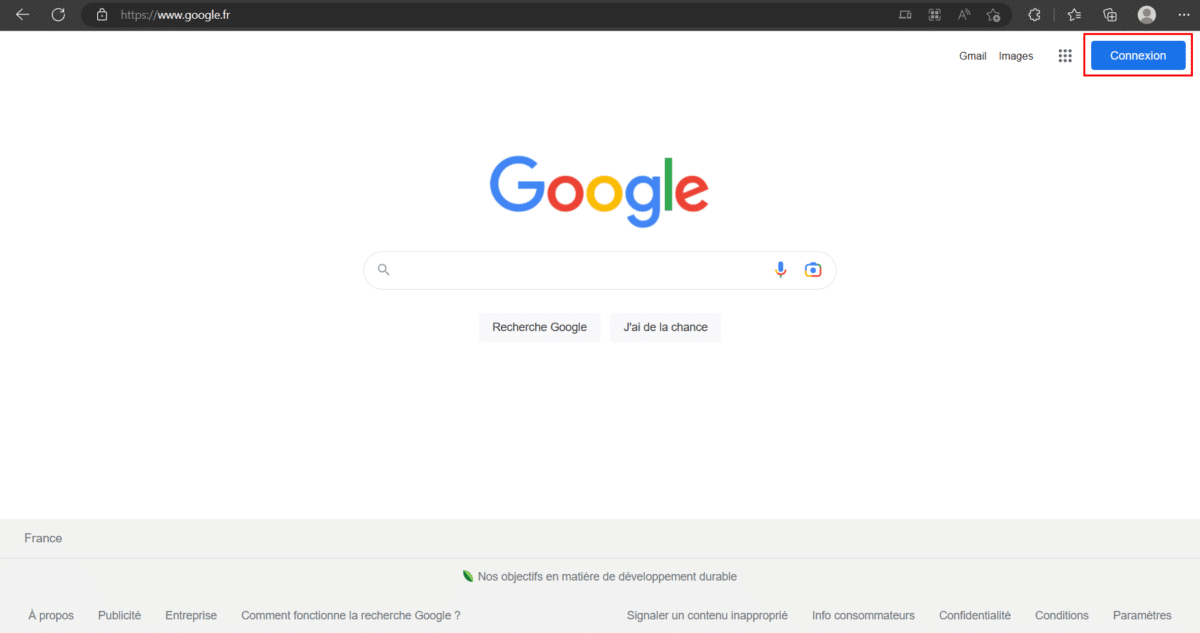
- Visit the website Google (regardless of the browser, whether it's Google Chrome or another) and click on "Connection at top right.
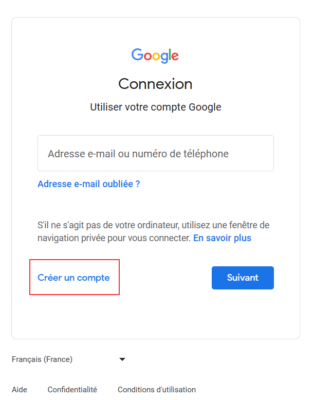
How to create a Google account on a PC. ©Emeline for Alucare.fr - On the login page, click «Create an Account». Several options appear: for me, for my child, or for my business. For a personal account, select «For me».
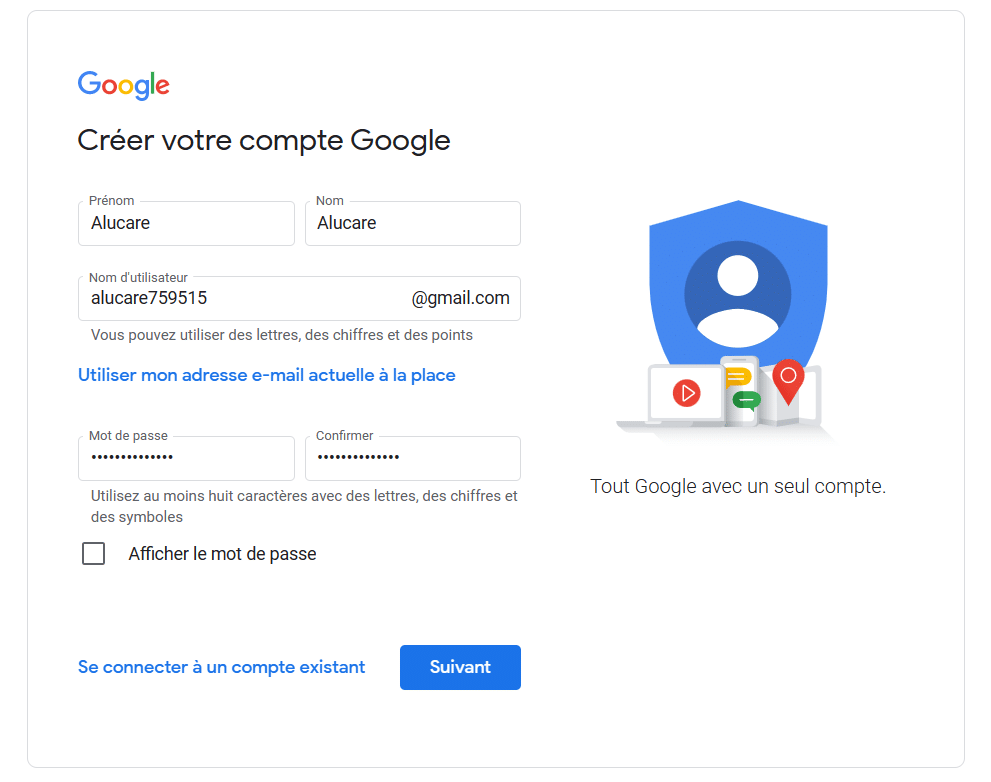
Create a personal Google account for me. ©Emeline for Alucare.fr - Enter your personal information : first name, last name, username for your Gmail address and password. Then click «Next.».
Please fill in your Google account information. ©Emeline for Alucare.fr - Select your phone number To secure your account, then click «Next.».
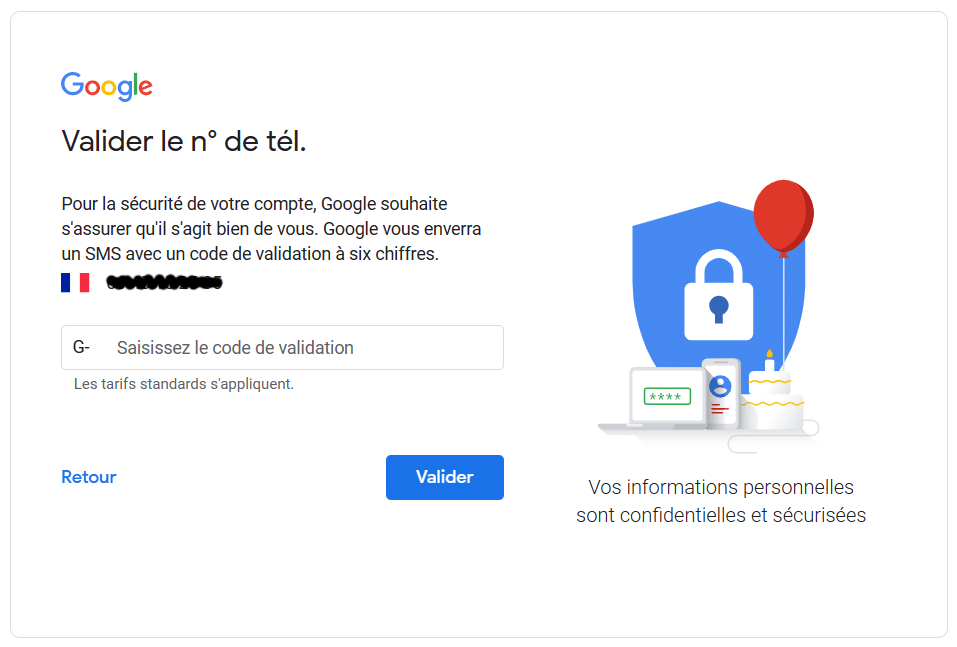
- You receive a SMS verification code. Enter this code and click «Confirm».
Phone number verification code for a Google account. ©Emeline for Alucare.fr - Add some further information : the phone number and the’recovery email address are optional, but your date of birth and your gender are required fields. Click «Next.».
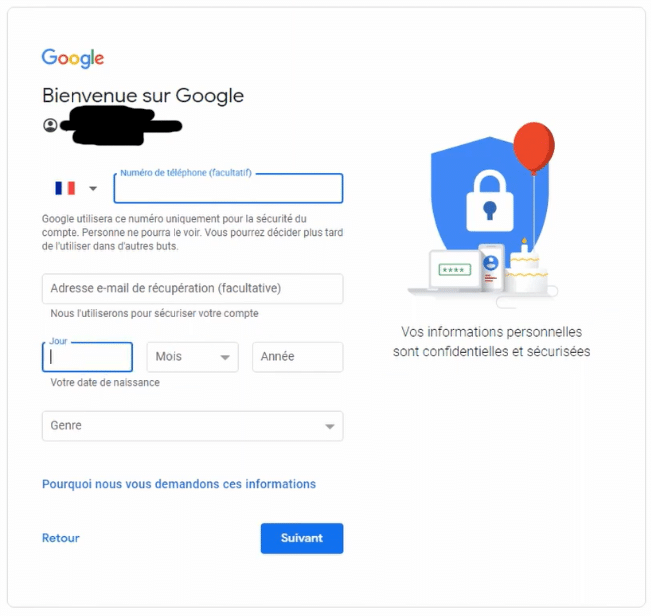
Additional and optional information for creating a Google account. ©Emeline for Alucare.fr - Choose your customization settings. You can change them at any time later. Click «Next.».
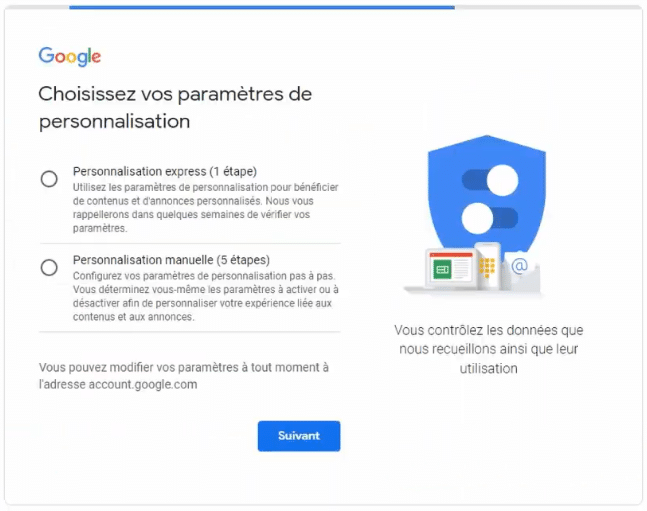
Google Account Customization Settings. ©Emeline for Alucare.fr - Confirm the settings, cookies, privacy policies, and conditions of use.
Your Google account has been created. You can now access all Google services and your inbox Gmail.
Use a different email address to create a Google account
Do you already have an email address (Orange, Outlook, Yahoo, etc.)? You can use it right away to create your Google account, without going through Gmail.
- Visit the website Google and click on "Connection at top right.
Go to the Google sign-in page on a PC. ©Emeline for Alucare.fr - Click on «Create an Account», then select «For me» for a personal account.
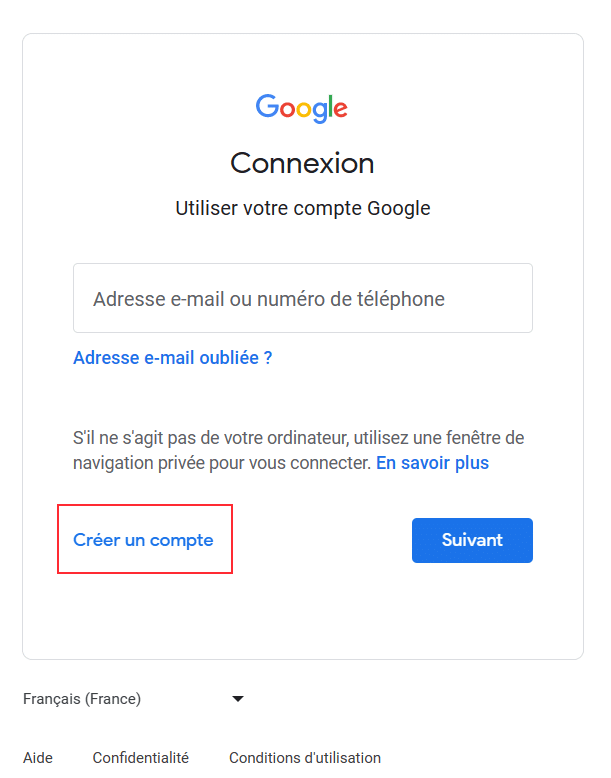
Create a personal Google account using an existing email address. ©Emeline for Alucare.fr - Enter your first name, your name and your password. For the address, click on «Use my current email address instead» and enter your current address. Click «Next.».
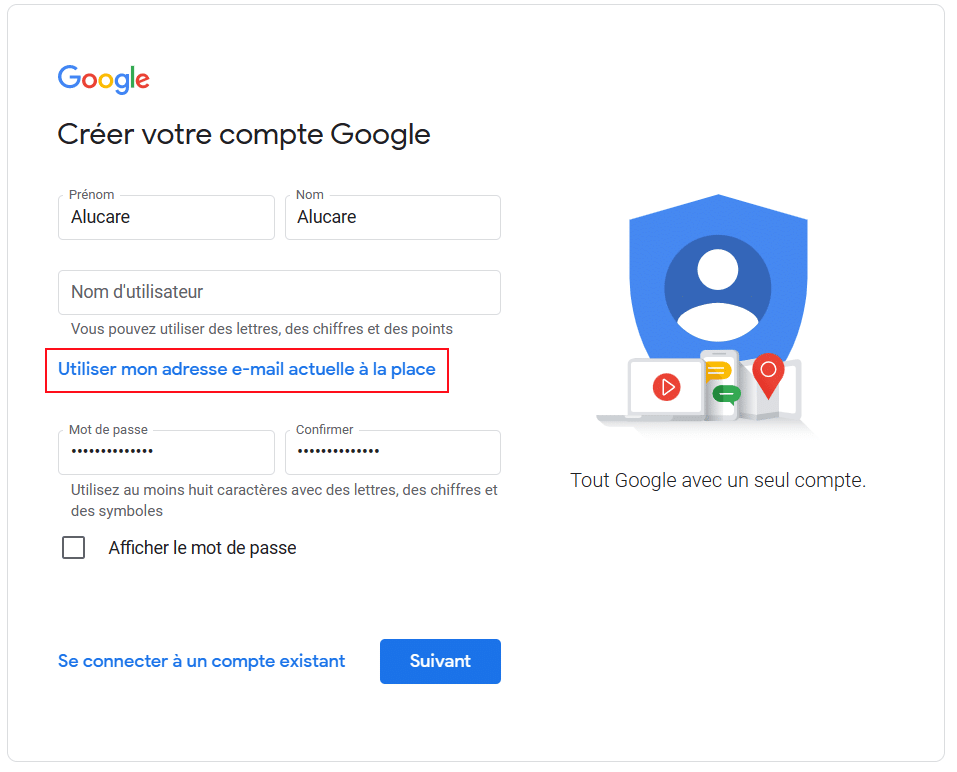
Create a Google account using an existing email address. ©Emeline for Alucare.fr - Open the email inbox for the address you entered to verify your account, then click «Next.».
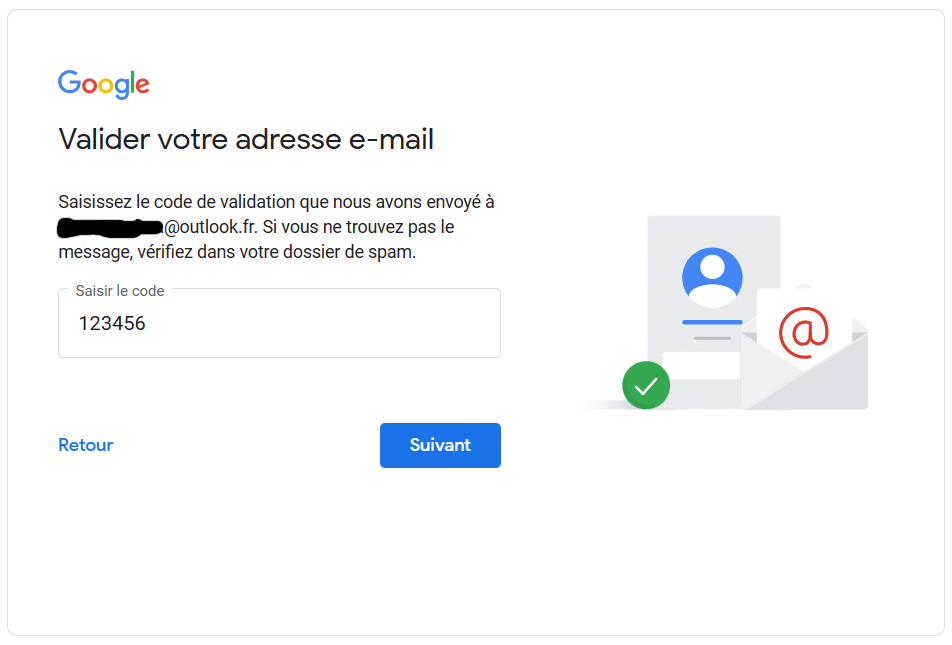
Verify the email address to create a Google account. ©Emeline for Alucare.fr - You receive a email verification code. Enter this code and click «Confirm».
Verification code received via email for the Google account. ©Emeline for Alucare.fr - Fill in the further information : the phone number and the’recovery email address are optional, but your date of birth and your gender are required fields. Click «Next.».
Additional information on creating a Google account with an existing email address ©Emeline for Alucare.fr - Adjust your customization settings (which can be changed at any time) and click «Next.».
Google Account Customization Settings. ©Emeline for Alucare.fr - Confirm the settings, cookies, privacy policies, and conditions of use.
You can now enjoy the Google services (Gmail, Drive, YouTube, Maps…), even with an address from another service.
How do I create a Google account on my cell phone?
On a phone, the steps are the same as on a computer. Only the entry point changes depending on your device.
How do I create a Gmail account on Android?
On android, there are three ways to start creating your Google account:
- Install the app Gmail since Play Store (also known as Google Play), open it, then tap "Add an account.
- Use the app Google already on your phone, and add an account right away.
- From your phone's settings: go to «Settings» > «Account Management» > «Add an Account», then select Google.
Once the form is open, the steps are the same as on a PC. Enter your personal information, you'll need to verify your phone number if Google asks you to Secure Your Account, then you confirm the conditions of use. It only takes a few minutes.
If you'd rather use an existing email address (Yahoo, Orange, or Outlook), click on our tutorial.
How do I create a Gmail account on an iPhone?
On iPhone, you can choose between four methods To start the registration process:
- From the Google : Open it, tap your profile icon, then tap "Add an account.
- From the Gmail : Download it from the’App Store, then select "Add an account.
- From the browser Safari : Go to accounts.google.com and click on «Create an Account».
- From the phone's settings: go to «Settings» > «Passwords and Accounts» > «Add an Account», then select the icon Google.
Once you're on the form, enter your name, your date of birth, your username and your password.
And if you need Unlink a Google account Later on, it's also very simple.









 FR
 RU
 EN
 ES
 IT
 DE
 ZH
 PT
 ID
 JA
 DA
Thanks